[I-09] Changing the Network Transmission Speed or Transfer Mode
You can change the network transmission speed or transfer mode using the following software.
Web browser (Remote UI)
You can change the settings by accessing the printer from your web browser via the network.
FTP Client
You can change the settings by accessing the FTP server of the printer using Command Prompt.
This section describes the procedure for changing the settings using a web browser (Remote UI).
NOTE
About the network transmission speed and transfer mode
Usually, you do not need to change the setting, since the transmission speed and transfer mode of
the network are detected automatically.
If the printer cannot communicate with other devices on the network successfully, set the network
transmission speed or transfer mode manually.
When changing the settings using FTP Client
"FTP Client"
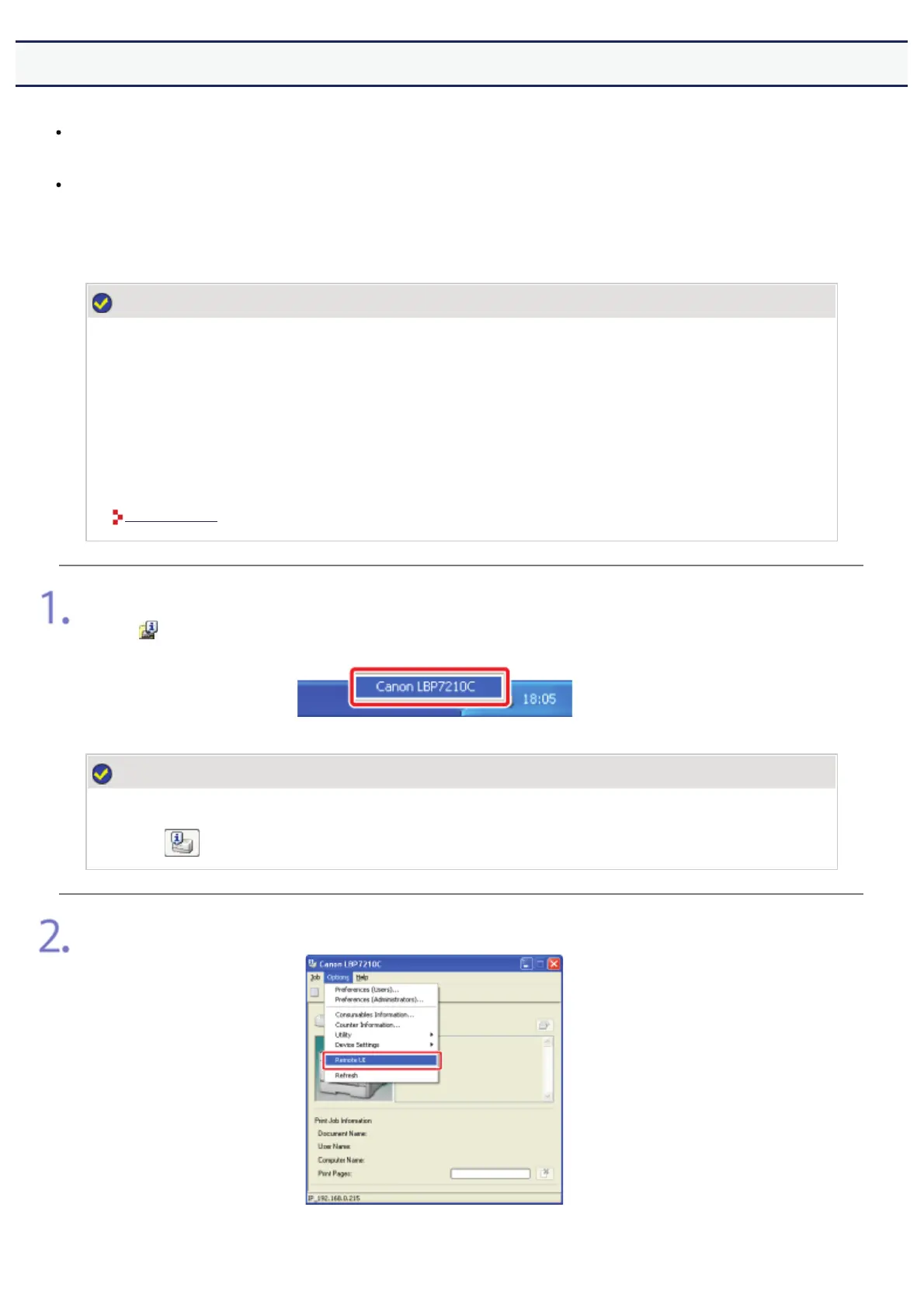
Display the Printer Status Window.
Click [
] in the Windows task tray, and then select the printer name.
NOTE
When displaying the Printer Status Window from the printer driver
Click [
] (Display Printer Status Window) in locations such as in the [Page Setup] sheet.
Select [Remote UI] from the [Options] menu.
ĺ The Remote UI is displayed.
㻡㻤㻣㻌㻛㻌㻣㻜㻡













 To Next Page