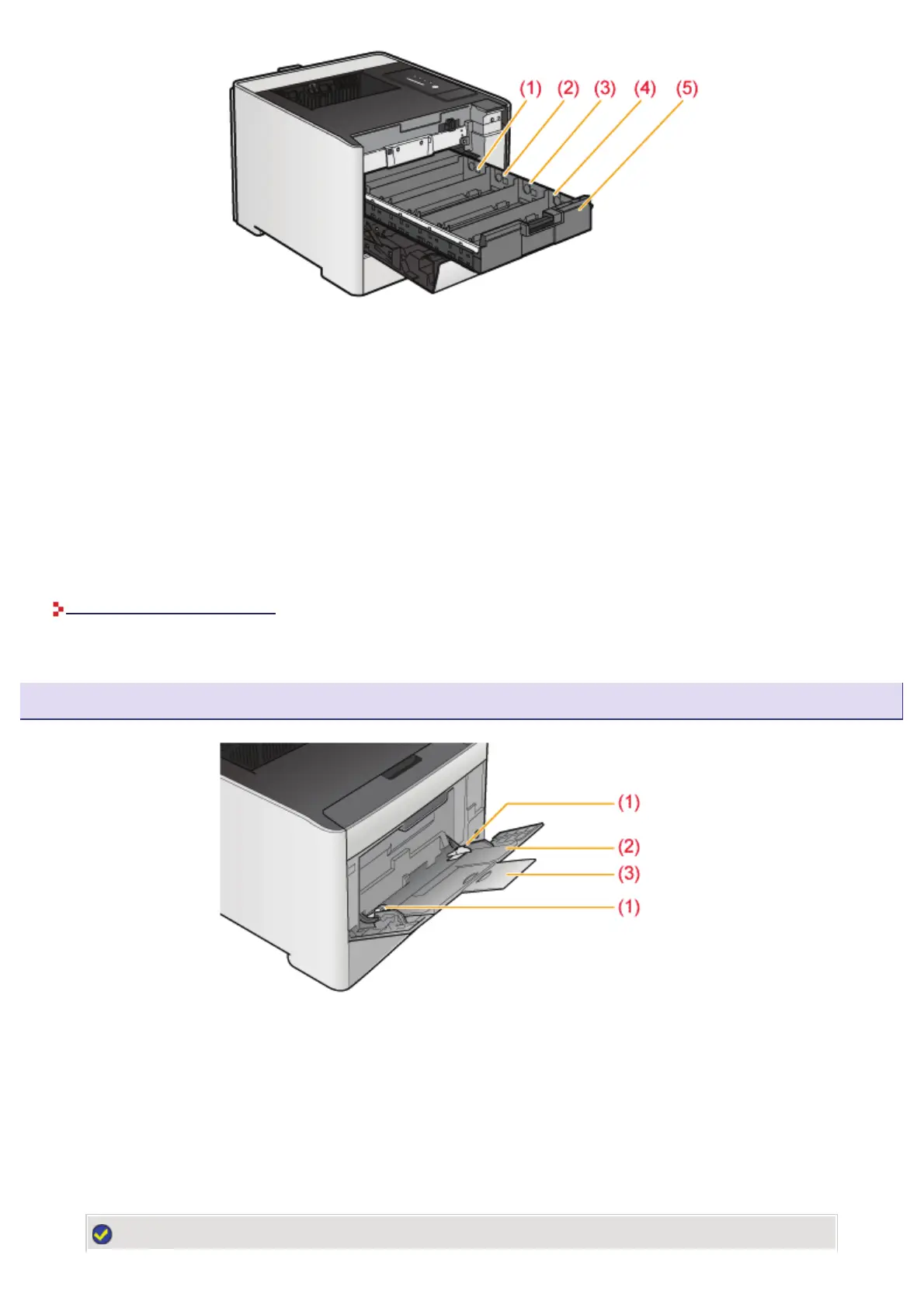
(1) Y (Yellow) Toner Cartridge Slot
The Y (yellow) toner cartridge is installed in this slot.
(2) M (Magenta) Toner Cartridge Slot
The M (magenta) toner cartridge is installed in this slot.
(3) C (Cyan) Toner Cartridge Slot
The C (cyan) toner cartridge is installed in this slot.
(4) K (Black) Toner Cartridge Slot
The K (black) toner cartridge is installed in this slot.
(5) Toner Cartridge Tray
Tray for installing the toner cartridges.
"Replacing Toner Cartridges"
Multi-purpose Tray
(1) Paper Guides
Adjust the guides to match the width of the paper.
(2) Auxiliary Tray
Be sure to pull out this tray when loading paper in the multi-purpose tray.
(3) Tray Extension
Open to prevent the paper from hanging out of the multi-purpose tray when loading long-size paper, such as A4.
NOTE
㻠㻣㻌㻛㻌㻣㻜㻡













 To Next Page