111
*
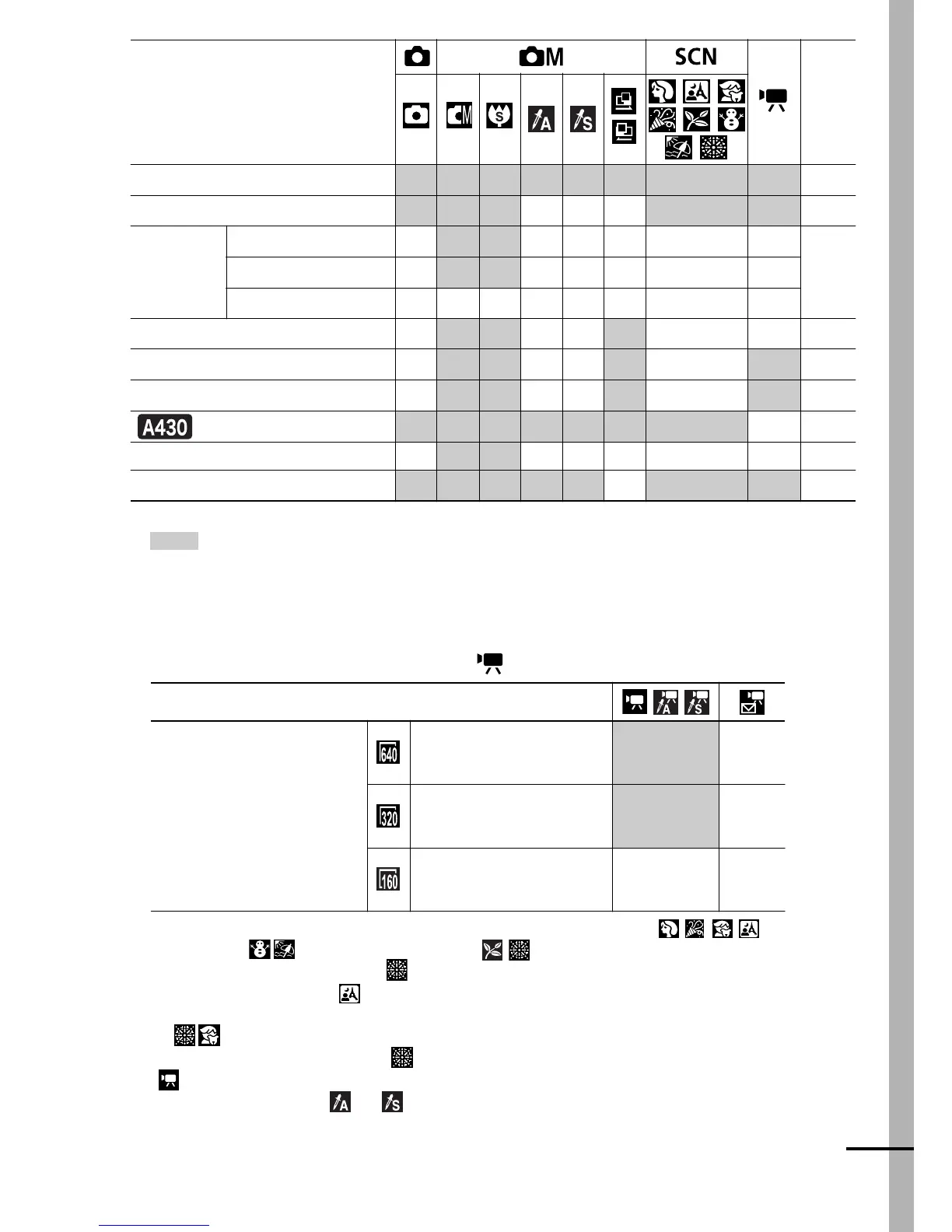
Default setting
o
Setting available
U
Setting can only be selected for the first image.
•
(Shaded Area): Setting is remembered even when the camera power is shut
off.
• With the exception of the [Date/Time], [Language], and [Video System
(PowerShot A430 only)] settings, all the other menu settings and changes made
with the camera buttons can be reset to the default
values in a single operation (p. 28).
(1) The recording pixels/frame rates for the (Movie) mode are as follows.
(2) The default flash setting is Auto with Red-Eye Reduction in the modes,
Auto in the modes, and Off in the modes.
- The flash cannot be set in mode.
-
When the flash fires in mode, the camera will automatically use Slow Synchro mode.
(3) You cannot switch between the Macro/Infinity modes when the camera is in the
modes.
(4)
AF cannot be selected in the modes.
(5)
only is available.
(6)
This cannot be set in or modes.
(7)
This cannot be set when My Colors is set to Sepia or B/W.
(8) Automatically set by the camera.
(9) Default setting is ISO AUTO.
AF-assist Beam
o o o o o
U
o
(4)
o
p. 24
Digital Zoom
o o o
–––
o
o
(5)
p. 32
Metering
Method
Evaluative
–
o* o*
––– – –
p. 47
Center-Weighted Average
– o o ––
–– –
Spot
– oo ––– – –
Exposure Compensation
–
o o
––
U
o
–
p. 48
White Balance
(7)
–
o o
––
U
–
(8)
o
(6)
p. 49
My Colors
–
o o
––
o
– o
(6)
p. 51
Auto Rotate
o o o o o o o –
p. 54
ISO Speed
–
(8)
o
(9)
o
(9)
–
(8)
–
(8)
–
(8)
–
(8)
–
(8)
p. 53
Grid Lines
o o o o o
–
o o
p. 24
Recording Pixels
/
Frame Rate
640 × 480 pixels/
10 frames/sec.
o*
–
320 × 240 pixels/
30 frames/sec.
o –
160 × 120 pixels/
15 frames/sec.
–
o
Function
Page















 To Next Page