16
Macintosh
If you have selected Register Later from the splash screen
and would like to register for CANON iMAGE GATEWAY,
please follow the instructions below.
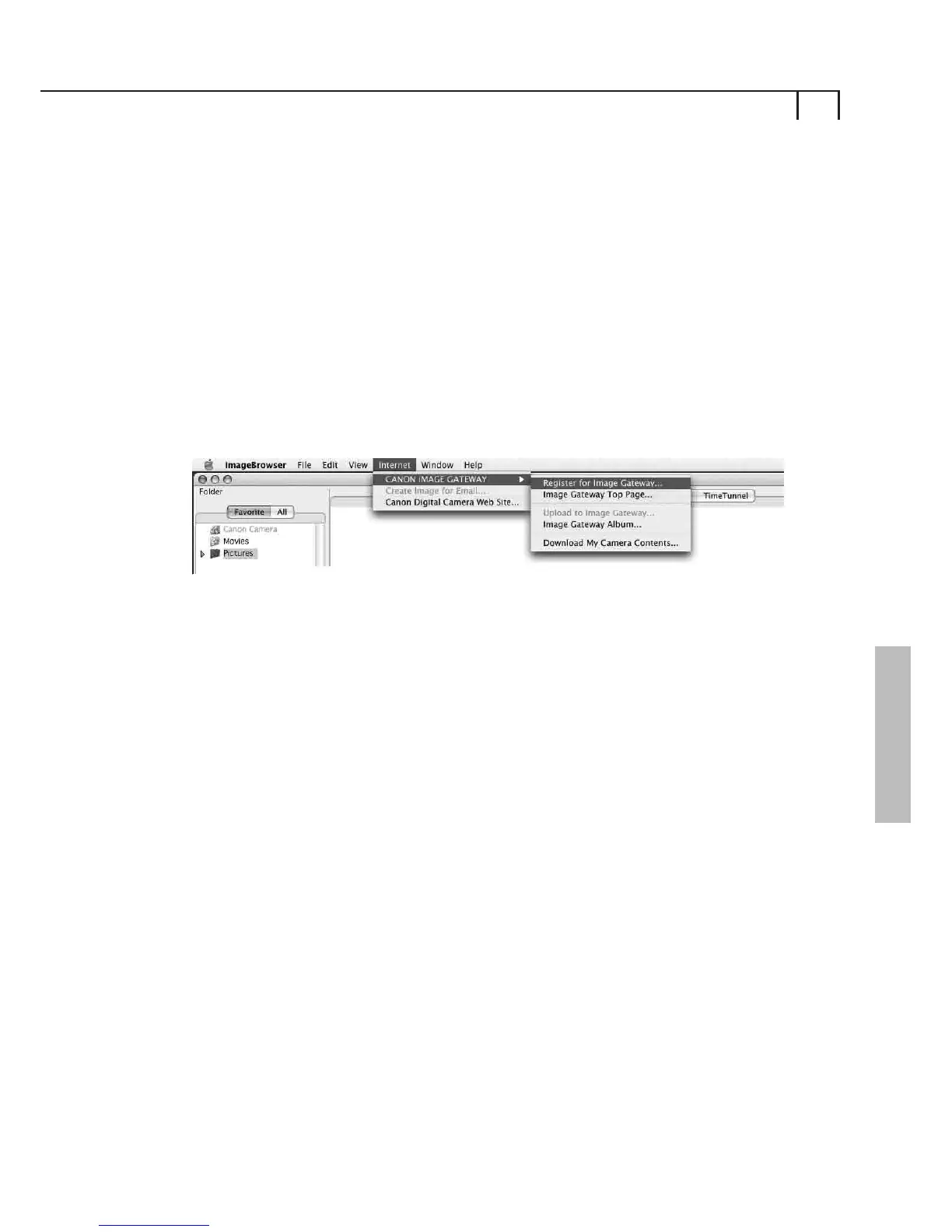
You can register via the CANON iMAGE GATEWAY menu
contained in the ImageBrowser Internet toolbar menu.
Registering for CANON iMAGE
GATEWAY from ImageBrowser
ImageBrowser Toolbar Menu
1
Click on Register for Image Gateway from the Internet
toolbar menu.
Once you click on Register, a web page will open and it will
start an Internet session so that you can complete online
registration for accessing CANON iMAGE GATEWAY.
You will then need to click on the Registration button in
CANON iMAGE GATEWAY and follow the instructions given
to register. You will need to provide a valid email address for
registration. Upon successful registration, a username and
password will be sent to your email address.
Once you are registered, you can use the Internet toolbar
menu to access the CANON iMAGE GATEWAY site and
services from ImageBrowser.
Please Note: You can register multiple products on your
account, but only one account per email address is possible.















 To Next Page