Preparation When Usingthe Printer
Preparation
When
Using
the
Printer
Turning
On/Off
the
Printer
This section describes the method
to
turn
on/off
the printer.
•
Turning
On
the
Printer
Follow the procedure below
to
turn
on
the printer.
1 Plug the Power
Cord
into the back
of
the printer and connect the other
end
to
a power outlet.
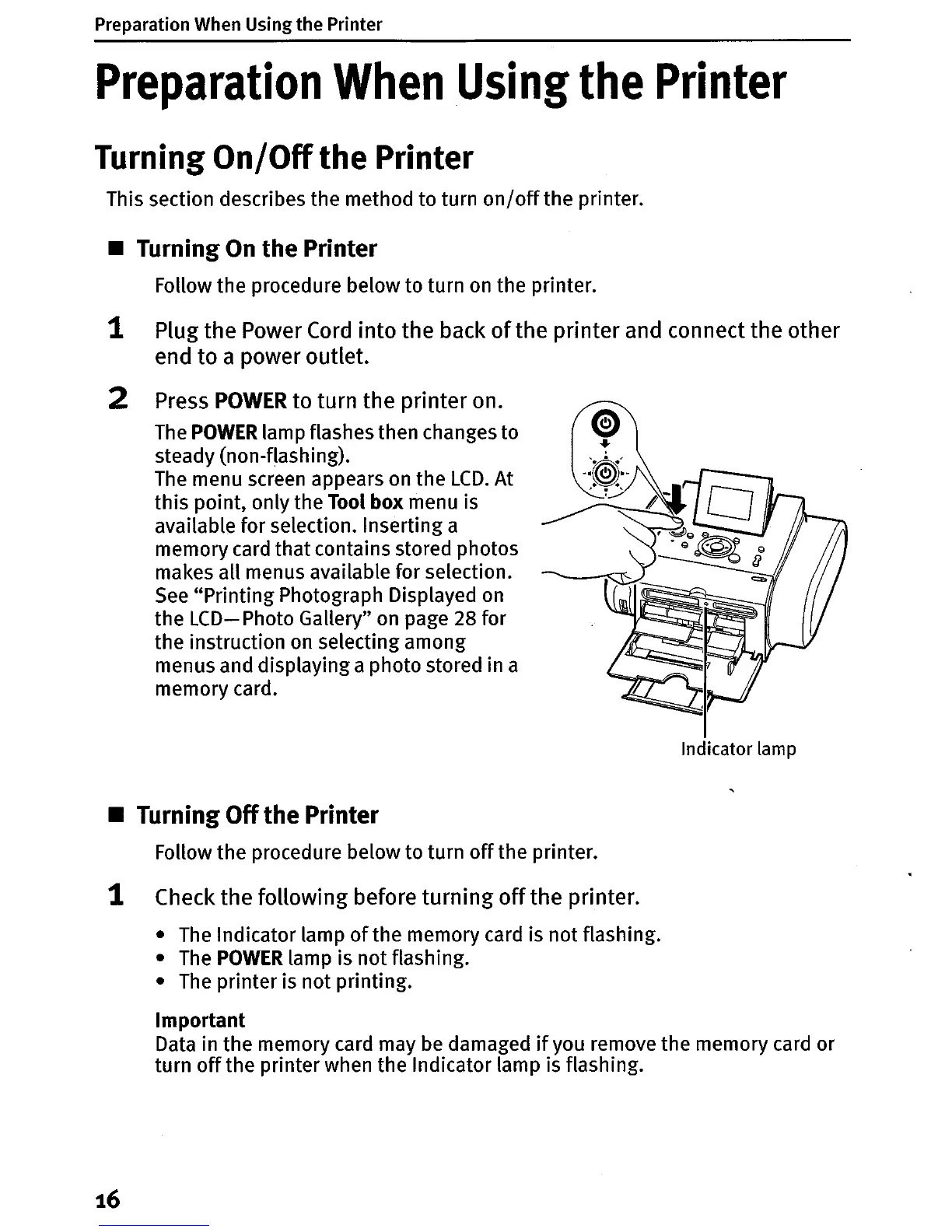
2 Press
POWER
to turn the printer on.
The
POWER
lamp flashes then changes to
steady (non-flashing).
The
menu screen appears on the
LCD.
At
this point, only the
Tool
box
menu is
available for selection. Inserting a
memory card
that
contains stored photos
makes all menus available for selection.
See
"Printing Photograph Displayed
on
the
LCD-
Photo Gallery"
on
page 28 for
the instruction
on
selecting among
menus and displaying a photo stored in a
memory card.
Indicator lamp
•
Turning
Off
the
Printer
Follow the procedure below to turn
off
the printer.
1 Check the following before turning
off
the printer.
•
The
Indicator lamp
of
the memory card is not flashing.
•
The
POWER
lamp is not flashing.
•
The
printer is not printing.
Important
Data in the memory card may be damaged
if
you remove the memory card or
turn
off
the printer when the Indicator lamp is flashing.
16












 To Next Page