Printing Maintenance
Printing
Maintenance
When
Printing
Becomes
Faint
or
Colors
are
Incorrect
When
printing
becomes faint or colors are incorrect, even
if
ink
remains in the Ink
Tanks, the Print
Head
Nozzles are probably clogged. Follow the procedures below to
clean the nozzles.
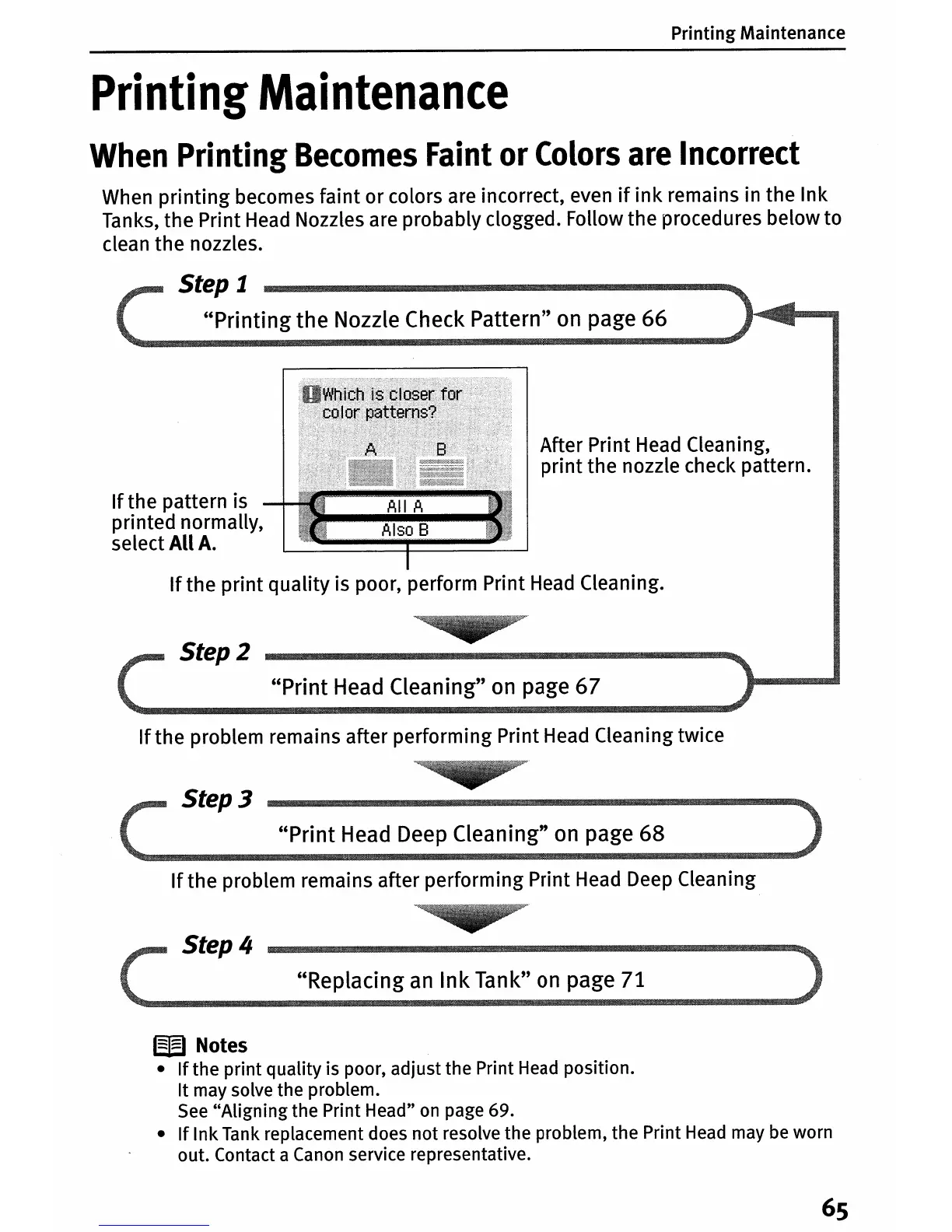
Step
1
"Printing
the Nozzle Check Pattern" on page 66
If
the pattern is
printed normally,
select
All
A.
After Print
Head
Cleaning,
print the nozzle check pattern.
If
the print quality is poor, perform Print
Head
Cleaning.
Step 2
"Print Head Cleaning"
on
page 67
If
the problem remains after performing Print
Head
Cleaning twice
Step 3
"Print
Head Deep Cleaning" on page 68
If
the problem remains after performing Print
Head
Deep
Cleaning
Step 4
"Replacing
an
Ink Tank"
on
page 71
W
Notes
•
If
the print quality is poor, adjust the Print Head position.
It
may solve the problem.
See "Aligning the Print Head"
on
page 69.
•
If
Ink Tank replacement does not resolve the problem, the Print Head may be worn
out. Contact a Canon service representative.
65















 To Next Page