Troubleshooting
Cannot
See
the
Display
Properly
on
the
LCD/Cannot
See
the
Display
on
the
LCD
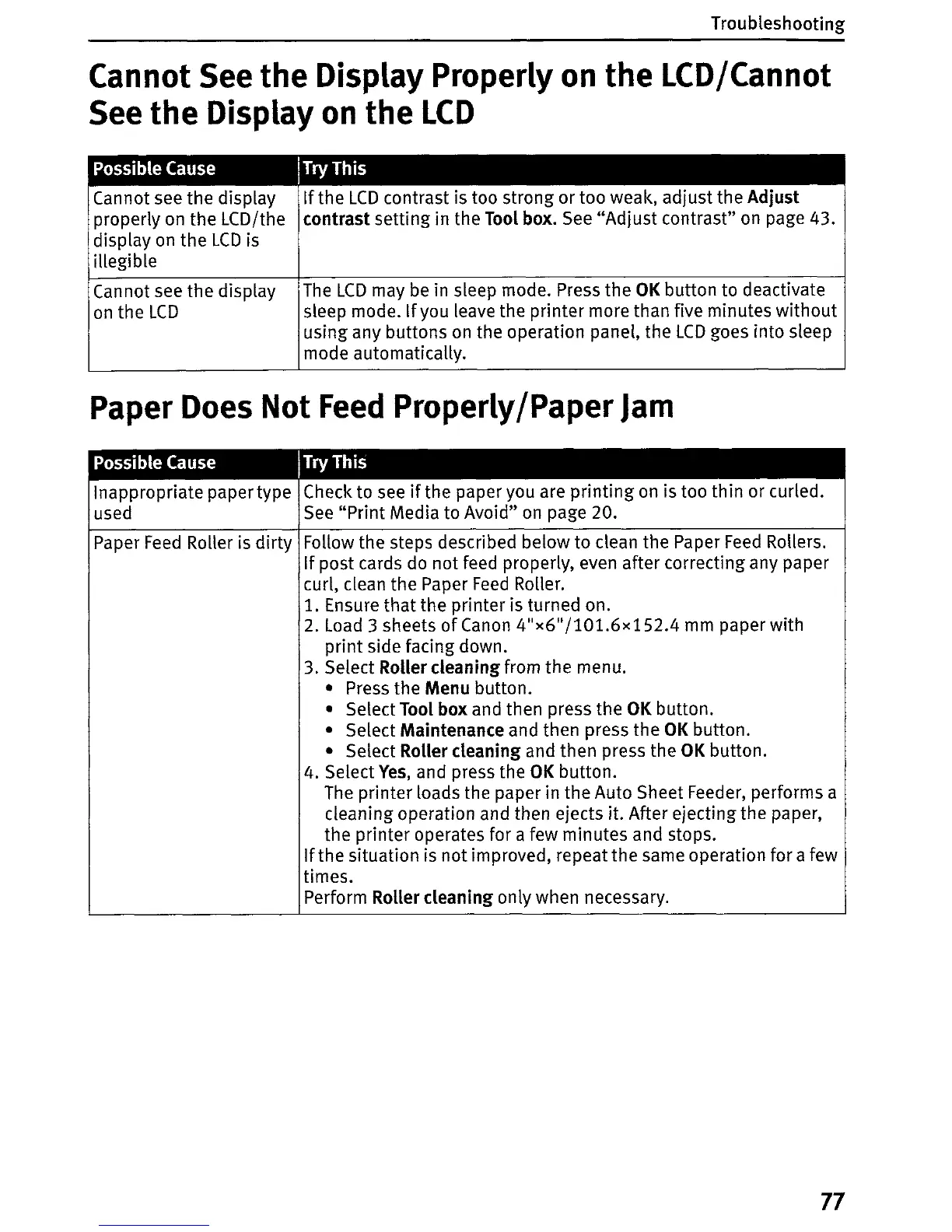
Possible Cause ITry This
Cannot see the display
properly on the LCD/the
display
on
the
LCD
is
illegible
Cannot see the display
on
the
LCD
If
the
LCD
contrast is too strong or too weak, adjust the Adjust
contrast setting in the
Toot
box.
See
"Adjust
contrast"
on
page 43.
The
LCD
may
be
in sleep mode. Press the
OK
button to deactivate
sleep mode. Ifyou leave the printer more than five minutes
without
using any buttons
on
the operation panel, the
LCD
goes into sleep
mode automatically.
Paper
Does
Not
Feed
Properly/Paper
Jam
Possible Cause ITry This
Inappropriate paper type Check to
see
if
the paper you are
printing
on
is too thin or curled.
used
See
"Print Media
to
Avoid"
on
page 20.
Paper
Feed
Roller
is
dirty Follow the steps described below
to
clean the Paper
Feed
Rollers.
If post cards do not feed properly, even after correcting any paper
curl, clean the Paper
Feed
RoHer.
1.
Ensure
that
the printer is turned on.
2.
Load
3 sheets
of
Canon
4"x6
11
/101.6x
152.4
mm
paper with
print
side facing down.
3. Select
RoUer
cleaning from the menu.
• Press the Menu button.
• Select Tool box and then press the
OK
button.
• Select Maintenance and then press the
OK
button.
• Select Roller cleaning and then press the
OK
button.
4. Select
Yes,
and press the
OK
button.
The
printer loads the paper in the Auto Sheet Feeder, performs a
cleaning operation and then ejects
it. After ejecting the paper,
the printer operates for a few minutes and stops.
If
the situation
is
not improved, repeat the same operation for a few
times.
Perform
RoUer
cleaning only when necessary.
77















 To Next Page