EasyManua.ls Logo

Canon SELPHY DS810 - Replacing an Ink Tank

Canon SELPHY DS810
108 pages
Print Icon
To Next Page IconTo Next Page
To Previous Page IconTo Previous Page
Loading...
Printing
Maintenance
Replacing
an
Ink
Tank
When replacing
an
Ink Tank, check
the
model
number
very carefully.
The
printer
will
not
print
properly
if
the
wrong Ink Tank is used.
Ink
Tank:
ll~
BCI-16 Color
Replacing
an
Ink
Tank
When
an
Ink Tank runs
out
of
ink, replace
it
using
the
following
steps.
1 Ensure
that
the
printer
is on.
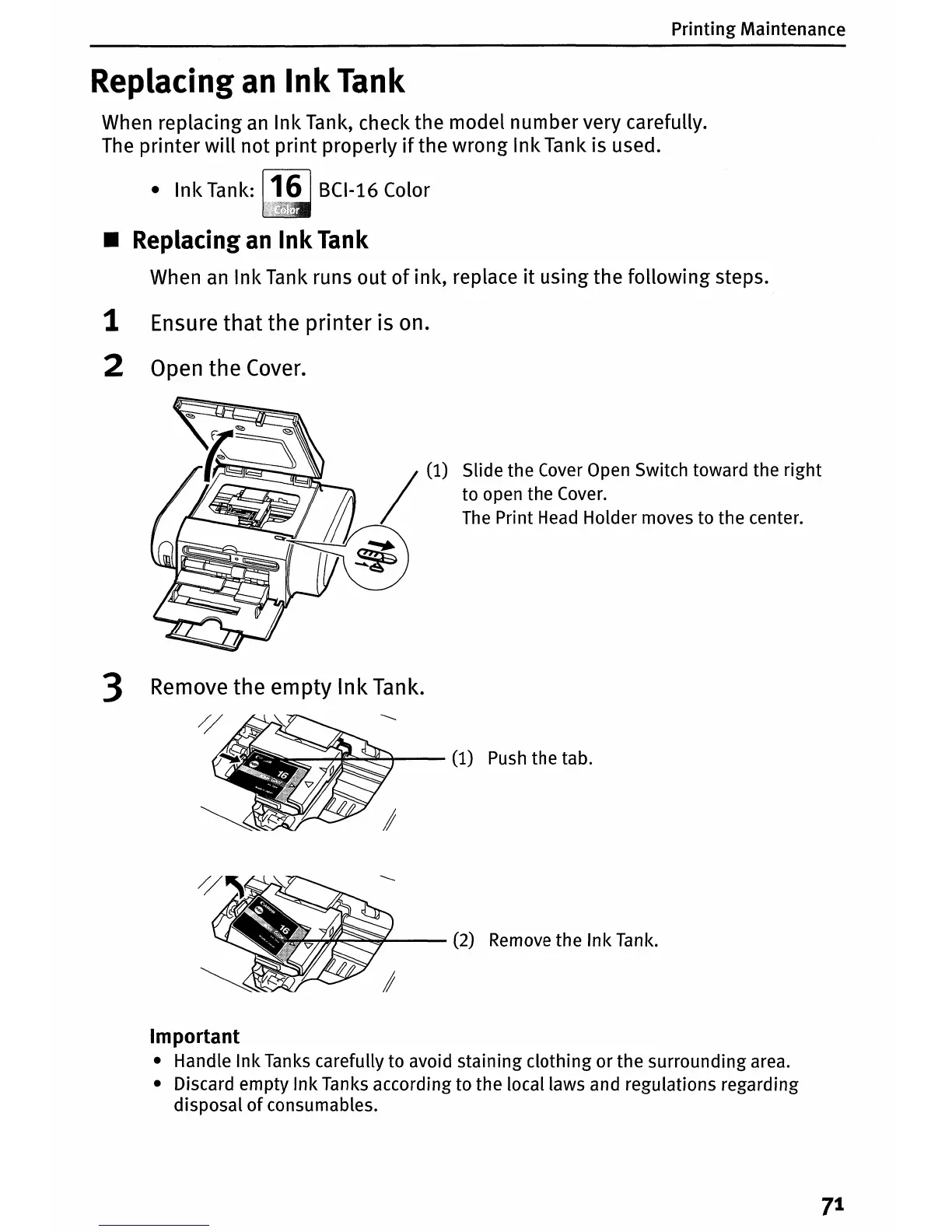
2 Open
the
Cover.
Slide
the
Cover Open Switch toward
the
right
to
open
the
Cover.
The Print Head Holder moves
to
the
center.
3 Remove the empty
Ink
Tank.
//
~
-~~'-+---
(1) Push
the
tab.
~~~~--
(2) Remove
the
Ink
Tank.
Important
Handle
Ink
Tanks carefully
to
avoid
staining
clothing
or
the
surrounding
area.
Discard
empty
Ink
Tanks according
to
the
local laws and regulations regarding
disposal
of
consumables.
7
1

Table of Contents

Other manuals for Canon SELPHY DS810

Related product manuals