Printing
from
the
Memory
Card
Other Useful Functions
You
can
print
your favorite photo
as
a postcard or sticker using the following
features.
• "Searching for Photos with the Shooting
Date-Search"
on
page 32
• "Printing a Specified
Area-Trimming"
on
page 34
• "Printing Multiple Photos
on
One
Sheet
of
Media-Layout
Print"
on
page 35
•
"Printing
Stickers from a
Photo-Sticker
Print"
on
page 37
•
"Printing
with Adjusted Color Balance-Color Balance"
on
page 38
• "Other Print Functions"
on
page
41
• Searching for Photos
with
the Shooting Date-Search
When
there
are
many photos stored
on
the memory card, you
can
select photos to
display or print
by
specifying the shooting date with the
search
function.
W Notes
• You can use
the
search function
to
specify a date
or
date range from
the
Photo
gallery,
Photo
print,
Layout
print,
Sticker
print
or
Color balance menus
to
display
or
print
only
photos
that
match
the
dates you set.
•
If
you have specified
the
number
of
copies
to
print
for
photos
or
pasted
photos
to
specify
the
layout before
using
the
search
function,
the
photos
will
be
printed
even
if
they
are excluded by
the
search.
•
You
can use
the
Print
all
photos
and Photo
Index
print
menus
to
print
photos
from
the
date
or
date range you set.
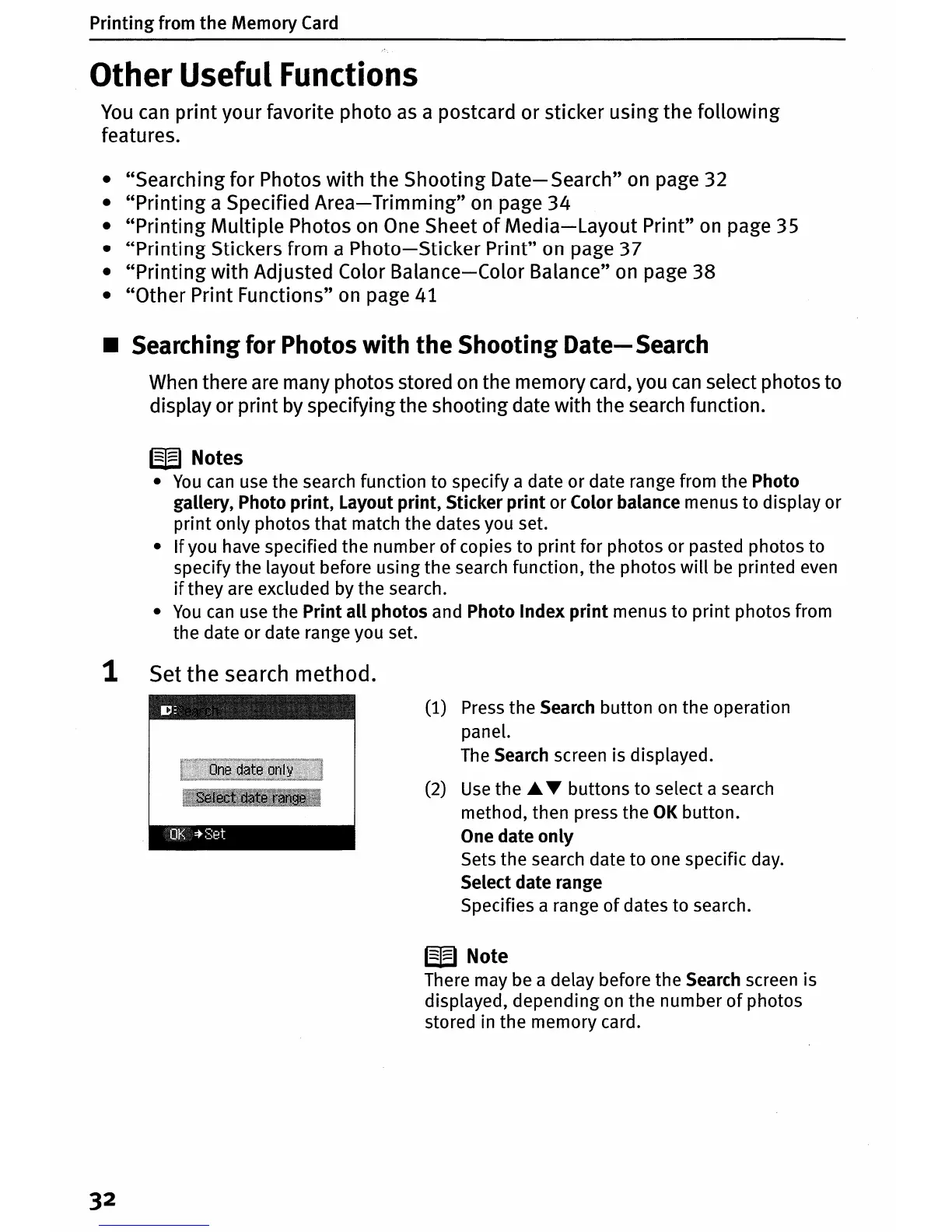
1 Set
the
search method.
nutt:
:tSet
32
(1) Press
the
Search
button
on
the
operation
panel.
The Search screen is displayed.
(2)
Use
the'"
T
buttons
to
select a search
method,
then
press
the
OK
button.
One
date
only
Sets
the
search date
to
one specific day.
Select
date
range
Specifies a range
of
dates
to
search.
W Note
There may be a delay before
the
Search screen is
displayed,
depending
on
the
number
of
photos
stored in
the
memory
card.












 To Next Page