EasyManua.ls Logo

Canon SELPHY DS810 - Page 35

Canon SELPHY DS810
108 pages
Print Icon
To Next Page IconTo Next Page
To Previous Page IconTo Previous Page
Loading...
Printing
from
the
Memory
Card
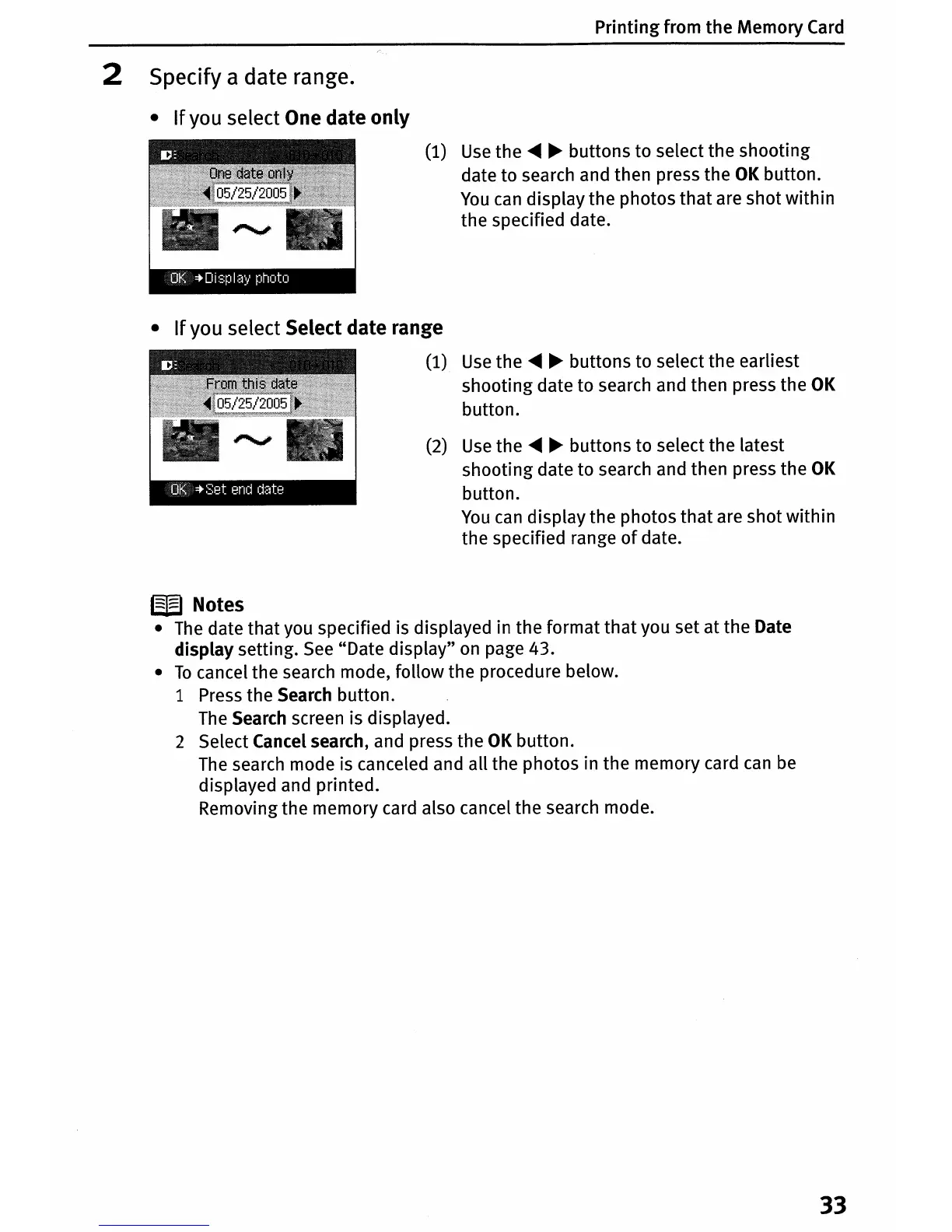
2 Specify a date range.
•
If
you select One date
only
(1) Use
the
~
~
buttons
to
select
the
shooting
date
to
search and
then
press
the
OK
button.
You
can
display
the
photos
that
are
shot
within
the
specified date.
•
If
you select Select date range
(1) Use
the
~
~
buttons
to
select
the
earliest
shooting
date
to
search and then press
the
OK
button.
(2) Use
the
~ ~
buttons
to
select
the
latest
shooting
date
to
search and then press
the
OK
button.
You
can
display
the
photos
that
are
shot
within
the
specified range
of
date.
W Notes
• The date
that
you specified is displayed in
the
format
that
you
set
at
the
Date
display
setting. See
"Date
display"
on page 43.
•
To
cancel
the
search mode,
follow
the
procedure below.
1 Press
the
Search
button.
The Search screen is displayed.
2 Select Cancel search, and press
the
OK
button.
The search mode is canceled and
all
the
photos
in
the
memory
card can be
displayed and
printed.
Removing
the
memory
card also cancel
the
search mode.
33

Table of Contents