Printing Maintenance
•
Printing
the Nozzle Check Pattern
Print the nozzle check pattern to determine whether the
ink
ejects properly
from the Print
Head
Nozzles.
Use
this function when printed results are
blurred or the color is incorrect.
1 Prepare to print.
(1)
Turn
on
the printer.
See
"Turning
On
the Printer"
on
page
16.
(2)
Load
the supplied paper or
Canon
4
1
x6"j
101.6x152.4mm
paper into the Paper
Support.
See
"Loading Paper"
on
page 20.
2 Print the Nozzle Check Pattern.
(1) Press the Menu button.
(2)
Use
the
<lllIII
~
buttons to select Tool box and then press the
OK
button.
(3)
Use
the
<lllIII
~
buttons to select Maintenance and then press the
OK
button.
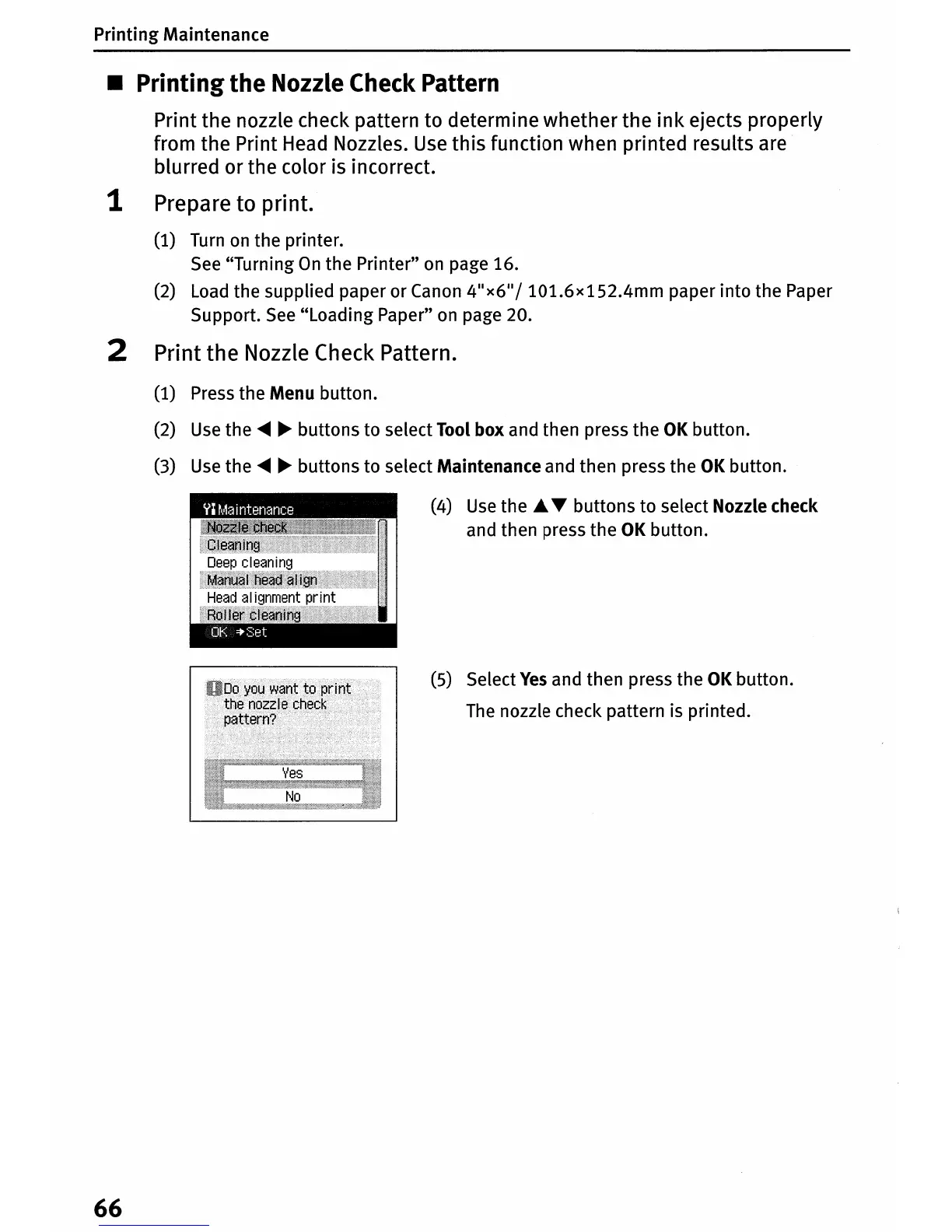
(4)
Use
the
£.
...
buttons to select Nozzle check
and then press the
OK
button.
(5) Select
Yes
and then press the
OK
button.
The
nozzle check pattern is printed.
66












 To Next Page