Easy
Setup Instructions
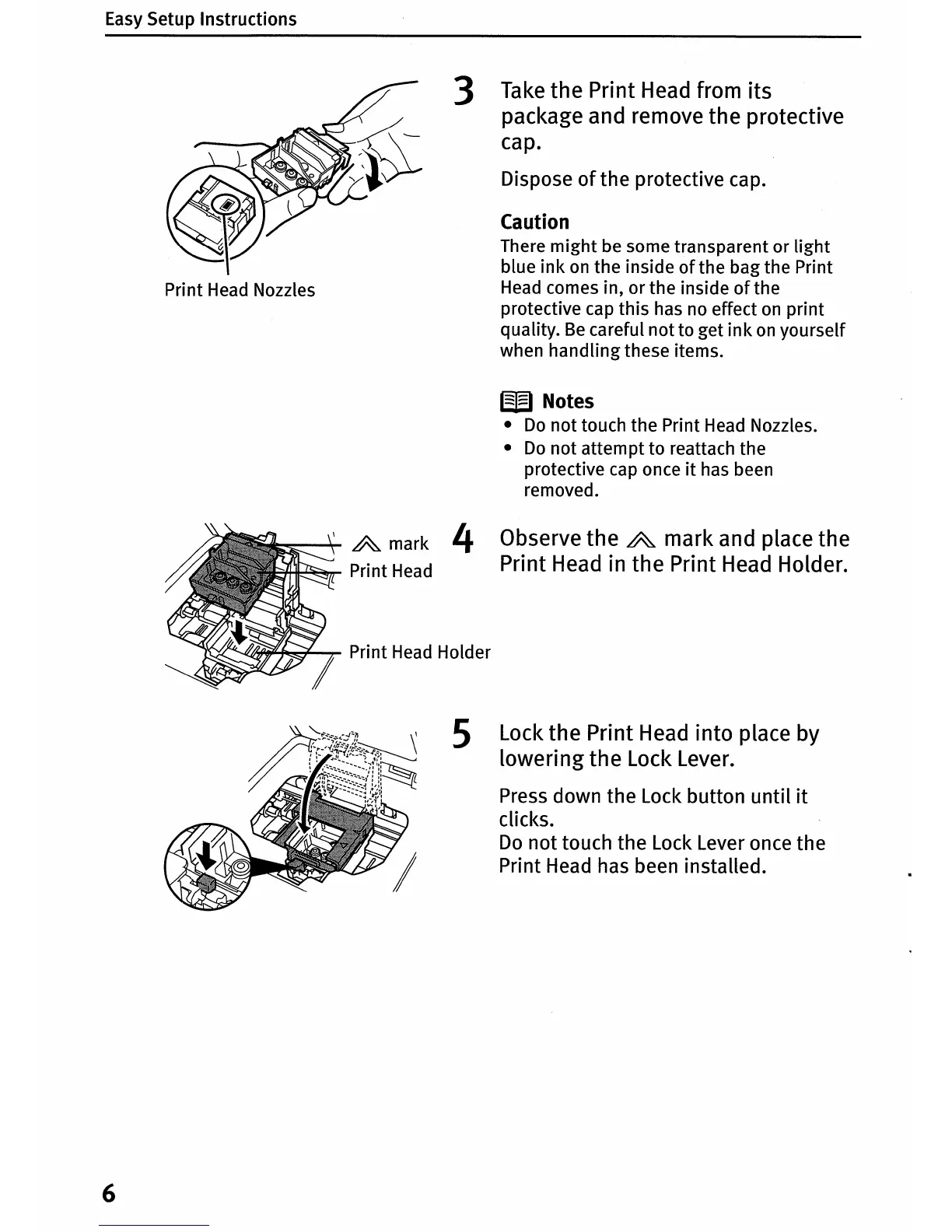
3
Take
the Print Head from its
package and remove the protective
cap.
Dispose
of
the protective cap.
Caution
There might
be
some transparent or
light
blue
ink
on
the inside
of
the bag the Print
Print
Head
Nozzles
Head
comes in, or the inside
of
the
protective cap this has no effect
on
print
quality.
Be
careful notto get
ink
on
yourself
when handling these items.
W
Notes
•
Do
not touch the Print
Head
Nozzles.
•
Do
not attempt to reattach the
protective
cap
once
it
has been
removed.
~-
....
A mark 4
~~-
Print
Head
I Print Head Holder
Observe
the
A mark and place the
Print Head in the Print Head Holder.
5 Lock the Print Head into place by
lowering the Lock Lever.
Press down the Lock button until
it
clicks.
Do
not touch the Lock Lever once the
Print
Head
has been installed.
6















 To Next Page