Troubleshooting
Possible
Cause
I
Try
This
Curled paper used
If
all four corners or the printing surface
of
the paper is curled, the
paper may become dirty or the paper may not feed properly.
Use
the paper after correcting paper curl
as
follows.
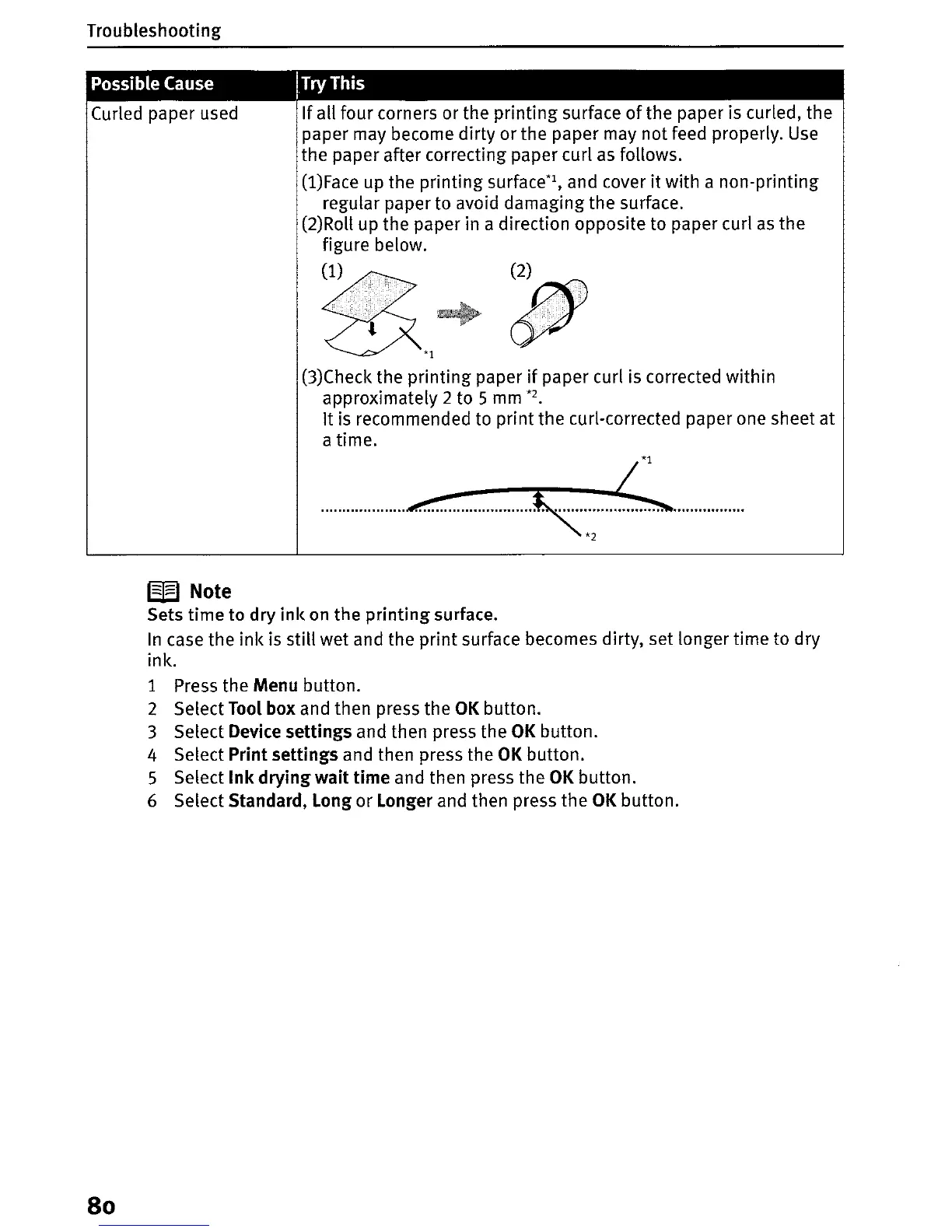
(l)Face up the printing surface*1, and cover
it
with a non-printing
regular paper to avoid damaging the surface.
(2)Roll up the paper in a direction opposite to paper curl
as
the
figure below.
~
,
CX*l
(3)Check the printing paper
if
paper curl is corrected within
approximately 2 to
S
mm
*2.
It is recommended to print the curl-corrected paper
one
sheet at
atime.
W Note
Sets time to dry
ink
on the
printing
surface.
In
case the ink is still wet and the print surface becomes dirty, set longer time to dry
ink.
1 Press the
Menu
button.
2 Select
Tool
box
and then press the
OK
button.
3 Select
Device
settings and then press the
OK
button.
4 Select
Print
settings and then press the
OK
button.
S Select Ink drying wait time and then press the
OK
button.
6 Select
Standard,
Long
or
Longer
and then press the
OK
button.
80


 To Next Page
 Loading...












