Appendix
Camera
Direct
Print
•
Canon
Bubble
Jet
Direct
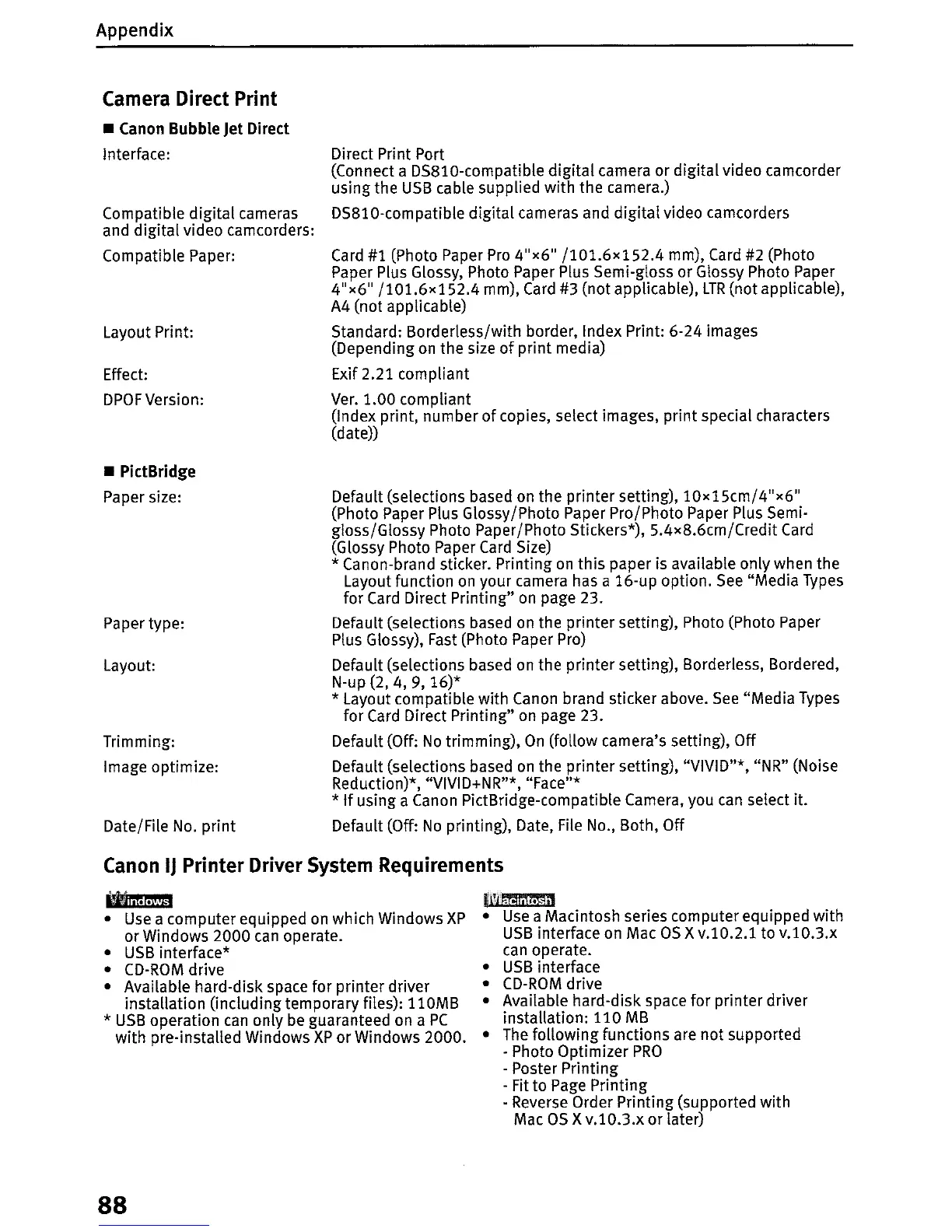
Interface:
Compatible
digital
cameras
and digital video camcorders:
Compatible Paper:
Layout Print:
Effect:
DPOF
Version:
•
PictBridge
Paper size:
Paper type:
Layout:
Trimming:
Image optimize:
Date/File
No.
print
Direct Print Port
(Connect a DS810-compatible
digital
camera or digital video camcorder
using the
USB
cable supplied with the camera.)
DS810-compatible digital cameras and
digital
video camcorders
Card
#1 (Photo Paper
Pro
4"x6"
/101.6x152.4
mm),
Card
#2 (Photo
Paper Plus Glossy, Photo Paper Plus Semi-gloss or Glossy Photo Paper
4"x6"
/101.6x152.4
mm),
Card
#3 (not applicable),
LTR
(not applicable),
A4 (not applicable)
Standard: Borderless/with border, Index Print: 6-24 images
(Depending
on
the size
of
print media)
Exif 2.21 compliant
Ver.
1.00 compliant
(Index print, number
of
copies, select images, print special characters
(date))
Default (selections based on the printer setting),
10
x
15cm/4"x6"
(Photo Paper Plus Glossy/Photo Paper Pro/Photo Paper Plus Semi-
gloss/Glossy Photo Paper/Photo Stickers*), 5.4
x
8.6cm/Credit
Card
(Glossy Photo Paper
Card
Size)
* Canon-brand sticker. Printing
on
this
paper is available only when the
Layout function
on
your camera has a 16-up option.
See
"Media
Types
for
Card
Direct Printing" on page 23.
Default (selections based on the printer setting), Photo (Photo Paper
Plus Glossy),
Fast
(Photo Paper Pro)
Default (selections based on the printer setting), Borderless, Bordered,
N-up (2, 4, 9,
16)*
* Layout compatible with Canon brand sticker above.
See
"Media Types
for
Card
Direct Printing"
on
page 23.
Default (Off:
No
trimming),
On
(follow camera's setting), Off
Default (selections based
on
the printer setting), "VIVID"*, "NR" (Noise
Reduction)*, "VIVID+NR"*, "Face"*
*
If
using a Canon PictBridge-compatible Camera, you
can
select it.
Default (Off:
No
printing), Date, File No., Both, Off
Canon
IJ
Printer
Driver
System
Requirements
•
Use
a computer equipped on which Windows
XP
or Windows 2000
can
operate.
•
USB
interface*
•
CD-ROM
drive
• Available hard-disk space for printer driver
installation (including temporary files): 110MB
*
USB
operation
can
only
be
guaranteed on a
PC
with pre-installed Windows
XP
or
Windows 2000.
88
I'!!ii~
•
Use
a Macintosh series computer equipped with
USB
interface
on
Mac
OS
X
v.l0.2.1
to
v.I0.3.x
can
operate.
•
USB
interface
•
CD-ROM
drive
• Available hard-disk space for printer driver
installation: 110
MB
•
The
following functions are not supported
. Photo Optimizer
PRO
- Poster Printing
- Fit to
Page
Printing
- Reverse Order Printing (supported with
Mac
as X
v.l0.3.x
or later)


 To Next Page
 Loading...












