Customer Service: 888-269-7477 USING THE ANSWERING MACHINE • 59
Clearing All Messages
In addition to erasing messages one at a time as you play them, you can also
erase all your saved Answering Machine messages at one time.
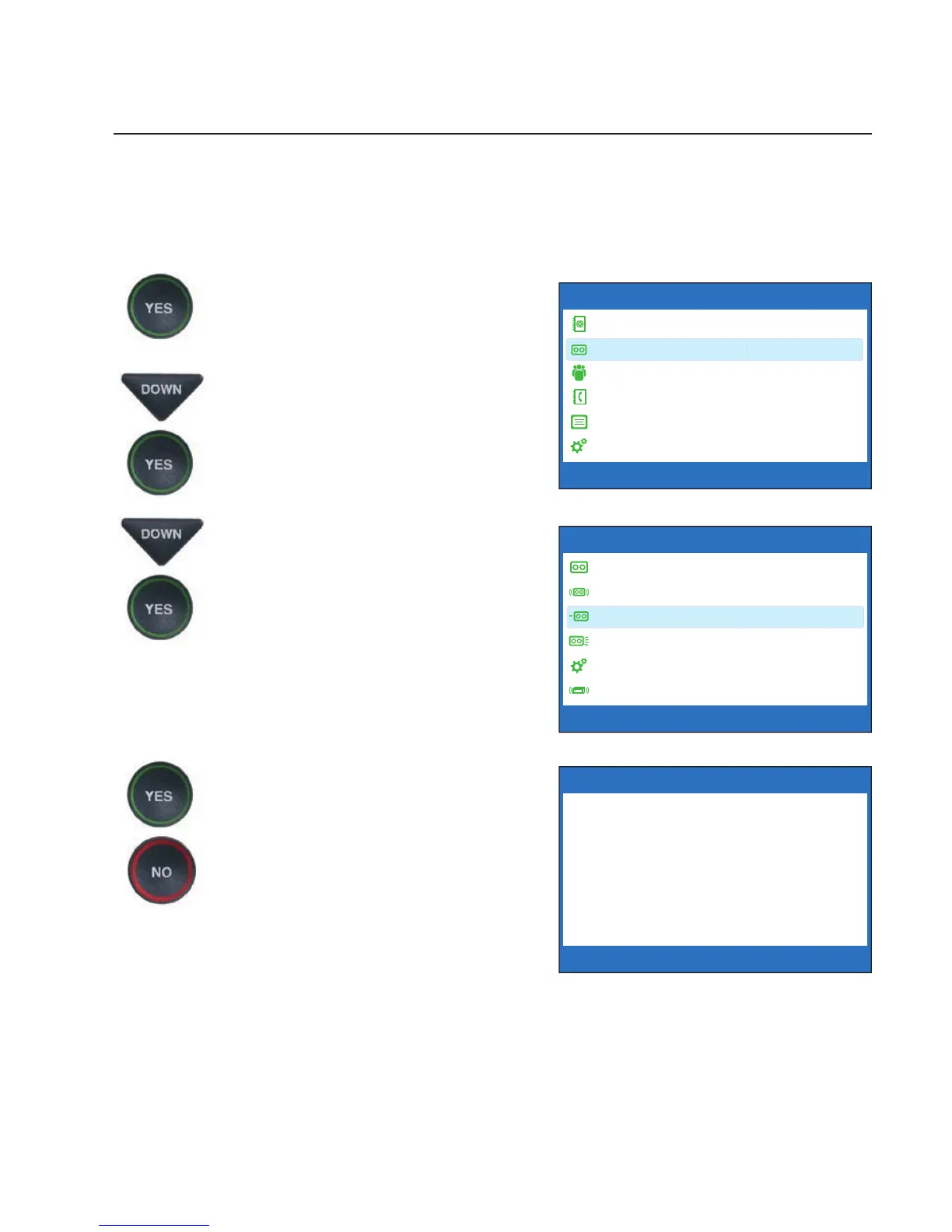
To clear all your Answering Machine messages:
1. With the handset hung up,
press the YES button to see the
Options menu.
2. Press the DOWN arrow button
until Answering Machine is
highlighted. Press the YES
button to select.
3. Press the DOWN arrow button
repeatedly to highlight Clear
All Messages. Press the YES
button to select.
4. Press the YES button to erase
all saved Answering Machine
messages. If you don’t want to
erase all messages, press the
NO button to exit.
5. CapTel confi rms that your
Answering Machine messages
have been erased.
OPTIONS
Dial from Phone Book
Answering Machine
Call History
Edit Phone Book
Conversations
Settings
Press YES to select or press NO to exit Options
?
CLEAR MESSAGES
Press YES to Erase All
Answering Machine Messages
Press NO to exit
Press YES to accept or NO to exit
ANSWERING MACHINE
Answering Machine On/Off
Play Messages
Clear All Messages
Greeting Message
Answering Machine Settings
Caption External Ans Machine
Press YES to select or press NO to exit



 To Next Page