Customer Service: 888-269-7477 USING THE PHONE BOOK • 73
Editing an Existing Contact in the
Phone Book
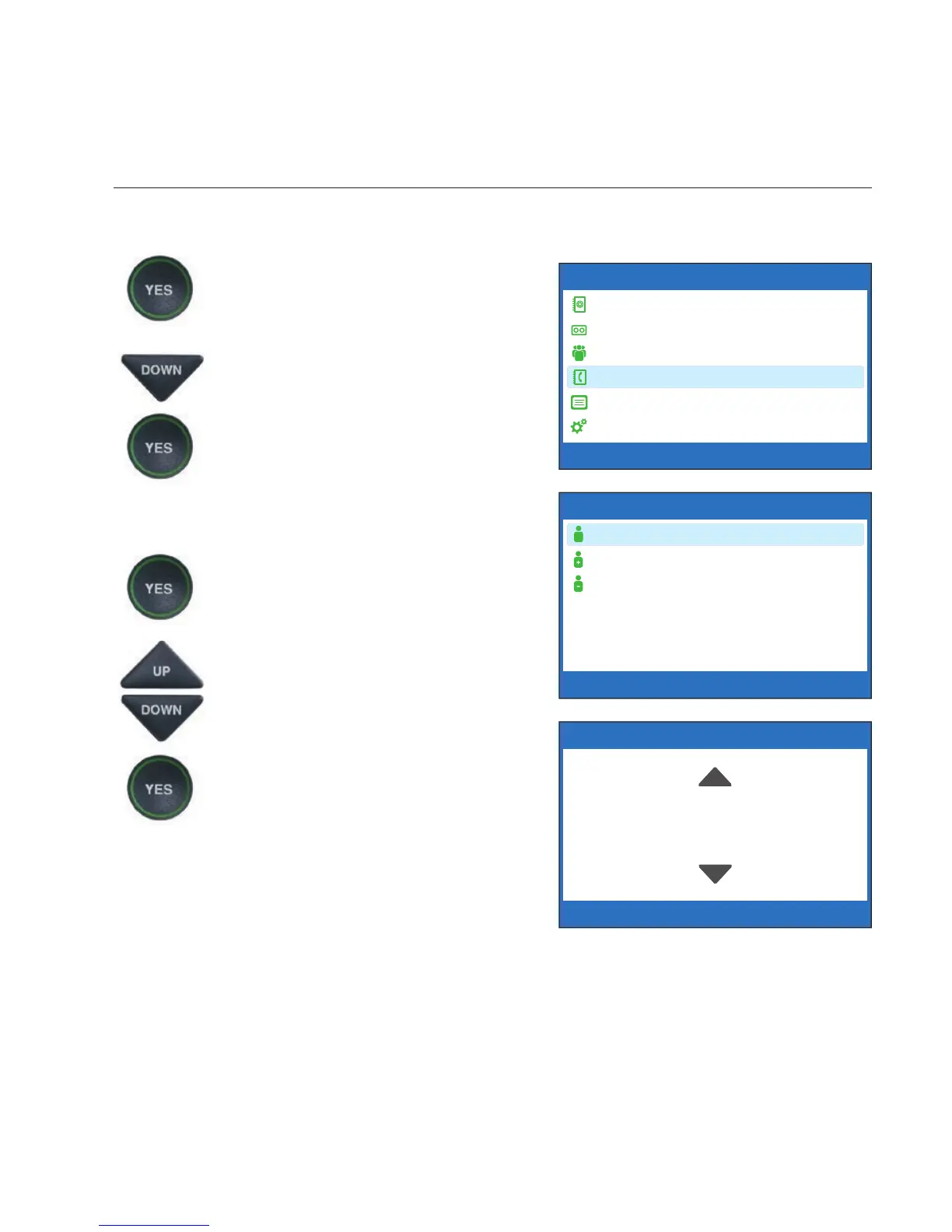
To make changes to an existing contact in the Phone Book:
1. With the handset hung up,
press the YES button to see the
Options menu.
2. Press the DOWN arrow button
repeatedly until Edit Phone
Book is highlighted. Press the
YES button to accept.
3. Check that Edit Existing
Contact is highlighted.
4. Press the YES button to select.
5. The display screen will show
you the fi rst listing in your
Phone Book. Use the UP and
DOWN arrow buttons to move
through the various contacts in
your Phone Book. When you
fi nd the contact you wish to
change, press the YES button
to select it.
OPTIONS
Dial from Phone Book
Answering Machine
Call History
Edit Phone Book
Conversations
Settings
Press YES to select or press NO to exit Options



 To Next Page