62 • USING THE ANSWERING MACHINE Customer Service: 888-269-7477
Setting the Number of Rings
Before Answering
You can set the approximate number of times the CapTel will ring before the
Answering Machine answers the call. The default setting is four (4) rings, but
you can set it to be any number of rings between three and eight.
NOTE: The ring count may be slightly different in telephone systems that use
“distinctive” ring patterns. Please experiment with this setting as needed for
your specifi c phone system.
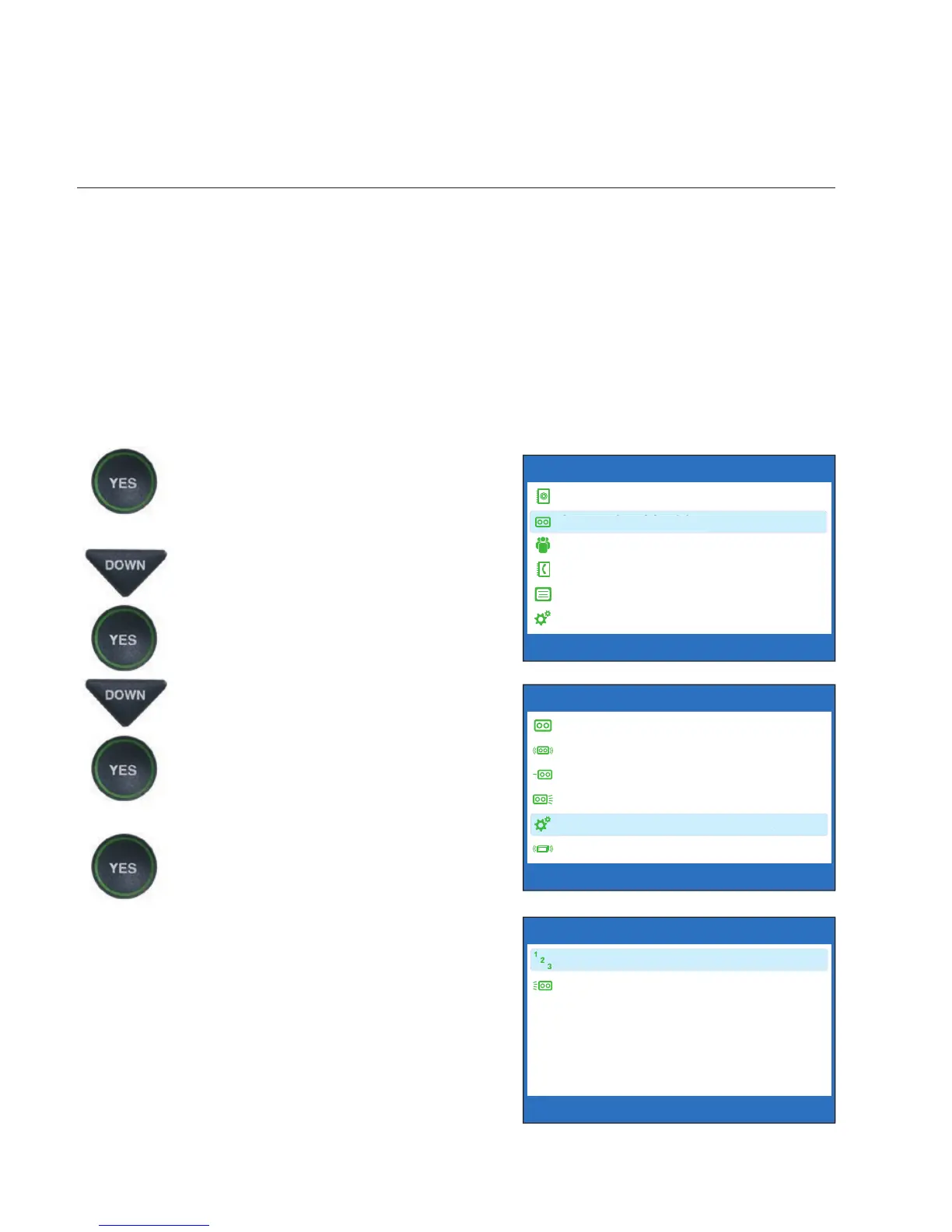
To set the number of rings before answering:
1. With the handset hung up,
press the YES button to see the
Options menu.
2. Press the DOWN arrow button
until Answering Machine is
highlighted. Press the YES
button to select.
3. Press the DOWN arrow button
repeatedly until Answering
Machine Settings is
highlighted. Press the YES
button to accept.
4. Check that Answer Ring
Count is highlighted. Press the
YES button to accept.
OPTIONS
Dial from Phone Book
Answering Machine
Call History
Edit Phone Book
Conversations
Settings
Press YES to select or press NO to exit Options
ANSWERING MACHINE
Answering Machine On/Off
Play Messages
Clear All Messages
Greeting Message
Answering Machine Settings
Caption External Ans Machine
Press YES to select or press NO to exit



 To Next Page