64 • USING THE ANSWERING MACHINE Customer Service: 888-269-7477
Making Incoming Messages Audible/Silent
Just like with other Answering Machines, you can “screen” callers by having
incoming messages played aloud on the CapTel phone for you to hear before
you answer the call. While this is a convenient feature, there may be times
when you do not want incoming messages to be played aloud, but instead
taken silently for you to review at a later time. The default setting is for
incoming messages to be muted (silent).
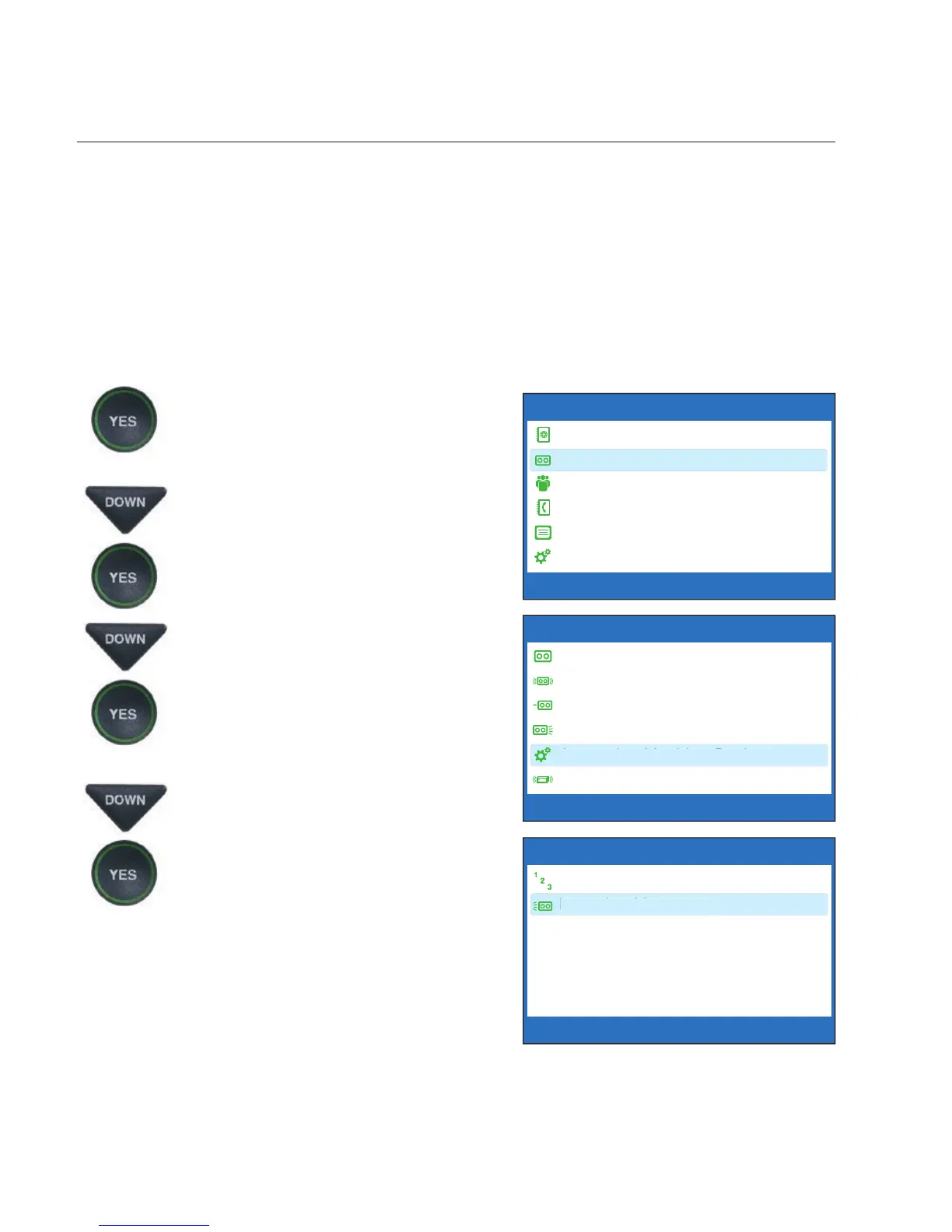
To make incoming calls audible or set them to be silent:
1. With the handset hung up,
press the YES button to see the
Options menu.
2. Press the DOWN arrow button
until Answering Machine is
highlighted. Press the YES
button to select.
3. Press the DOWN arrow button
repeatedly until Answering
Machine Settings is
highlighted. Press the YES
button to accept.
4. Press the DOWN arrow button
so that Incoming Messages is
highlighted. Press the YES
button to accept.
OPTIONS
Dial from Phone Book
Answering Machine
Call History
Edit Phone Book
Conversations
Settings
Press YES to select or press NO to exit Options



 To Next Page