Customer Service: 888-269-7477 SETTINGS • 97
Testing the Telephone Line Quality
Captions of your conversation are “carried” over your telephone line, so it is
important to have a high-quality connection. Some VoIP telephone connections,
for example, are not reliable enough to support captions. If the quality of the
connection is not adequate, your captions may be interrupted or even
dropped due to interference on the line.
To ensure the highest quality connection, your CapTel phone can test the line
quality to make sure it is adequate to provide captions.
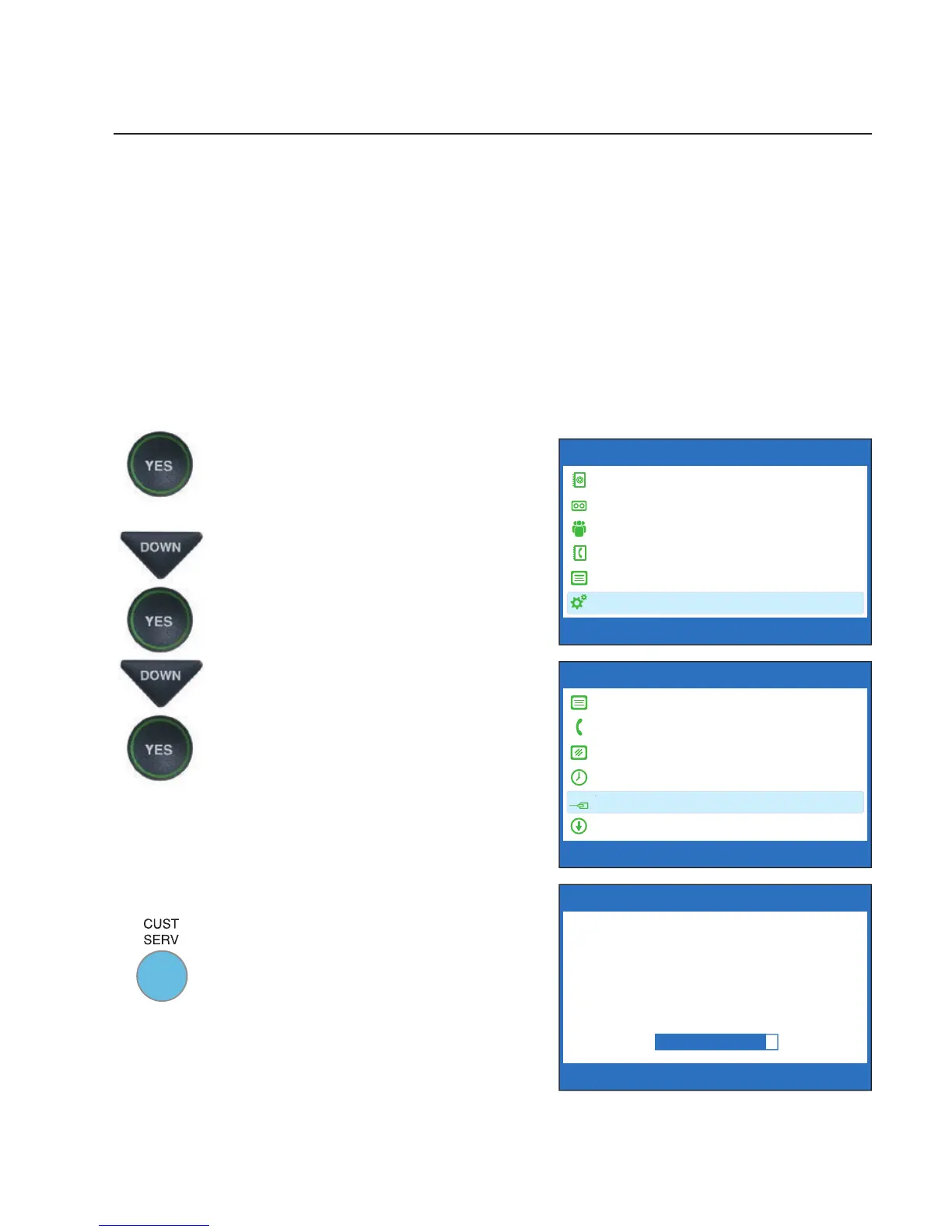
To test the quality of your telephone line connection:
1. With the handset hung up,
press the YES button to see the
Options menu.
2. Press the DOWN arrow button
repeatedly until Settings is
highlighted. Press the YES
button to select.
3. Press the DOWN arrow button
repeatedly until Telephone
Line Quality Test is highlighted.
Press the YES button to select.
4. CapTel will test the quality of
your telephone line. Watch the
display screen for information
about the test.
If the test indicates poor line
quality, you may still be able to
make/receive calls, but you might
experience problems with the
captions. Please contact CapTel
Customer Service for assistance.
OPTIONS
Dial from Phone Book
Answering Machine
Call History
Edit Phone Book
Conversations
Settings
Press YES to select or press NO to exit Options



 To Next Page