Dialing a Phone Number from the
Phone Book
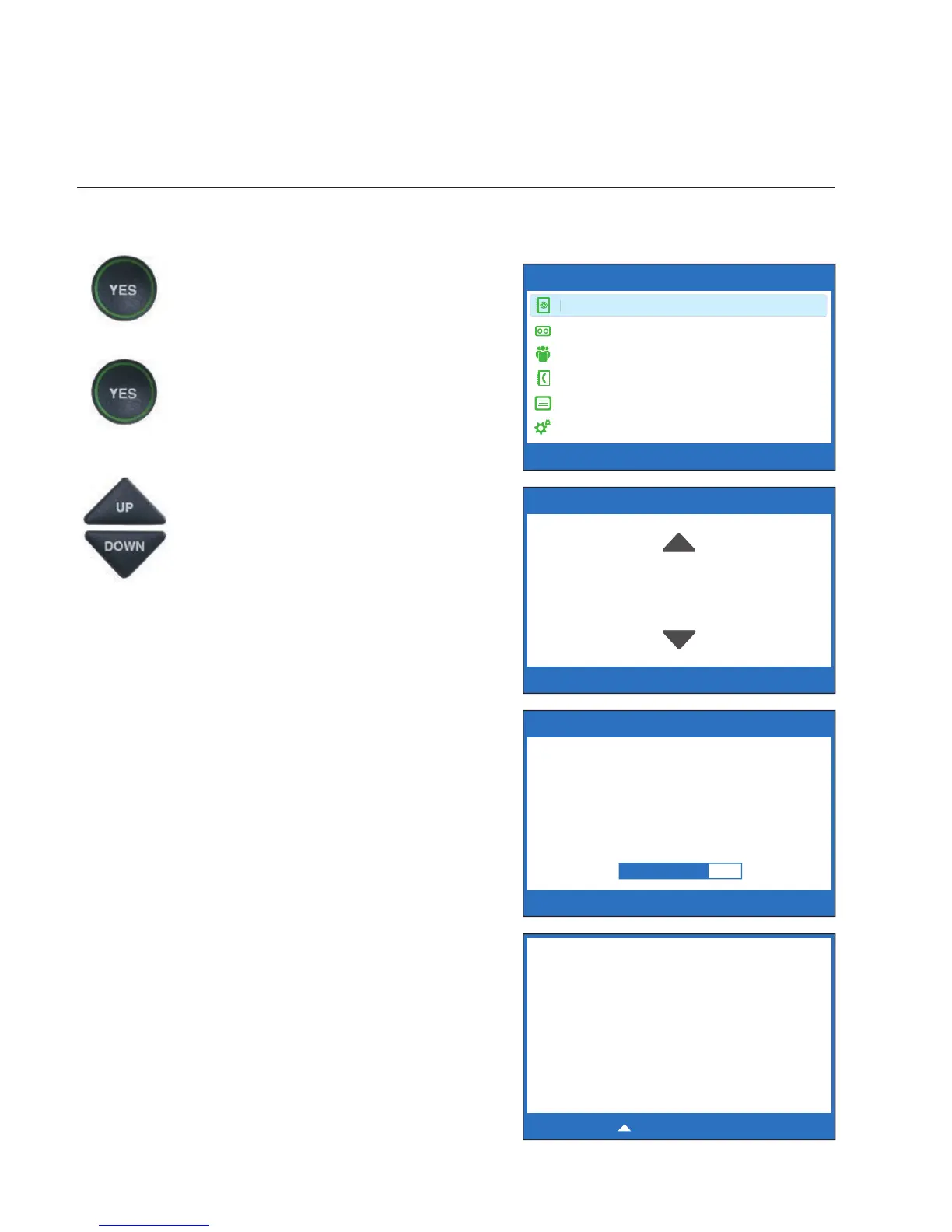
To quickly dial any phone number listed in your Phone Book:
1. With the handset hung up,
press the YES button to see the
Options menu.
2. Make sure that Dial from
Phone Book is highlighted.
Press the YES button to select.
3. The display screen shows you
the fi rst contact name and
number listed in your Phone
Book. Use the UP and DOWN
arrows to move through the
contacts in your Phone Book.
4. When you see the contact
listing you want to dial, simply
lift the handset. The CapTel
phone will dial the number for
you automatically.
5. Listen or watch the signal
meter to know when someone
answers. Watch the display
screen for captions. Begin
your conversation as you
normally would.
When you are done with your
call, hang up the handset.
72 • USING THE PHONE BOOK Customer Service: 888-269-7477
OPTIONS
Dial from Phone Book
Answering Machine
Call History
Edit Phone Book
Conversations
Settings
?
Press YES to select or press NO to exit Options
PHONE BOOK (3 of 4)
Name: Mary
Number: 555-1234
Please lift handset to dial this number or
Press NO to exit
UP
DOWN
Dialing:
Mary
5551234
Waiting for Captions
********
5/16 12:30 PM
********
(CapTel CA# 1234) Ringing
1 2 3 (F) Hello this is Mary
Oh hi mom I’m so glad you
called
Press to Review the Conversation



 To Next Page