Customer Service: 888-269-7477 SETTINGS • 89
Adjusting the Volume of the Ringer
You can set the volume of the CapTel 840 PLUS ringer to the volume that you
hear best: Choose from minimum volume (105 dB), medium volume (111 dB),
maximum volume (117 dB), or Mute (turns Ringer off).
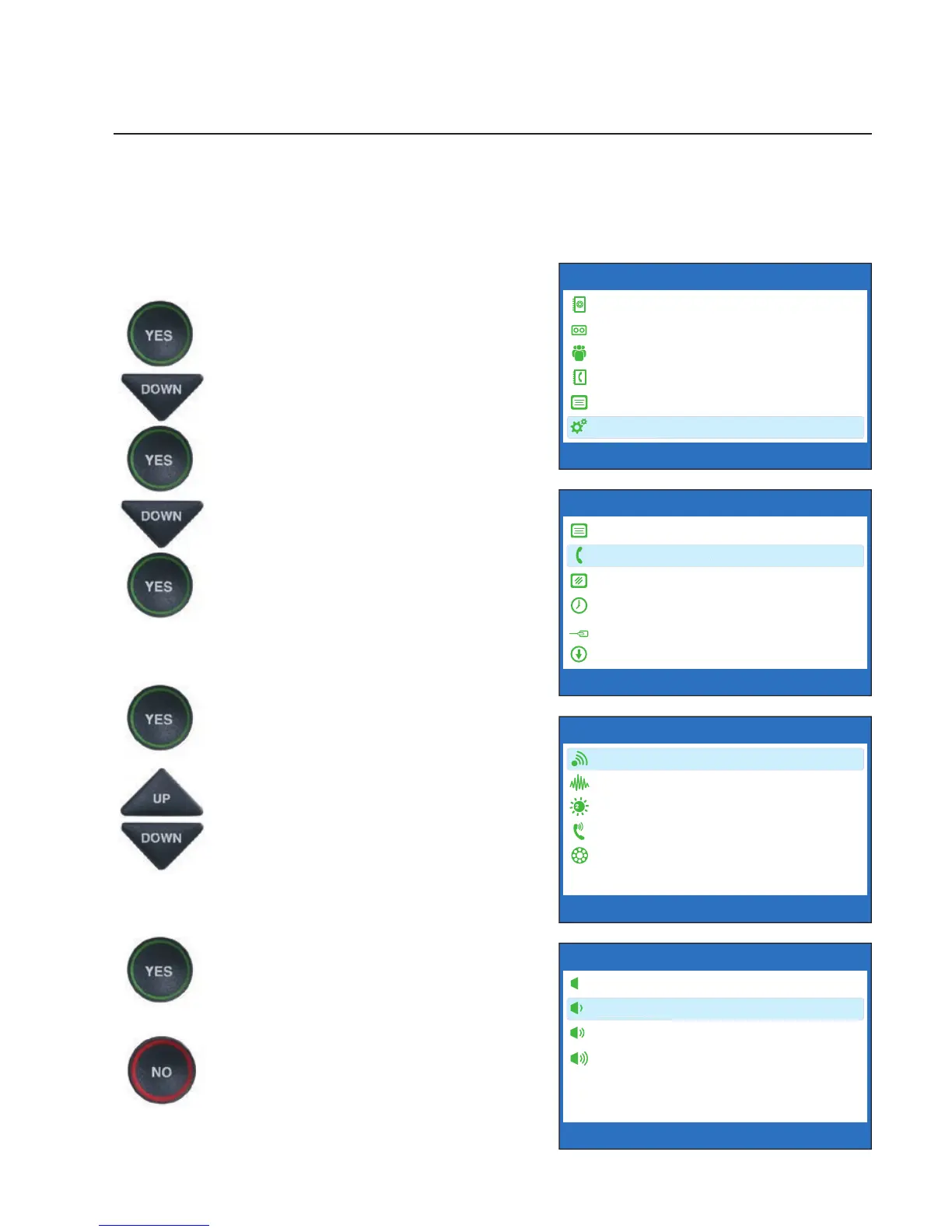
To set the Ringer volume:
1. Press the YES button to see the
Options menu.
2. Press the DOWN arrow button
until Settings is highlighted.
Press the YES button to select.
3. Press the DOWN arrow button
to highlight Phone Settings.
Press the YES button to select.
4. Check that Ringer Volume is
highlighted.
5. Press the YES button to select.
6. Press the UP or DOWN arrow
button to select your desired
Ringer Volume level. To turn the
Ringer off entirely, select Mute.
7. When the volume setting you
want is highlighted, press the
YES button to accept.
8. Press the NO button
repeatedly to exit out of the
Options menu.
OPTIONS
Dial from Phone Book
Answering Machine
Call History
Edit Phone Book
Conversations
Settings
Press YES to select or press NO to exit Options



 To Next Page