82 • SETTINGS Customer Service: 888-269-7477
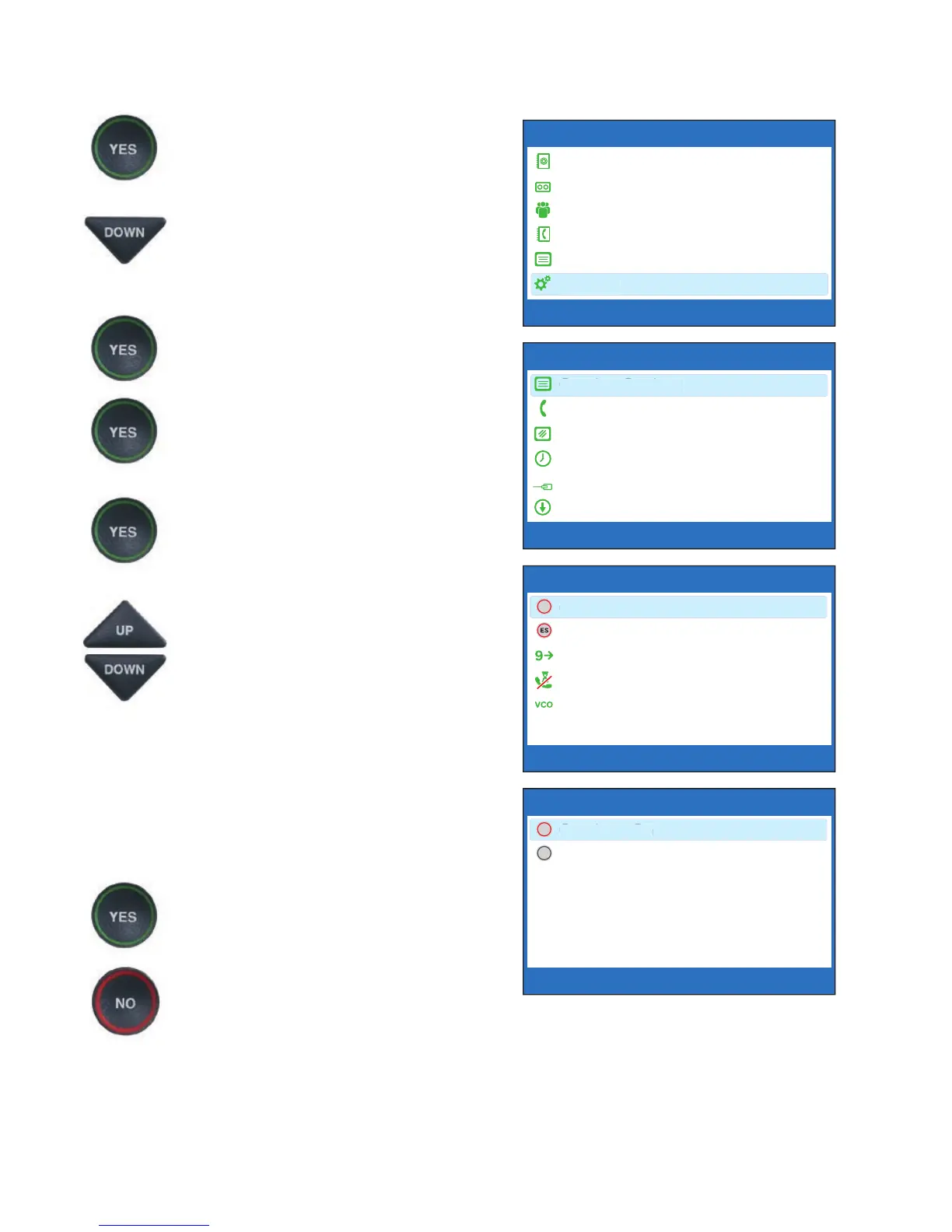
To change the Captions button setting:
1. With the handset hung up,
press the YES button to see the
Options menu.
2. Press the DOWN arrow button
repeatedly to highlight
Settings.
3. Press the YES button to select.
4. Check that Caption Settings is
highlighted. Press the YES
button to select.
5. Check that Captions Button is
highlighted. Press the YES
button to select.
6. Press the UP or DOWN arrow
button to select Captions On
or Captions Off.
Captions On: Captions will automatically
be on every outgoing call.
Captions Off: You will need to press the
Captions button before your outgoing call
to turn the Captions feature on.
7. Press the YES button to accept.
8. Press the NO button
repeatedly to exit out of
the Options menu.
OPTIONS
Dial from Phone Book
Answering Machine
Call History
Edit Phone Book
Conversations
Settings
Press YES to select or press NO to exit Options



 To Next Page