58
Snapshot Tutorial
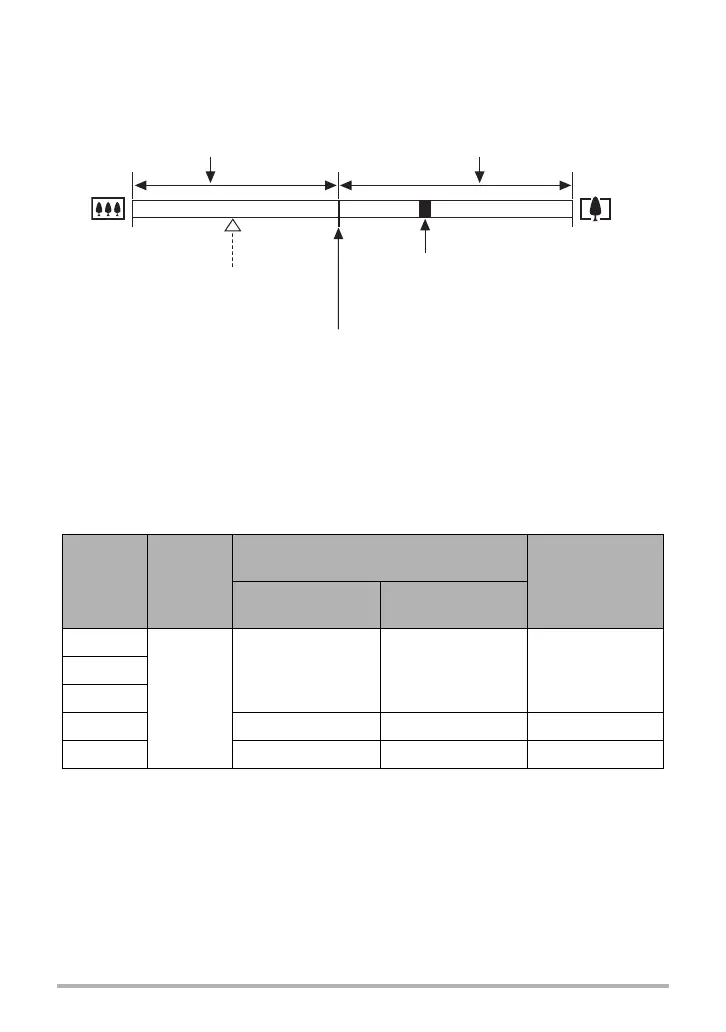
. Interpreting the Zoom Bar
During a zoom operation, a zoom bar appears on the monitor screen to show the
current zoom setting.
. Zoom Factor
The digital zoom factor depends on the image size (page 121), the super resolution
zoom setting, and on whether or not “Multi SR Zoom” is selected (page 60).
• Multi SR Zoom is enabled only when the “Multi SR Zoom” BEST SHOT scene is
selected.
Image size
Optical
zoom
Maximum zoom factor where image
deterioration can be suppressed
Total maximum
zoom factor
(In combination
with digital zoom)
Zoom (SR): Off
(HD Zoom)
Multi SR Zoom
Zoom (SR): Single
12M
5.0X
5.0X 10.0X 20.0X3:2
16:9
8M 6.2X 12.3X 24.5X
3M 9.8X 19.5X 39.0X
Range where image deterioration is
suppressed.
Wide Angle Telephoto
Zoom pointer
(Indicates current zoom.)
Point from which image deteriorates
• The location of this point depends on the image size, the “Zoom (SR)”
setting, and whether Multi SR Zoom is enabled.
Optical zoom limit point
Deteriorated image range



 To Next Page
 Loading...