113
Advanced Settings (REC MENU)
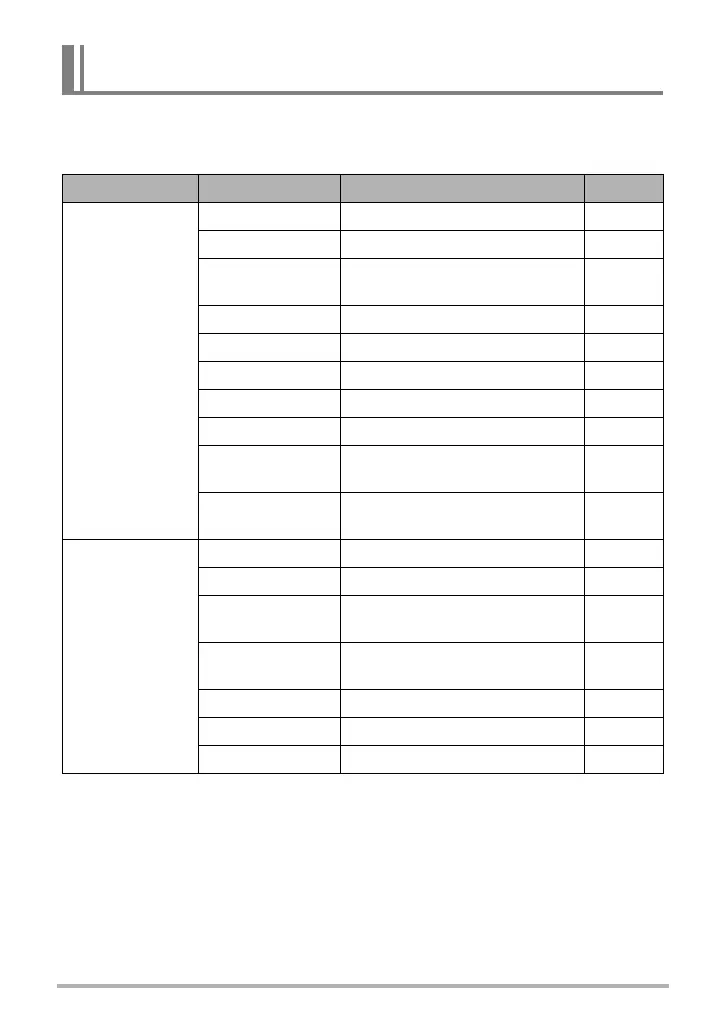
Key Customize lets you assign any one of the functions listed below to the function
ring, [4] and [6], Control Dial keys.
Assigning Functions to the Function Ring and Control Dial
(Key Customize)
Menu item: Key Customize
Operation Setting Description
See page:
Function Ring*
1
Step Zoom Changes the zoom factor.
Page 57
Exposure Corrects brightness.
Page 52
ISO
Changes the ISO sensitivity
setting.
Page 50
White Balance Adjusts hue.
Page 46
MF*
2
Adjusts focus.
Page 48
Smooth Skin Adjusts skin smoothness.
Page 51
Shutter Speed Changes the shutter speed.
Page 43
Aperture Adjusts the aperture.
Page 43
Pre-record CS
Shots
Specifies the number of pre-
recorded CS shots.
Page 63
Art Effect
Adjusts the intensity of the
effect.
Page 72
Control Dial*
3
Exposure Corrects brightness.
Page 52
White Balance Adjusts hue.
Page 46
ISO
Changes the ISO sensitivity
setting.
Page 50
ISO High Limit
Specifies the ISO sensitivity high
limit.
Page 116
Self-timer Selects the self-timer time.
Page 45
Focus Changes the focus mode.
Page 48
Off No function assigned to the dial.



 To Next Page
 Loading...