APPENDIX
234
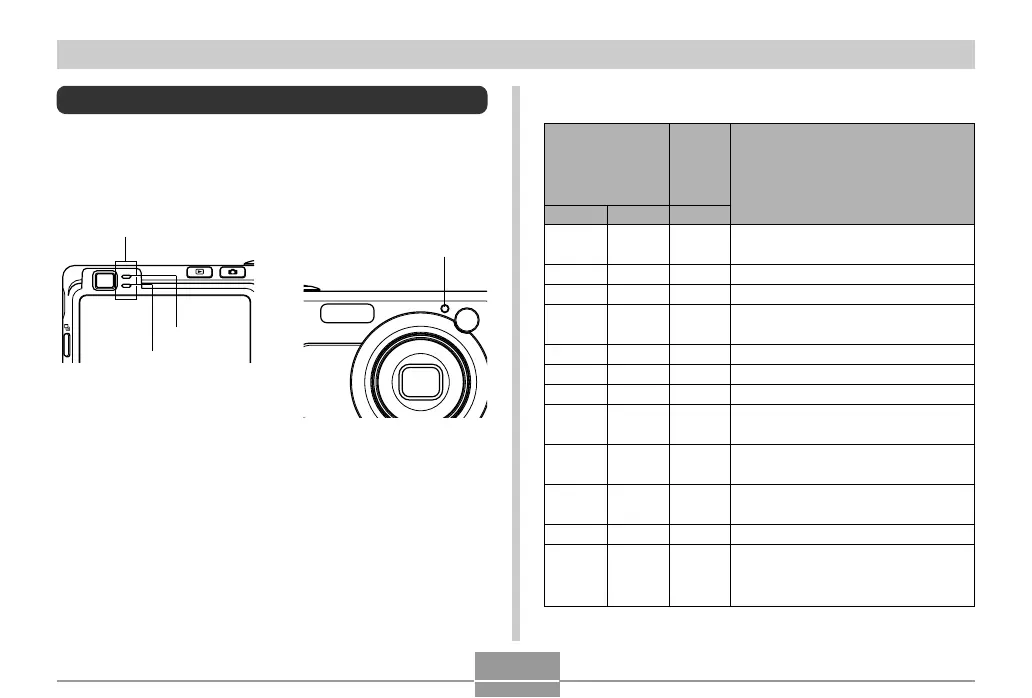
Indicator Lamp Reference
The camera has three indicator lamps: a green operation
lamp, a red operation lamp, and a AF assist light / self-
timer lamp. These lamps light and flash to indicate the
current operational status of the camera.
* There are three lamp flash patterns. Pattern 1 flashes once per
second, Pattern 2 flashes twice per second, and Pattern 3 flashes
four times per second. The table below explains what each flash
pattern indicates.
AF assist light /
self-timer lamp
Operation lamp
Green
Red
■ REC Modes
Operation Lamp
AF assist
light /
self-timer
lamp
Green
Lit
Lit
Pattern 3
Lit
Pattern 2
Pattern 1
Red
Pattern 3
Lit
Pattern 1
Pattern 2
Red
Pattern 1
Pattern 2
Operational (Power on, recording
enabled)
Flash is charging.
Flash charging is complete.
Auto Focus operation was
successful.
Cannot Auto Focus.
Monitor screen is off. / Sleep state
Storing image
Storing movie data / processing
image data
Self-timer countdown
(10 to 3 seconds)
Self-timer countdown
(3 to 0 seconds)
Cannot charge flash.
Memory card problem / Memory card
is unformatted. / BEST SHOT setup
cannot be registered.
Meaning


 To Next Page
 Loading...