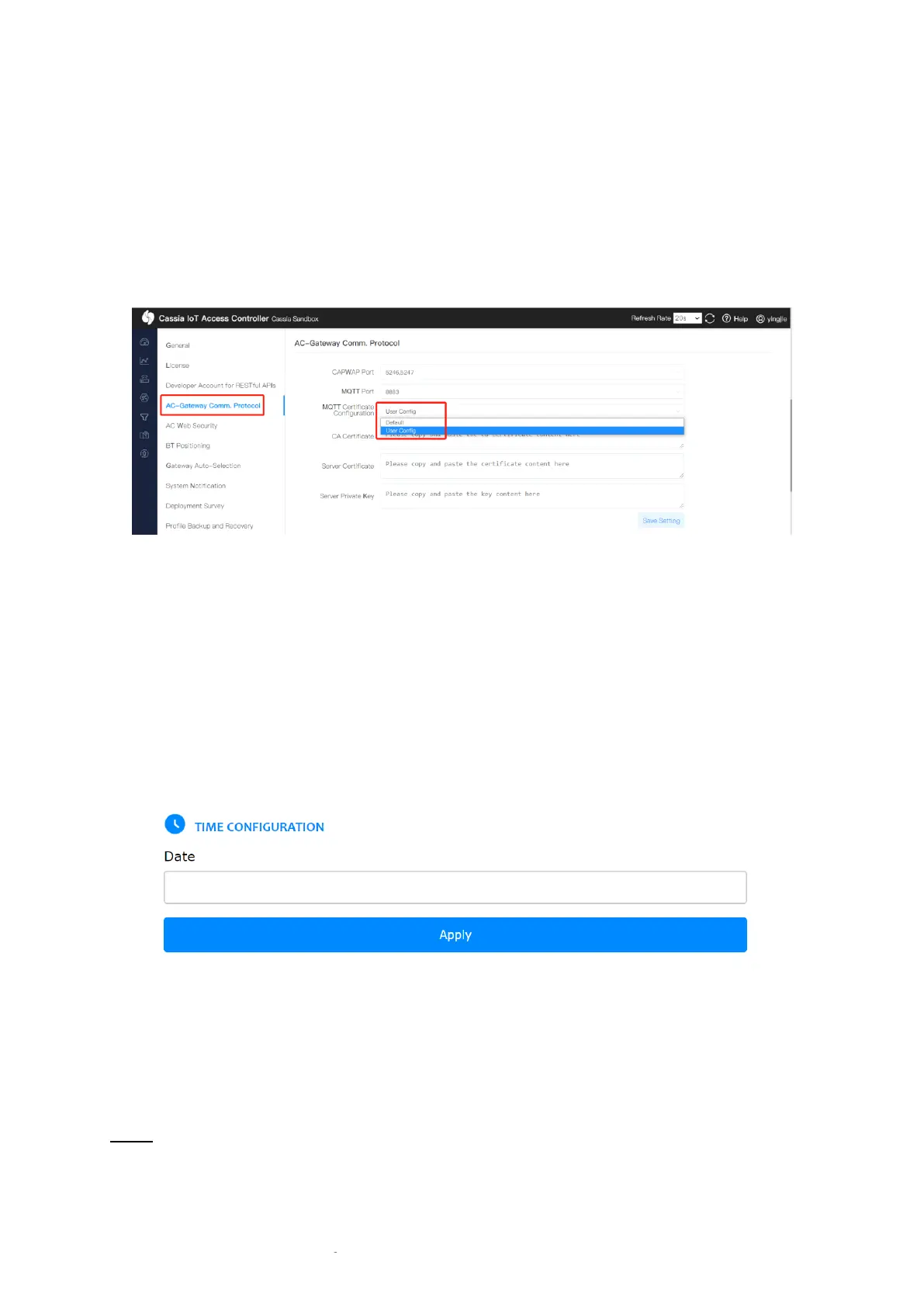
2.4. Configure MQTT Certificate
On the AC Settings page, please change MQTT Certificate Configuration from Default to User
Config. Then, please fill in the CA Certificate, Server Certificate, and Server Private Key.
Default means using the default certificate provided by Cassia. The gateway and AC
communication is still protected.
3. Gateway Configuration
3.1. Configure Gateway Date
Please configure the correct local date in the gateway’s local console Other tab. After
connected to AC, the gateway will get the correct time from AC automatically.
The local date will be used for certificate validation. If the date is not configured correctly,
the gateway can’t connect to the AC. The default gateway local time is 1970-01-02, 00:00:00.
3.2. Configure MQTT Certificate
Please fill in MQTT certificates in the gateway Other tab. Please change Certificate
Configuration to User Config, and then fill in the CA Certificate, Client Certificate, and Client
Private Key.
NOTE
The AC and gateways should use the same CA certificate.
Now, we only support bi-directional authentication. It means the gateway will
authenticate AC and AC will authenticate gateway too. So, both CA certificate, client



 To Next Page