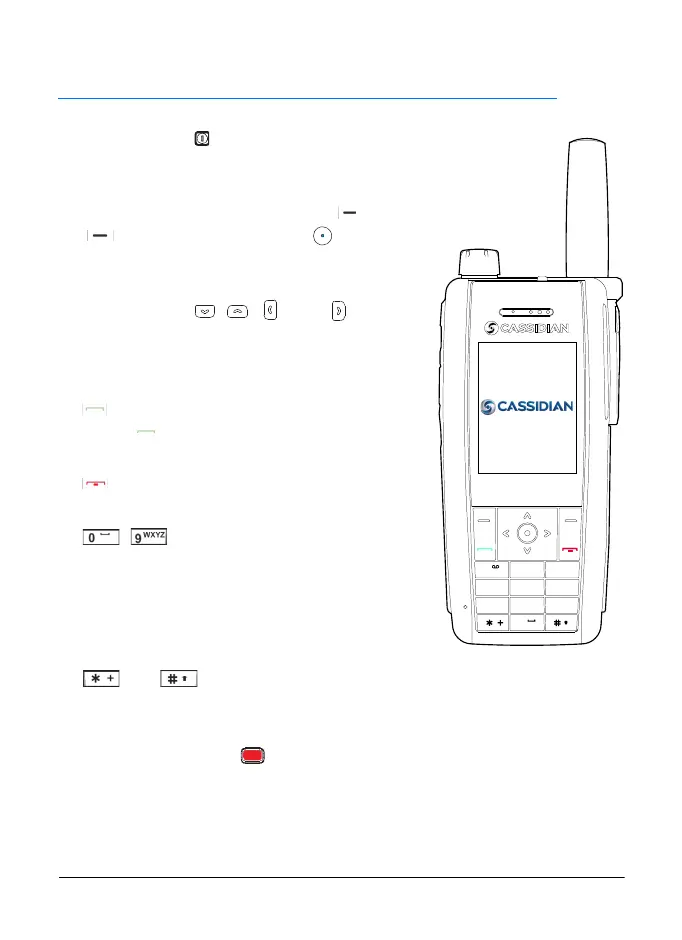
Your radio
PS11366AENAA01 TH1n - User Guide
18/115
This document is the property of Cassidian and should not be copied or circulated without permission.
2. Your radio
•
The power key (at the bottom of the radio
on the same side as the PTT key) switches the
power on and off.
•
The function of the selection keys and
and middle selection key depends
on the guiding text shown on the display above
the keys.
•
The scroll keys , , , and are used
to scroll through names, phone numbers, and
menus. See also Scroll key shortcuts on
page 20.
•
dials and answers a phone call. In the idle
mode, shows the list of the most recently
dialled numbers.
•
ends or rejects a phone call or an express
call.
•
- are used to enter numbers and
characters. They can be used as speed
dialling, and also as shortcuts to predefined
functions. You can access the function by
pressing and holding they key. For more
information, contact your organisation.
•
and are used for various purposes in different functions. You
can access the function by pressing and holding the key. For more
information, contact your organisation.
•
The red function key (on top of the radio). See Red key calls and
status sending on page 21.
•
Blank display. You can make blank the display of the radio with a long
press of a number key.The radio is working normally, but the display is
blank, and the keypad lock is activated. You can deactivate the blank
1
2
ABC
3
DEF
5
JKL
6
MNO
8
TUV
9
WXYZ
4
GHI
7
PQRS
0
Polaris_en_print.book Page 18 Tuesday, October 23, 2012 12:30 PM



 To Next Page