29Q-Discs
Q-Discs
The Q-Discs are disposable ltration discs that provide nal ltration of the extract prior to analysis. The Q-Disc
barcode must be added prior to sample analysis. Various types of discs are available for different applications and
analysis techniques. Some Q-Discs will require a support Q-Disc, which will have to be added prior to the Q-Disc of
choice. If this is not done properly, an error message will pop up to remind you to add the support Q-Discs rst.
Q-discs must be purchased directly from CEM Corporation or through its authorized dealer network.
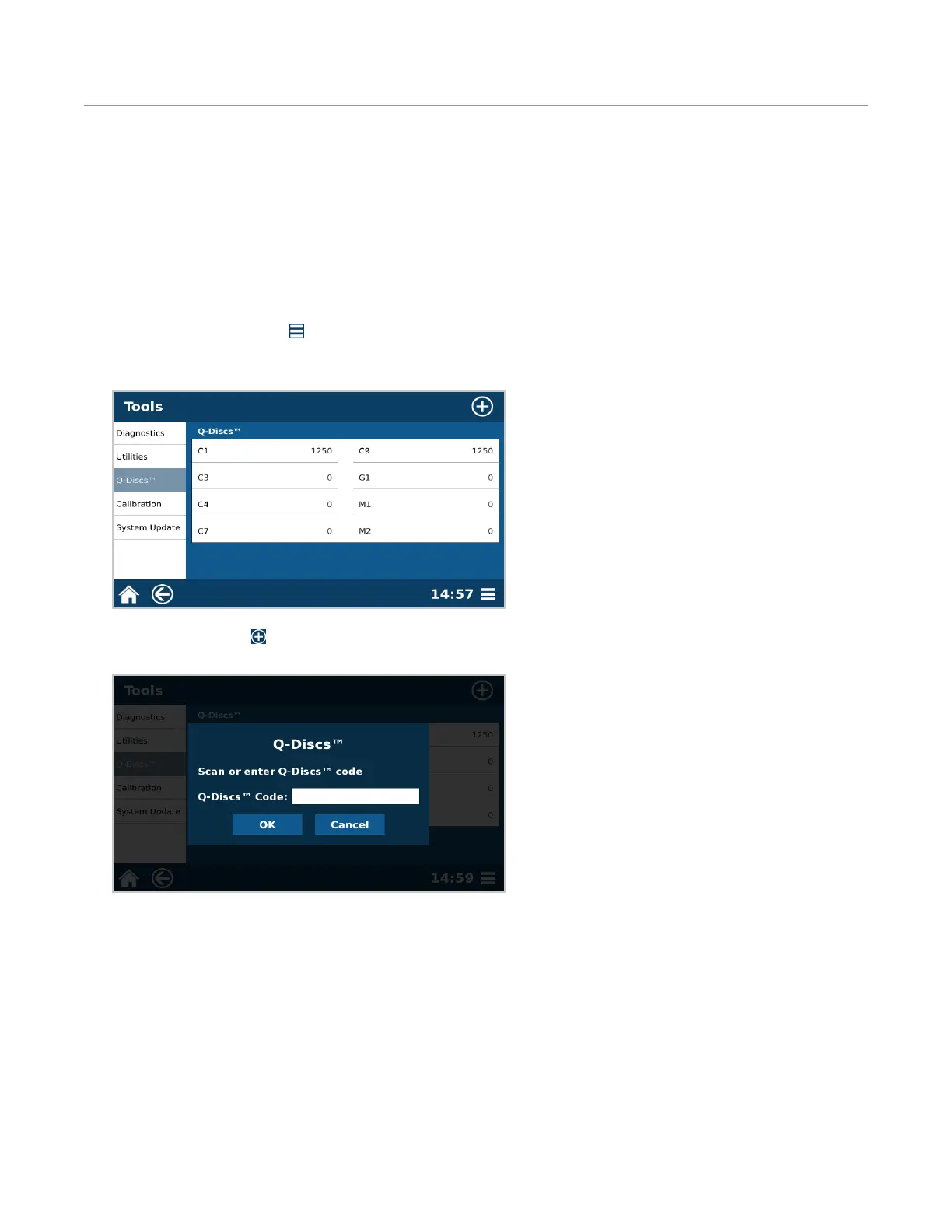
Enter Q-Disc Code
1. Select System Menu icon in the bottom right corner of the screen.
2. Select Tools.
3. Select “Q-Discs.”
4. Select the New icon .
5. Manually type in the barcode on the Q-Disc box or use barcode scanner from the accessory kit.
6. Select “OK” to add the Q-Discs to the database.
• If a valid code is entered then “successfully added...” will appear and the user will select “OK.”
• If an invalid code is entered, then try re-entering the code. The Q-Disc codes are case sensitive and contain
letters and numbers.



 To Next Page