58 Troubleshooting
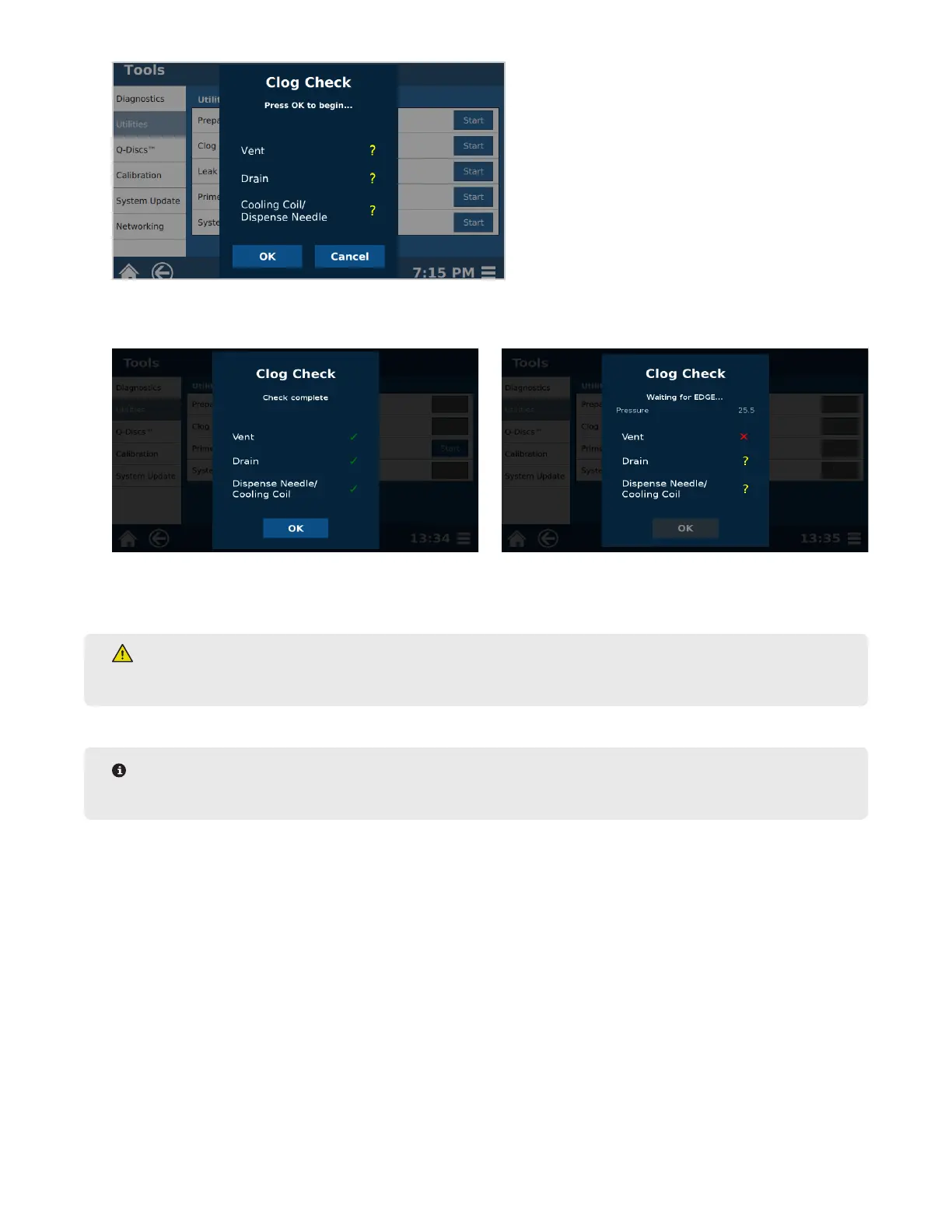
6. If green checks appear beside vent, drain, and cooling coil/dispense needle, then clog check has completed
successfully. Select “OK.” If a red “x” appears, proceed with next step.
6.1. If red “X” appears, check inside chamber and dispense needle for any obstruction to solvent ow such as
sample in chamber or needle.
WARNING
Never place hands into the vessel chamber area when the EDGE is in use or powered on.
NOTE
If Clog Check fails, the EDGE must be powered off/on before Water Wash can be attempted/loaded.
7. Select and run “Water Wash” Method to clear clog.
7.1. If “Water Wash” Method is not available, create a User method with the following parameters: Solvent=Wa-
ter; Top Volume=30mL; Bottom Volume=0mL; Rinse Volume=0mL; Temperature=150°C; Hold time=3:00;
Wash=10mL Water.
7.2. Place empty Q-Cup, without Q-Disc in place, and collection container on the rack.
7.3. Load the “Water Wash” method.
7.4. Select the Run icon at the top of the screen and select “Start.”
8. If there is a clog, contact CEM Corporation if system continues to fail clog check and “Water Wash” procedure
has been performed more than once.



 To Next Page