DRSplus – Operating Manual
9.1 Configuration of Exam Parameters
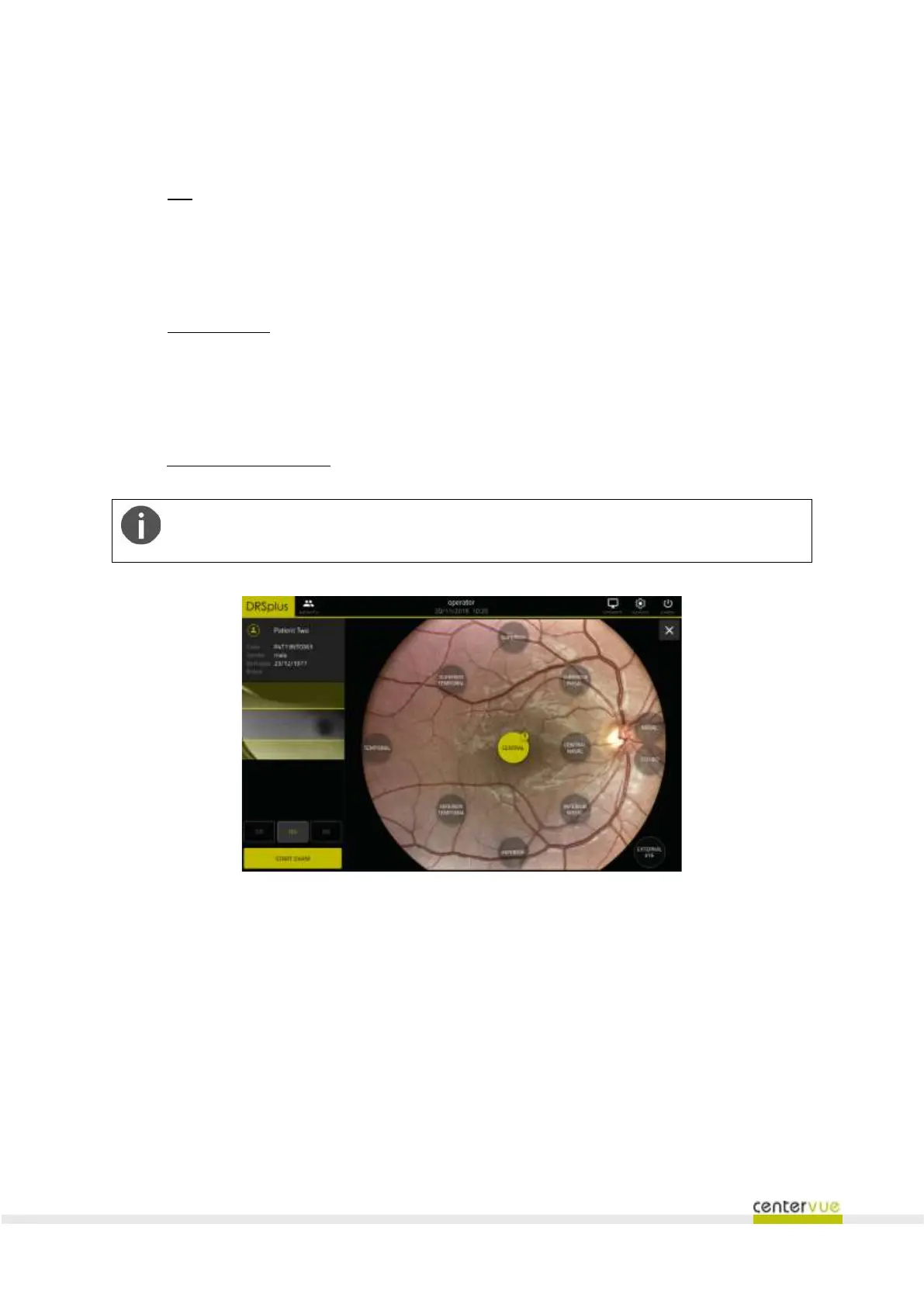
To configure the examination, the following parameters can be set (see Fig. 22):
❖ Eye:
o OD = right eye,
o OS = left eye,
o OU = both eyes (default option);
❖ Exam modality:
o default = acquire a retinal picture,
o EXTERNAL EYE = acquire a picture of the external eye surface (see §0),
o STEREO = acquire a couple of retinal images for stereo review (see §9.5);
❖ Retinal fields to acquire: the available options follow.
Every selected field corresponds to a specific position of the internal green fixation
target.
Fig. 22 – Exam configuration screen
The following fields can be selected:
a. CENTRAL: centered on the foveal pit;
b. NASAL: centered approx. 19° nasally to the foveal pit;
c. TEMPORAL: centered approx. 19° temporally to the foveal pit;
d. CENTRAL-NASAL: centered approx. 7° nasally to the foveal pit;
e. SUPERIOR: centered approx. 19° superiorly to the foveal pit;
f. INFERIOR: centered approx. 19° inferiorly to the foveal pit;
g. SUPERIOR-TEMPORAL: centered approx. 12° superiorly and 7° temporally to the foveal pit;



 To Next Page