CENTRALINE I/O MODULES – INSTALLATION & COMMISSIONING INSTRUCTIONS
EN1Z-0973GE51 R0119
38
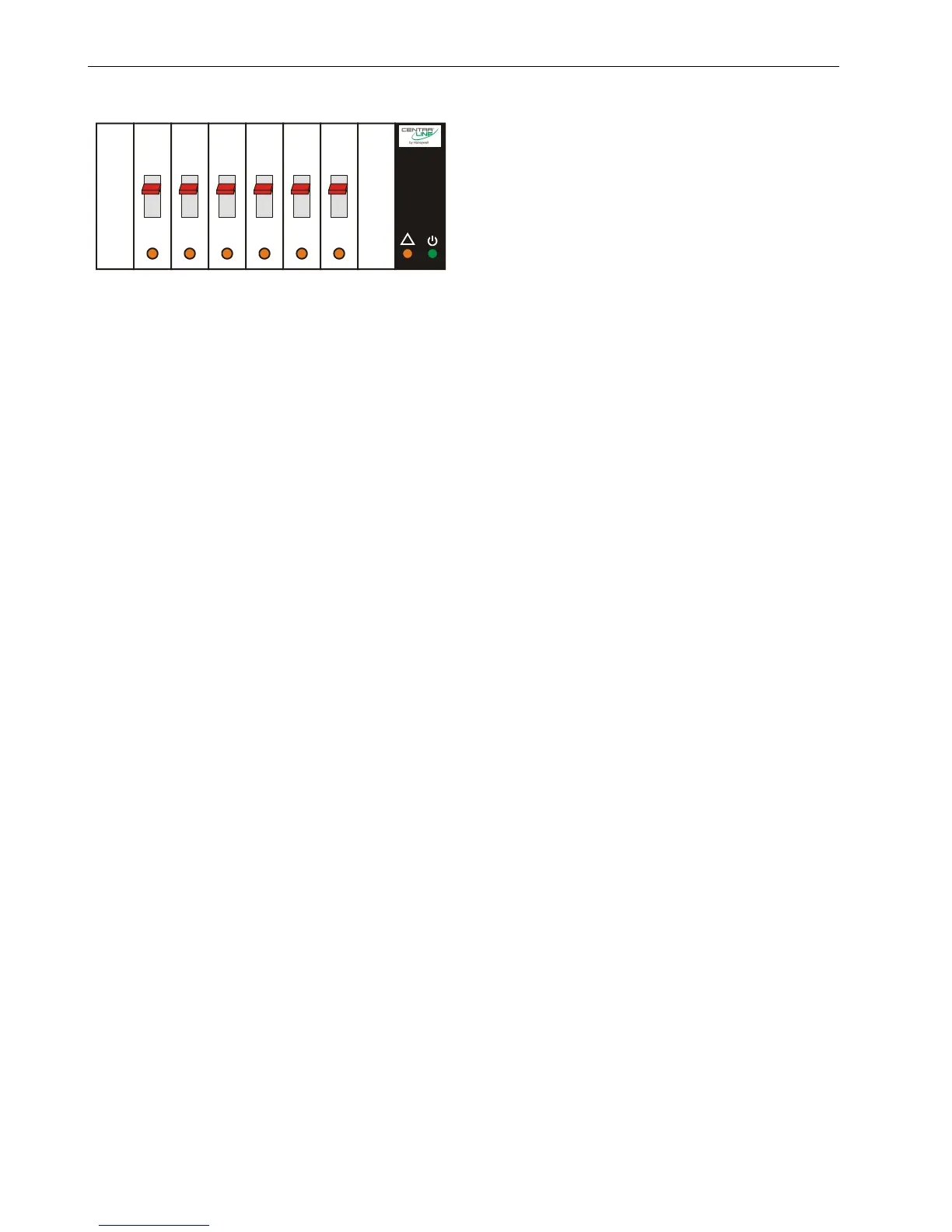
Status LEDs with Manual Overrides
12
3
4
5
6
--1
--0
--AUTO
!
Fig. 47. Manual overrides (toggle switches)
The …R824A Relay Output Modules are equipped with
manual overrides: one for each relay output. These sliding
switches can manually be set to either "auto" or "0" or "1".
Manual Override in the AUTO Position
When a manual override of the …R824A Relay Output
Module is set to the “AUTO” position, and the corresponding
relay output has been configured, the following applies:
If the L
ONWORKS network is functioning properly, the
logical status of the relay output will be “AUTO.”
If the L
ONWORKS network is not functioning properly, the
feedback signal will be switched to the safety position
value.
The feedback signal on the LONWORKS network:
nvoDoActPosnFb[ ] will have a value of either 0% or
100%, and a state of -1.
The status LED (yellow) will indicate the actual
logical state of the relay output as commanded
(by nviDoSwitch[ ]).
When a manual override of the …R824A Relay Output
Module is set to the “AUTO” position, and the corresponding
relay output has not been configured, the following applies:
Regardless as to whether the L
ONWORKS network is
functioning properly or not, values from the L
ONWORKS
Bus will be ignored, and there will be no heartbeat or
safety position.
The feedback signal on the L
ONWORKS network:
nvoDoActPosnFb[ ] will have a value of 0% and a state of
0.
The status LED will be dark.
Manual Override in the ON Position
When a manual override of the …R824A Relay Output
Module is set to the “ON” position, the following applies:
If the relay output has been configured, its logical state
will depend upon the actual output configuration.
If the relay output is unconfigured, it will be switched ON.
Regardless of configuration, the feedback signal on the
L
ONWORKS network: nvoDoActPosnFb[ ] will have a value
of 100…0% and a state of -1.
Regardless of configuration, the status LED (yellow) will
flash to indicate “manual override.”
Manual Override in the OFF Position
When a manual override of the …R824A Relay Output
Module is set to the “OFF” position, the following applies:
If the relay output has been configured, its logical state
will depend upon the actual output configuration.
If the relay output is unconfigured, it will be switched OFF.
Regardless of configuration, the feedback signal on the
L
ONWORKS network: nvoDoActPosnFb[ ] will have a value
of 0% (direct) or 100% (reverse) and a state of -1.
Regardless of configuration, the status LED (yellow) will
flash to indicate “manual override.”



 To Next Page