3-4 Christie ACT User Manual
020-100129-05 Rev. 1 (02-2010)
Section 3: Operation
3.4.2 Operator Tab
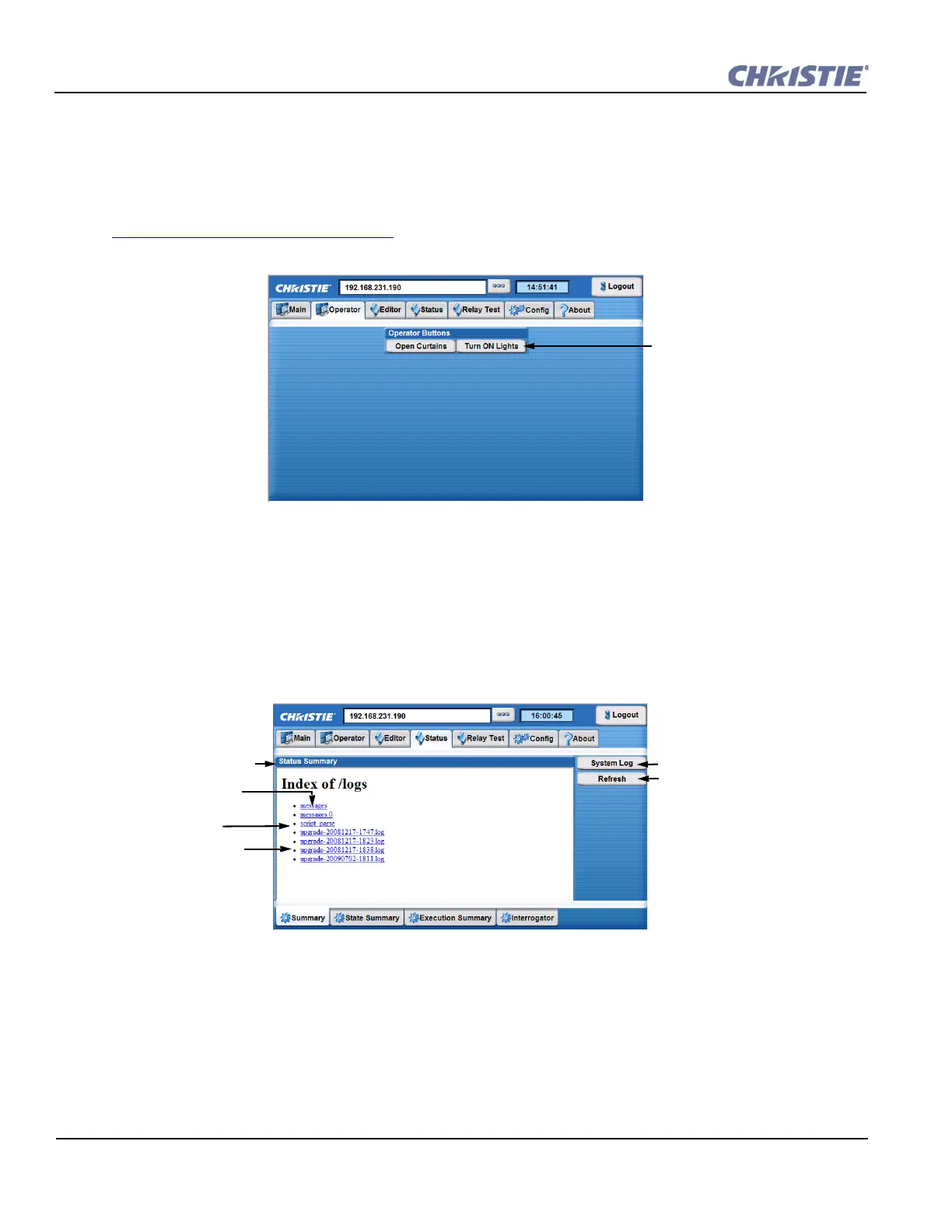
The Operator tab provides a view of the user-defined operator buttons where each button performs a specific
action initiating the start of a programmed sequence. Operator buttons extend the system beyond the 8 buttons
available on Christie ACT. Buttons are created in the Editor: Operator Buttons tab. You must have the proper
permission to create or modify buttons. For more information on adding or editing buttons, refer to
Section 3.9.6 Adding an Operator Button
.
3.4.3 Status Tab
The Status tab provides an overall view of Christie ACT’s status.
Status: Summary Tab
This tab provides status information about Christie ACT’s log files (Figure 3-6).
Select to initiate the start of
a programmed sequence.
Figure 3-5 Operator Tab
Status summary logs
generated from general
operation of Christie ACT.
Returns the list of logs.
Refreshes the current log.
General logging of the
system.
Shows errors or status of
the script parsing.
Status of the last
upgrade.
Figure 3-6 Status: Summary Tab


 To Next Page