Section 3: Operation
Christie ACT User Manual 3-15
020-100129-05 Rev. 1 (02-2010)
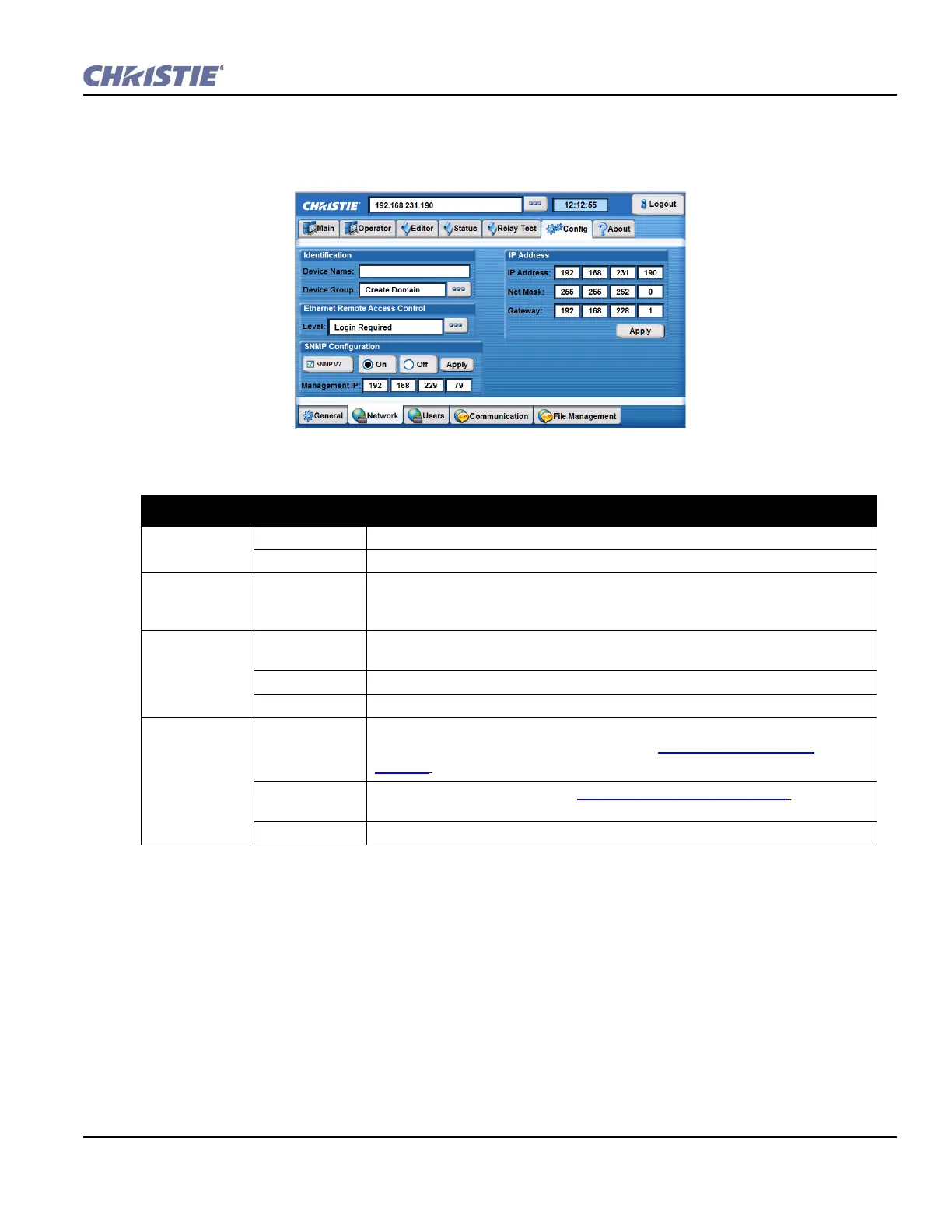
Config: Network Tab
The Config: Network tab is used to define or change the Ethernet settings for Christie ACT.
Table 3.6 Summary of Config: Network Tab
CONFIG: NETWORK TAB OPTIONS
Identification Device Name Name for the device.
Device Group Assign the device to a device group by selecting a group from the displayed list.
Ethernet
Remote Access
Control
Level Restrict Ethernet access to Christie ACT. Options include No Access, Login Required,
and Free Access. Default is Login Required.
SNMP
Configuration
On/Off Gives network managers access to manage the network. Select On or Off to enable or
disable the SNMP network management system. Click Apply to apply any changes.
SNMP V2 Simple Network Management Protocol version 2.
Management IP The IP address of the SNMP Manager.
IP Address IP Address Christie ACT’s current IP address. To change it, type a unique IP address and click the
Apply button. For default factory settings, refer to
Section 1.2.2 Ethernet
Settings.
Net Mask /
Gateway
For default factory settings, refer to
Section 1.2.2 Ethernet Settings.
Apply Button Click to apply any IP address changes.
Figure 3-17 Config: Network Tab


 To Next Page