Ciara Enterprise/Discovery 945GTP
- 24 -
2.11: BIOS Security Features
The BIOS includes security features that restrict access to the BIOS Setup program and who can boot the computer. A
supervisor password and a user password can be set for the BIOS Setup program and for booting the computer, with
the following restrictions:
• The supervisor password gives unrestricted access to view and change all the Setup options in the BIOS Setup
program. This is the supervisor mode.
• The user password gives restricted access to view and change Setup options in the BIOS Setup program. This is the
user mode.
• If only the supervisor password is set, pressing the <Enter> key at the password prompt of the BIOS Setup program
allows the user restricted access to Setup.
• If both the supervisor and user passwords are set, users can enter either the supervisor password or the user password
to access Setup. Users have access to Setup respective to which password is entered.
• Setting the user password restricts who can boot the computer. The password prompt will be displayed before the
computer is booted. If only the supervisor password is set, the computer boots without asking for a password. If both
passwords are set, the user can enter either password to boot the computer.
• For enhanced security, use different passwords for the supervisor and user passwords.
• Valid password characters are A-Z, a-z, and 0-9. Passwords may be up to 16 characters in length.
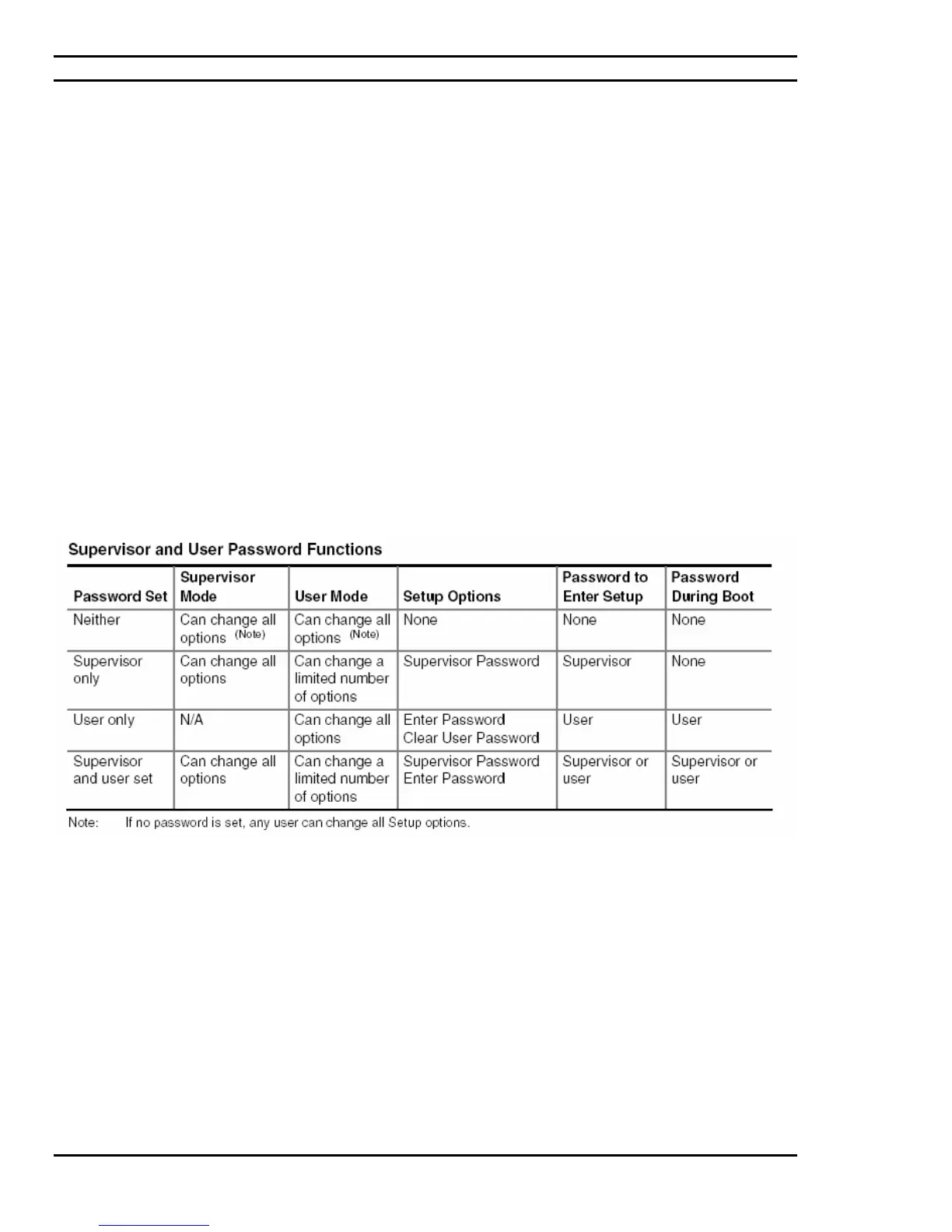
The below table shows the effects of setting the supervisor password and user password. This table is for reference
only and is not displayed on the screen.



 To Next Page