English
13 EN
11. Description display symbols (only DT version with display)
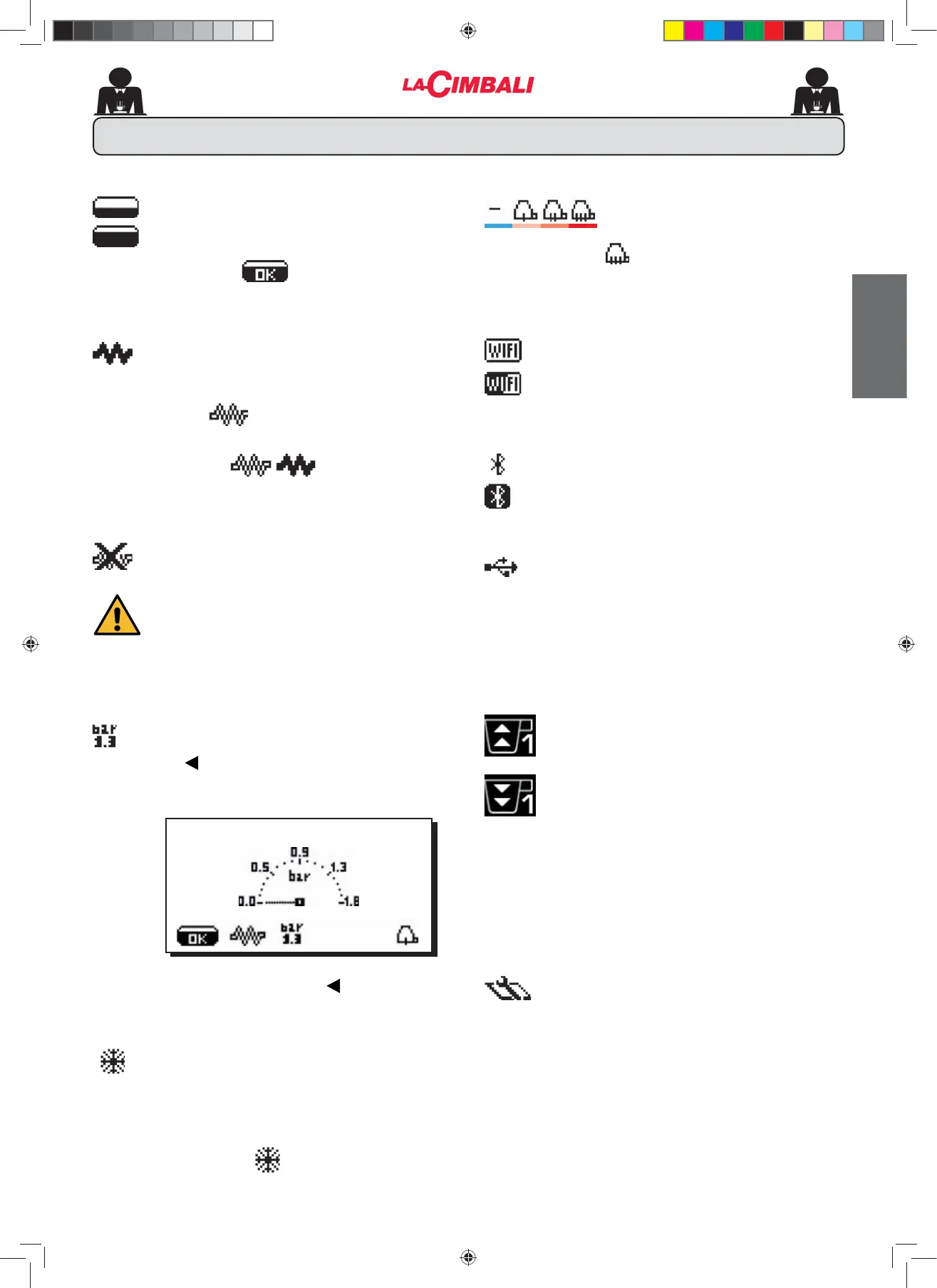
WATER LEVEL
This symbol indicates the boiler water level.
During the loading phase, the bottom part of the
icon blinks.
When the optimum level is reached, the symbol
looks like this: .
RESISTANCE
This symbol (dark inside) indicates that the
resistance is activated and functioning.
When the boiler pressure reaches the set value, the icon
looks like this
(light inside).
When the machine is in operation, the two icons
alternate on the display, indicating the presence
of the electric heating.
This indicates that the heating resistance has
been disabled.
Note: the customer cannot switch on or switch
RႇWKHHOHFWULFKHDWLQJ
:KHQ WKH RQRႇ IXQFWLRQ LV SURJUDPPHG WKH
electric heating takes place automatically.
SERVICE BOILER PRESSURE
This symbol indicates the boiler pressure value.
If the key is pressed for about 3”, the pressure
gauge will be displayed analogically. This will be
shown on the display:
Press and hold down the key for about 3
seconds to return to the regular display mode.
This symbol indicates that the machine is pre-
heating or the boiler pressure has dropped below
0.5 bar.
For the duration of this phase, the display alternates this
symbol with the one indicating the boiler pressure.
The machine has reached the set work pressure and
temperature when the icon
disappears from the display.
CUP-WARMER (*)
These symbols indicate the power
currently selected by the cup warmer.
no symbol = OFF
= maximum power symbol
WIFI (*)
WIFI connection symbols:
QHWZRUNSUHVHQWEXWQRWFRQQHFWHG
- connected to the network.
BLUETOOTH (*)
These symbols refer to Bluetooth communication:
- the icon indicates the presence of the Bluetooth
PRGXOHRQWKHPDFKLQH
- the icon indicates that the machine is communicating
with a Bluetooth grinder/dispenser.
USB
This symbol appears on the display when a USB
pen drive is connected.
CONTROL OF THE FLOW (ONLY IF IN USE)
When this animated icon appears it means that it is
necessary to adjust the grinder-dispenser to tighten or
ORRVHQWKHJULQGHULQRUGHUWRUHWXUQWKHFRႇHHGRVHWR
the correct parameters.
The icons that are shown are:
means that the grinder needs to be loosened.
ÀRZRIFRႇHHLVORZHUWKDQWKHUHIHUHQFH
means that the grinder needs to be tightened.
ÀRZRIFRႇHHLVJUHDWHUWKDQWKHUHIHUHQFH
Note. The number next to the icon (1 or 2) indicates the
grinder-dispenser that must be adjusted.
The icon appears on the display instead of the level symbol.
TECHNICAL PROGRAMMING MENU
This symbol indicates that the technical
programming menu can be accessed.
(*) The components - * - are applied only in some produit
FRQ¿JXUDWLRQV
20 SEP 17 15:18:12
02_M26_UNICO_EU_2314.indd 13
02_M26_UNICO_EU_2314.indd 13
07/04/2023 12:05:01












 To Next Page