24
Cirris® Easy-Touch™ Pro User Manual
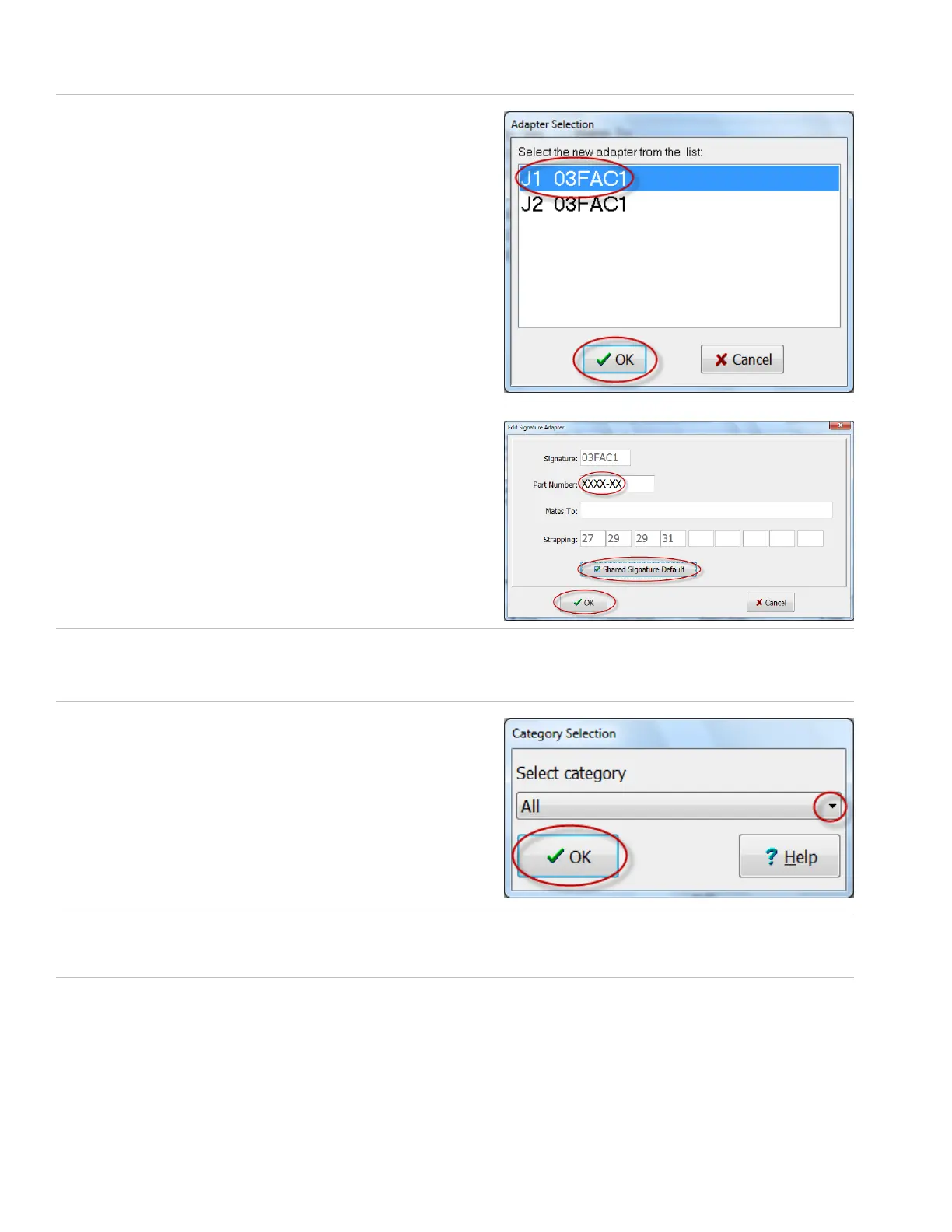
5. The tester calculates the installed adapter signature number(s).
Select the rst adapter in the list, and press ‘OK.’
6. In the designated “Part Number” box, enter the part number of
the rst adapter. The “Mates to” comment box is optional. Then
check the “Shared Signature Default” box to set the adapter to
“Default.” When you are nished, click ‘OK.’
7. You can come back later and draw a graphical representation of your adapter if desired. To move quickly to the next
step press ‘No.’ For more information on graphical representations, see the Easy-Wire help system.
8. Select an adapter category and click ‘OK.’
9. 9. If you have more than one attached adapter, click ‘Create’ again and repeat this process substituting the new
adapter signature and adapter part number in steps 5 and 6.
10. When you are nished creating adapters, the “Connector Type Library” will be open. Click ‘Close’ to return to the main
menu.



 To Next Page