Home
Cirris
Test Equipment
Easy-Touch Pro
Page 8
Cirris Easy-Touch Pro - Page 8
46 pages
Manual
Save Page as PDF
To Next Page
To Next Page
To Previous Page
To Previous Page
Loading...
4
Cirris
®
Easy-
T
ouch
™
P
ro User Manu
al
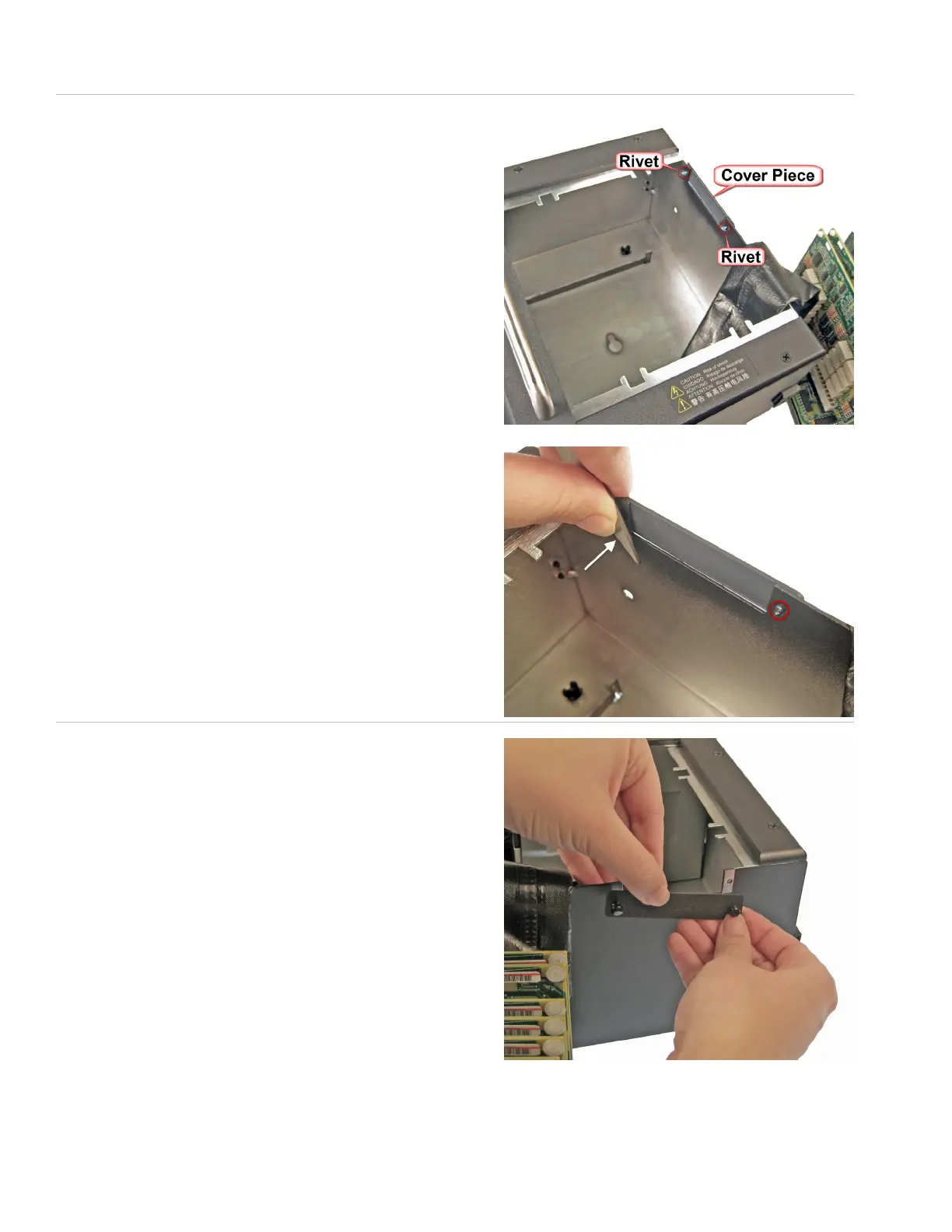
4.
A plastic cover piec
e is attached to the right side of the test
er by
two rivets.
F
rom the inside of the chassis, push both riv
ets out using a
screwdriv
er or a hard, at object.
5.
Remove the co
ver piece
.
7
9
Table of Contents
Main Page
Default Chapter
3
Table of Contents
3
1 Introduction and Setup
5
Hipot Warning
5
Cirris Customer Support
5
Optional Parts
5
Electrical Assembly
6
Installing Add-On Scanners
6
Setting up the Tester
11
Using the Touch Screen
12
Accessing Input Tools
13
Checking the System
13
Checking the Sound
13
Optional Software Features
14
Enabling a Feature
15
Setting up Security
16
Setting up Easy-Wire Software Security
16
Printing from the Easy-Touch Pro Tester
18
Adding a Printer
18
2 Adapters
21
Adapter Types
21
Adapter Positions
21
Adapter Sizes
22
Installing Adapters
23
Removing Adapters
24
Duplicating the Adapter Setup
25
Adapter Signatures
25
Cable Signatures
25
3 Cirris Easy-Wire™ Software
27
Creating Default Adapters
27
Learning a Sample Cable
29
Verifying/Editing the Test Program
30
Testing the Device-Under-Test
31
Accessing the Easy-Wire Manual/Help System
32
Sharing Wirelists Bestween Touch 1/1100 and Easy
33
Touch Pro Testers
33
Importing Touch 1 or 1100 Wirelists
37
Verifying Shared Wirelists
39
Moving Test Programs between Categories
39
4 General Information
41
Tester Maintenance
41
Fixture Maintenance
41
Service
41
Calibration
41
Tester Symbols
41
Conditions for Operation
42
Helpful Links
42
Warranty
43
Other manuals for Cirris Easy-Touch Pro
Getting Started Guide
12 pages
Related product manuals
Cirris CH2
64 pages
Cirris 4200
60 pages
Cirris 4200 Series
60 pages



 To Next Page