ESIGNO_SYSTEM_USER_MANUAL_101.DOCX 19/71
L
LL
LOCKOUT
OCKOUT OCKOUT
OCKOUT /
//
/
R
RR
REVERSAL
EVERSAL EVERSAL
EVERSAL L
LL
LOCKOUT
OCKOUTOCKOUT
OCKOUT
C
CC
CARDS
ARDSARDS
ARDS
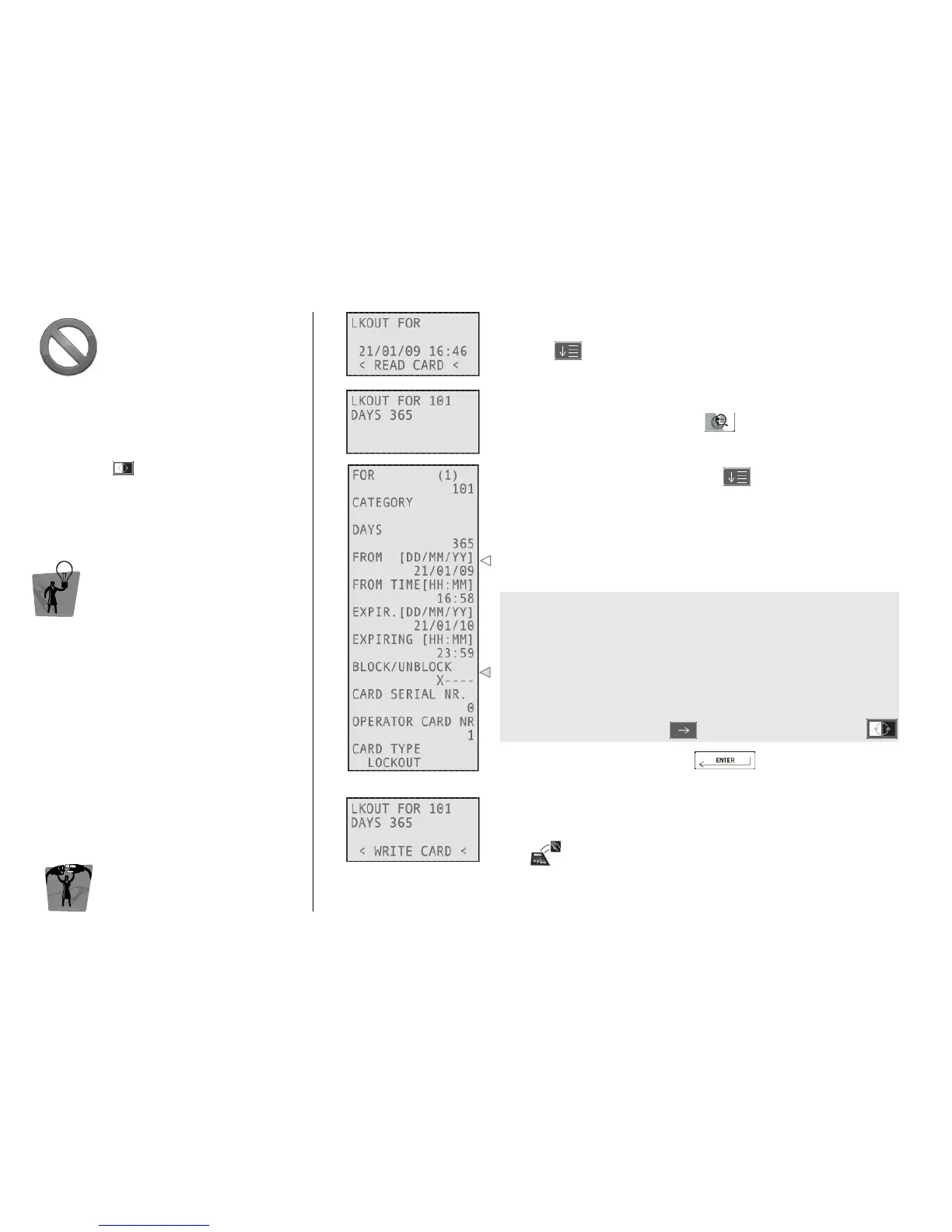
This kind of card permits to lock out (or reverse
lock out) other different card categories, like
guest or staff cards. Once logged into the
system, to write lock out (or reverse lock out)
cards, press and select LKOUT FOR (or
REV.LOCK.).
TIP
TIPTIP
TIP
These cards can be created only for a specified
zone of lockout. If you lock out all card types, the
only one allowed to enter is an emergency card.
E
EE
ENCODER
NCODER NCODER
NCODER M
MM
MODE
ODEODE
ODE
C
CC
CARD
ARD ARD
ARD O
OO
OPERATIONS
PERATIONSPERATIONS
PERATIONS
1
11
1
Type the zone the card will be valid for and the days of validity,
pressing after each field.
2
22
2
To change other parameters, press
3
33
3
Navigate through the fields by pressing
By setting these fields you can manage the time validity of the card
you are issuing.
The card groups which can be locked out (or reverse locked out) are:
• Guest
• Staff 1
• Staff 2
• Staff 3
• Staff 4 and Operators
In a lockout (reverse lockout) card, X indicates the kind of cards you
are able to block (unblock).
To change values, move with and select (or unselect) with
Confirm your choices by pressing
4
44
4
Move the card over the tag reader/writer on the encoder and wait
for the short beep.
Card writing is now completed!



 To Next Page