ONES
ONESONES
ONES
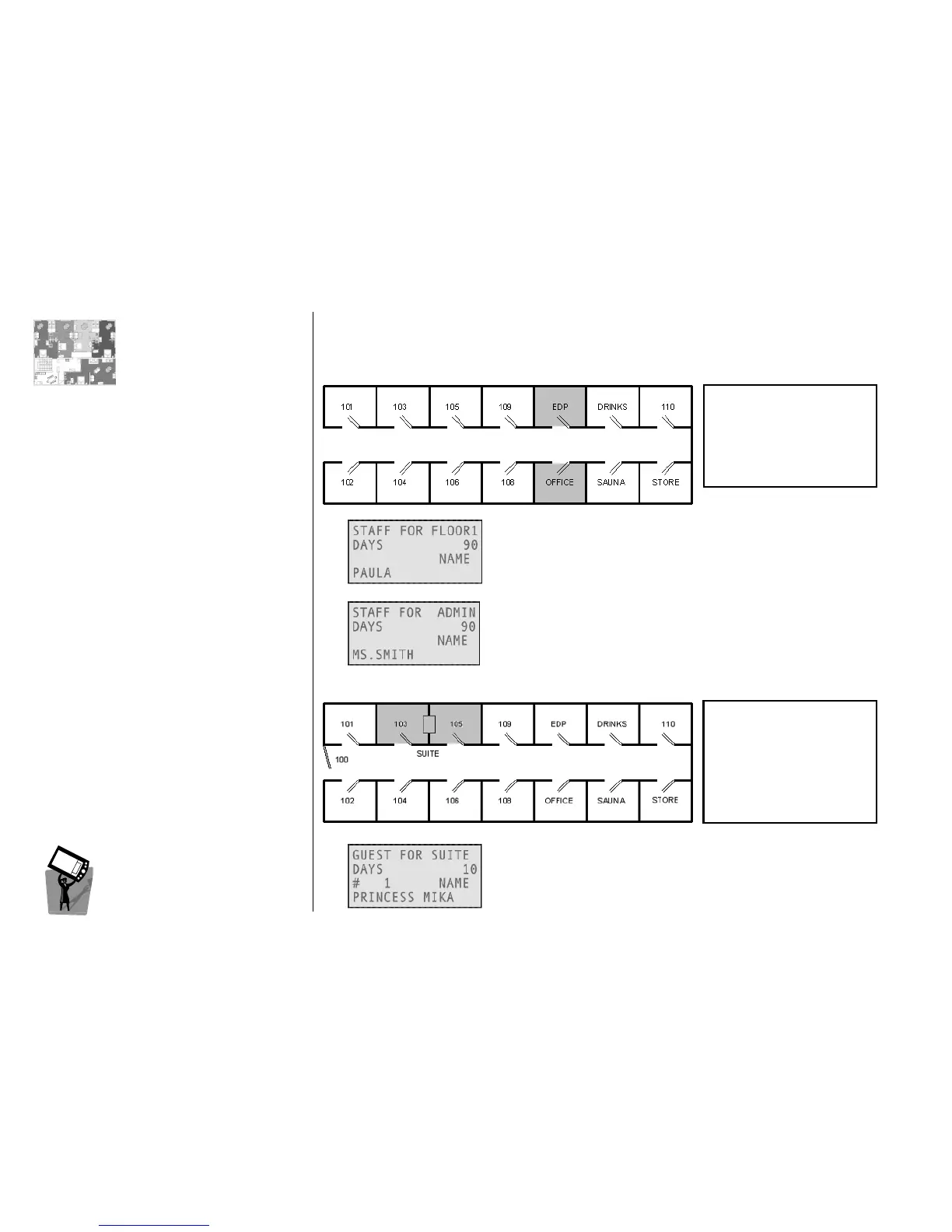
Groups of locks defined during system configuration.
Example 1
Example 1Example 1
Example 1
A zone can be an input for any card: with this card a staff member will
open all the locks in the FLOOR1 zone (room 101 to 110).
With this card, a staff member will open the locks into the ADMIN
zone i.e. rooms OFFICE and EDP. There are two additional features:
• Override Privacy: card opens also if the colleagues are closed inside;
• Office Function: inserted twice, card will put the lock in office mode.
Example 2
Example 2Example 2
Example 2
With this card, a guest will open the SUITE zone (rooms 103 and 105);
alternatively one card can be issued only for 103 and one card only
for 105. Remember that a latest card always invalidates an earlier one.
FLOOR1 101
FLOOR1 101 FLOOR1 101
FLOOR1 101 -
--
-
110
110110
110
FLOOR2 201 - 209
FLOOR3 301 - 309
MASTER All rooms
ADMIN OFFICE + EDP
ADMIN OFFICE + EDPADMIN OFFICE + EDP
ADMIN OFFICE + EDP



 To Next Page