ESIGNO_SYSTEM_USER_MANUAL_101.DOCX 21/71
CLC
CLCCLC
CLC
C
CC
CARDS
ARDSARDS
ARDS
This kind of card permits the access of a lock’s
memory and the memorization of any other
card, encoded by the CISA system, onto it. In this
way the door will be enabled to open with
the new contactless card memorized in the lock.
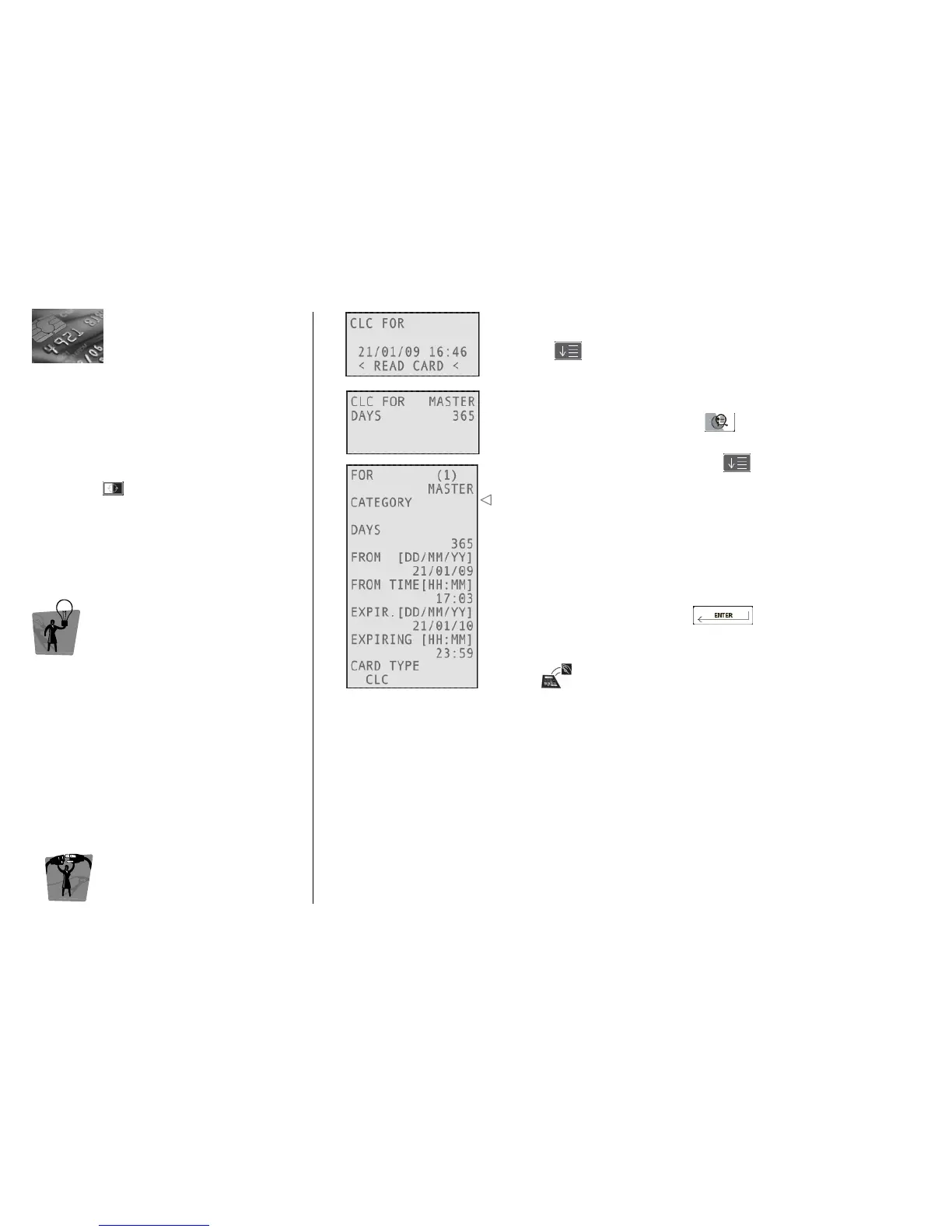
Once logged into the system, to write CLC
cards, press and select CLC FOR.
TIP
TIPTIP
TIP
This function is useful for example when a guest
has an his own contactless card (of another
hotel or of other systems) and he wants to open
with his card without having a new one.
E
EE
ENCODER
NCODER NCODER
NCODER M
MM
MODE
ODEODE
ODE
C
CC
CARD
ARD ARD
ARD O
OO
OPERATIONS
PERATIONSPERATIONS
PERATIONS
1
11
1
Navigate through the fields by pressing
• CLC cards can be created only for a specified zone.
• Up to three different cards can be memorized as guest cards with
CLC card on each lock: if you attempt to memorize the fourth card,
the lock will display three red blinks.
• To disable the memorized cards it is necessary to keep a new guest
card close to the lock (with start of validity later than the time of
memorization), created from the encoding station.
Confirm your choices by pressing
Move the card over the tag reader/writer on the encoder and wait
for the short beep
Card writing is now completed!
HOW TO MEMORIZE A CARD WITH A CLC
HOW TO MEMORIZE A CARD WITH A CLCHOW TO MEMORIZE A CARD WITH A CLC
HOW TO MEMORIZE A CARD WITH A CLC
• Keep the CLC close to the lock, which responds with 2 green blinks;
• keep the card to be memorized close to the lock, which responds with 2 red & green blinks (this
will be recorded as memorized cards on the history readout.);
• to add more cards repeat the same operation.
MANAGING SPECIAL GROUPS
MANAGING SPECIAL GROUPSMANAGING SPECIAL GROUPS
MANAGING SPECIAL GROUPS
Example: students + professor.
The professor is allowed to enter all the student rooms, but students can only enter individual rooms:
to accomplish this, in each room, memorize the professor card and the specific student card.



 To Next Page