ESIGNO_SYSTEM_USER_MANUAL_101.DOCX 14/71
S
SS
STAFF
TAFFTAFF
TAFF
C
CC
CARDS
ARDSARDS
ARDS
(1)
(1)(1)
(1)
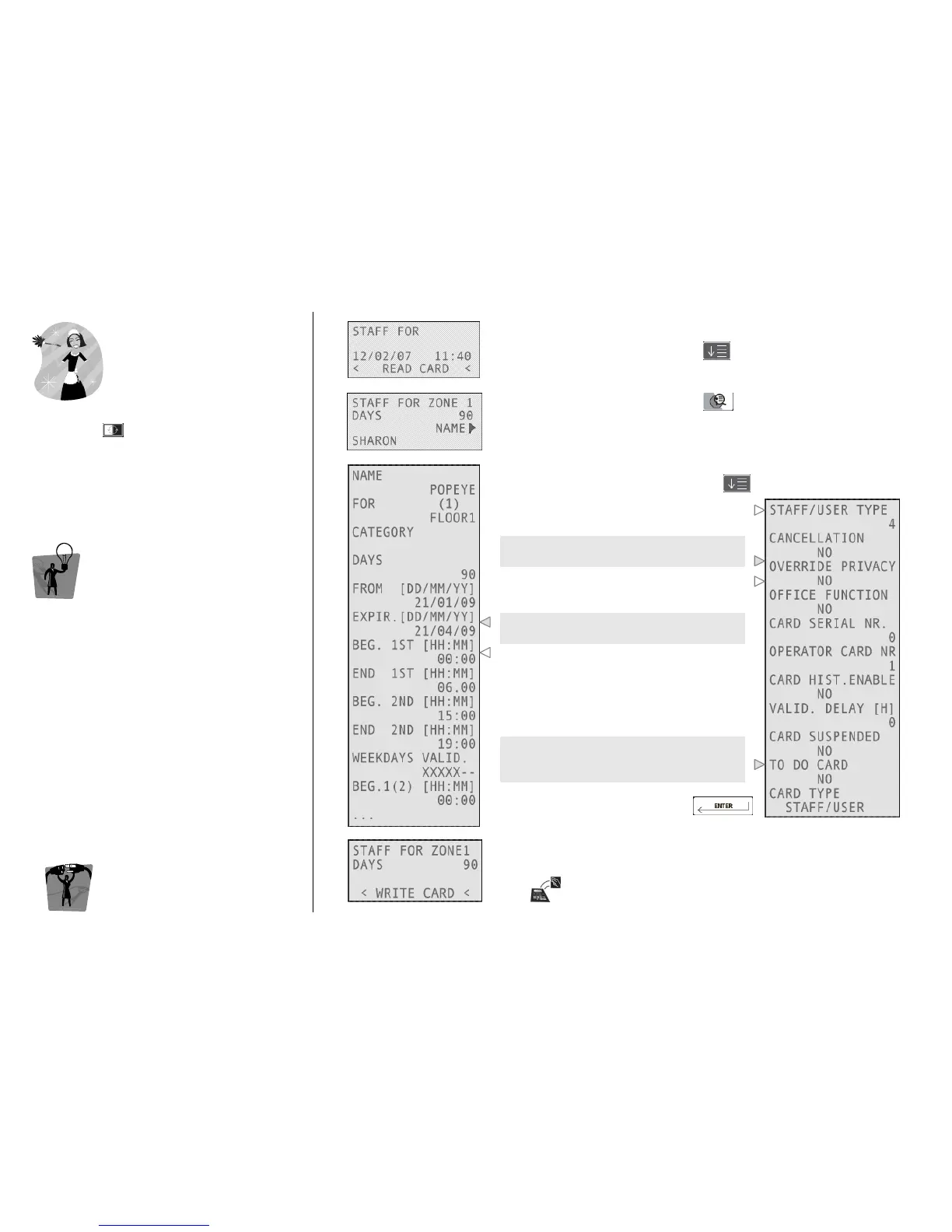
Once logged into the system, to write staff
cards, press and select STAFF FOR.
TIP
TIPTIP
TIP
To create a Staff card, you have to define:
• the Zones and the doors that belong to
them while creating the plant.
• the hierarchy level to define the rights of
the operator (e.g. level 6 operator can
write guest cards only)
E
EE
ENCODER
NCODER NCODER
NCODER M
MM
MODE
ODEODE
ODE
C
CC
CARD
ARD ARD
ARD O
OO
OPERATIONS
PERATIONSPERATIONS
PERATIONS
1
11
1
Type the zone the card will be valid for, the days of validity and the
name of the staff member, pressing after each field.
2
22
2
To change other parameters, press
3
33
3
Navigate through the fields by pressing
This is Staff type (1 to 4), assigned
depending on the selected zone.
To issue a card which opens the door(s)
also if the privacy is on, change this value.
Enable to activate the Office function
inserting the card twice into an Office lock.
By setting these fields you can manage the
time validity of the card you are issuing.
To set working time and days: there are 4
time modules; inside each, it is possible to
set 2 working periods for each day of
module’s validity with 15 minutes precision
(card is valid in X-marked days only).
This field is active only if the Recoding
Function is active. After setting Yes in this
field, it is then possible to recode the card.
Confirm your choices by pressing
4
44
4
Move the card over the tag reader/writer on the encoder and wait
for the short beep.
Card writing is now completed!



 To Next Page