ESIGNO_SYSTEM_USER_MANUAL_101.DOCX 60/71
N
NN
NETWORKING
ETWORKINGETWORKING
ETWORKING
A network
networknetwork
network is a group of devices connected to
each other, through Ethernet cables or via
wireless.
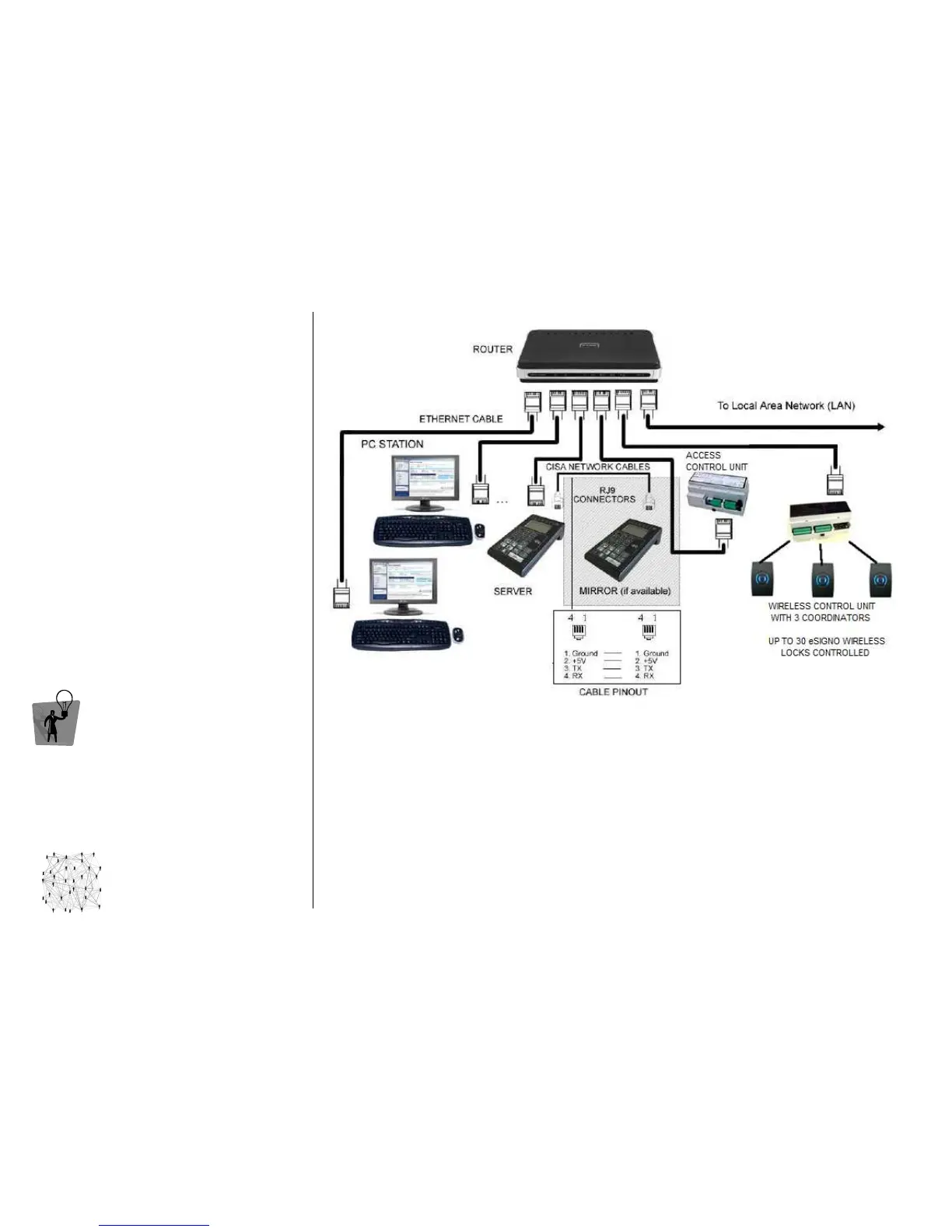
The most essential network is composed by a
The most essential network is composed by a The most essential network is composed by a
The most essential network is composed by a
eSIGNO
eSIGNO eSIGNO
eSIGNO Mobile working as Server and a PC
Mobile working as Server and a PCMobile working as Server and a PC
Mobile working as Server and a PC; to
this configuration several other devices can be
added, depending on customer need:
• Clients
ClientsClients
Clients, essentially a number of eSIGNO
Mobiles, connected to the network in order
to have several independent cards issuing
points;
• Mirror
MirrorMirror
Mirror, an eSIGNO Mobile to backup Server’s
memory;
• Special locks
Special locksSpecial locks
Special locks (based on access control units);
• Wireless Control Units
Wireless Control UnitsWireless Control Units
Wireless Control Units, each connecting to
the system (via wireless) up to 30 eSIGNO
locks.
TIP
TIPTIP
TIP
All the encoding stations share the server’s
database; however, functionality and user
interface of each device are the same.
C
CC
CONNECTIONS
ONNECTIONSONNECTIONS
ONNECTIONS
CONNECTIONS
CONNECTIONSCONNECTIONS
CONNECTIONS
CONFIGURATION
CONFIGURATIONCONFIGURATION
CONFIGURATION
Here are the steps to configure each device included into the network:
• start the CS9500 Configurator program;
• create or open an existing plant configuration;
• click on Devices and select Server Encoder #00000;
• click on Properties, then select the M305 Hardware Type and the Ethernet Connection Box;
• type the device IP address (if integrating into an existing LAN network, a dedicated range of
IP
addresses must be reserved). Check that the Subnet Mask matches as well, then start download;
• for the Mirror, select the proper Hardware Type and start download (it will use the same IP address
as the server). The connection between Server and Mirror must be through a CISA Network Cable;
• for Special Locks, select the proper Hardware Type and Ethernet settings, then start download;
• for Wireless Control Units, select the proper Ethernet settings and start download. A different IP
address must be used for each Special Lock or Wireless Control Unit.



 To Next Page