ESIGNO_SYSTEM_USER_MANUAL_101.DOCX 40/71
C
CC
CATEGORY
ATEGORY ATEGORY
ATEGORY M
MM
MANAGER
ANAGERANAGER
ANAGER
M
MM
MENU
ENUENU
ENU
(1)
(1)(1)
(1)
TIP
TIPTIP
TIP
This menu allows the creation of new groups of
utility doors called categories
categoriescategories
categories.
E
EE
ENCODER
NCODER NCODER
NCODER M
MM
MODE
ODE ODE
ODE
M
MM
MENU
ENUENU
ENU
CREATE A NEW CATEGORY
CREATE A NEW CATEGORYCREATE A NEW CATEGORY
CREATE A NEW CATEGORY
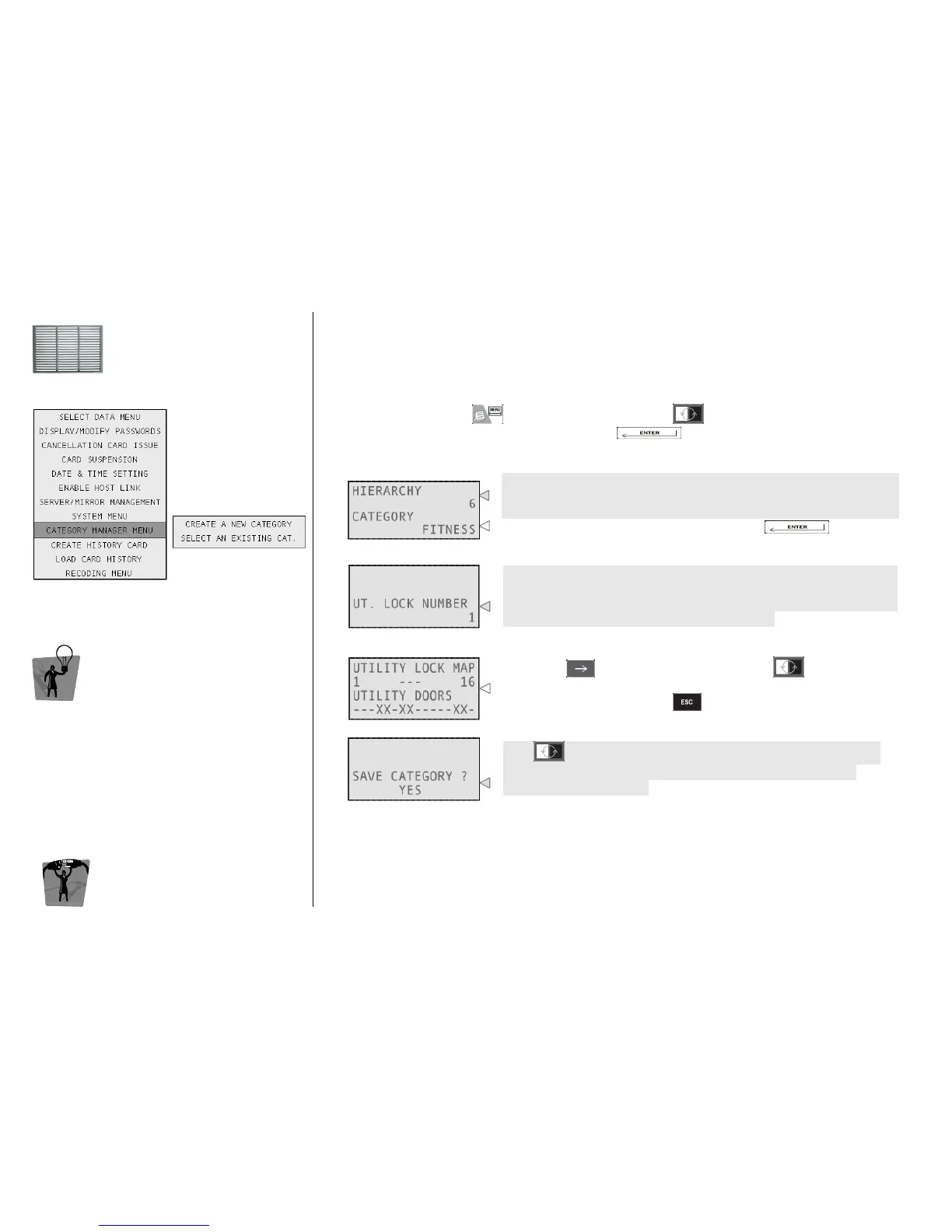
To access this menu, press , navigate into the menu with and select Category Manager
Menu and then Create a New Category by pressing .
1
11
1
Type here the minimum hierarchic level an operator must have to be
allowed to use this category; this parameter can be used to create
protected categories that only high hierarchy operators can use.
Type here the name of the category and press .
2
22
2
Here you have to type the number of the utility you want to manage,
considering that the system will visualize utilities in groups of 16 (e.g.
typing a random number between 1 and 16, you can manage all the
first 16 utilities, then 17 ÷ 32, 33 ÷ 48 and so on).
3
33
3
Move with to select from the utility list and to select (X) or
unselect (-) the door. After having completed the utility pattern
according to your needs press .
4
44
4
With select whether you want to save the category you have
just created or not. Now you will automatically step back to the
Category Manager menu.



 To Next Page