ESIGNO_SYSTEM_USER_MANUAL_101.DOCX 32/71
S
SS
SELECT
ELECTELECT
ELECT
D
DD
DAT
ATAT
ATA
AA
A
M
MM
MENU
ENUENU
ENU
TIP
TIPTIP
TIP
From the Input
InputInput
Input
F
FF
Form
ormorm
orm, search is possible only on
the active cards
active cardsactive cards
active cards (cards that are not expired nor
future).
E
EE
ENCODER
NCODER NCODER
NCODER M
MM
MODE
ODE ODE
ODE
M
MM
MENU
ENUENU
ENU
SEARCHING FOR CARDS
SEARCHING FOR CARDSSEARCHING FOR CARDS
SEARCHING FOR CARDS
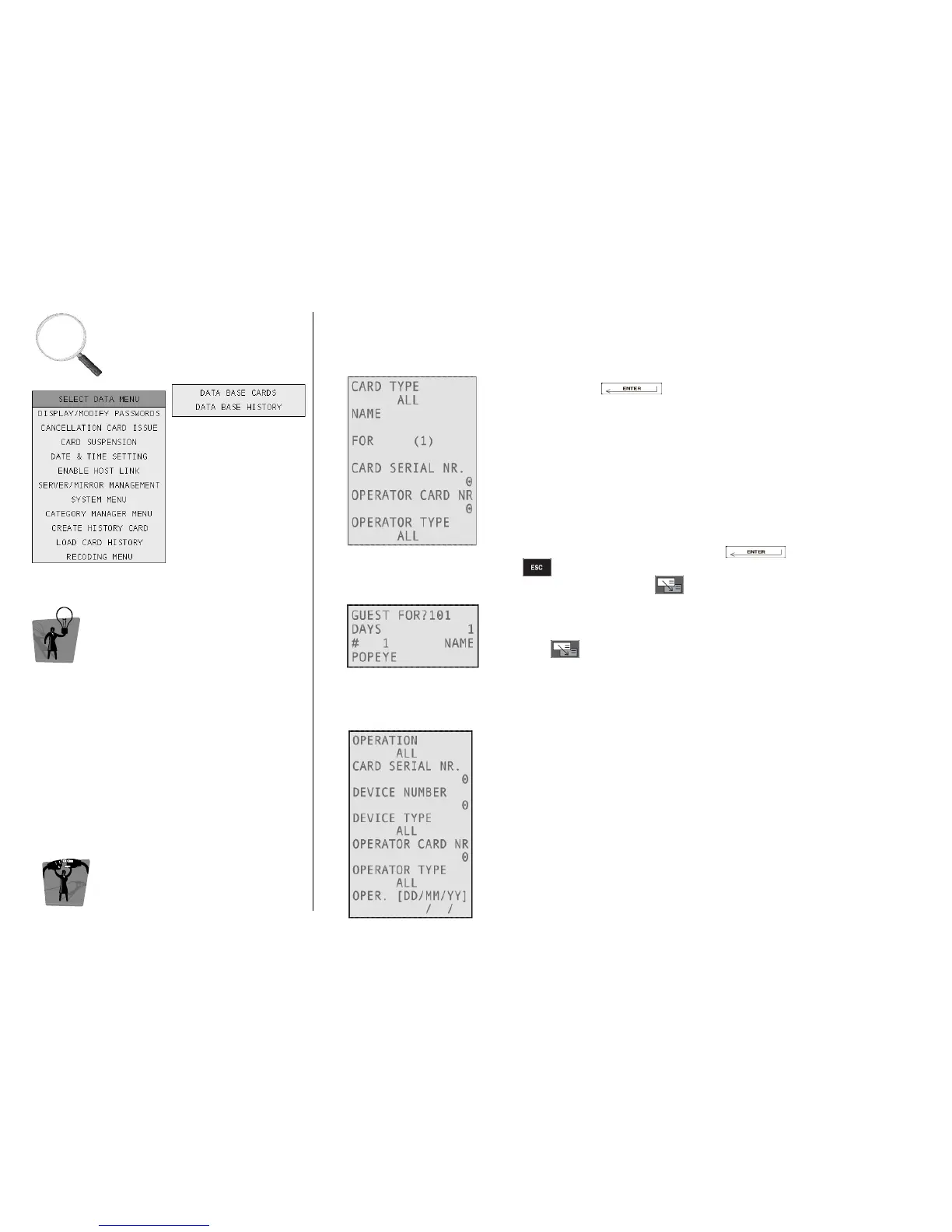
This kind of search is possible from the Select Data Menu
Select Data MenuSelect Data Menu
Select Data Menu or from the Input
InputInput
Input
F
FF
Form
ormorm
orm.
A
AA
A
Enter in the Select Data Menu
Select Data MenuSelect Data Menu
Select Data Menu, then into the Data Base Cards
Data Base CardsData Base Cards
Data Base Cards, each
time by pressing . The search criteria for cards are:
• Card Type: search for a single type (e.g. guest) or between all types;
• Name: it’s also possible to search a single part of the name
(e.g. typing AR, the system will find ARnold, mARia and so on);
• For: to search the cards issued for a room or a zone;
• Card Serial Number: card with a specified number of issuing;
• Operator Card Nr: cards issued by the specified Operator Card;
• Operator Type: cards issued by Encoder, PMS-Host or both (ALL).
The search function can have more than one criterion at a time,
considering them in logical AND. Press to start the search
or to quit. If more than one card fit the criteria, the list of results
can be scrolled by pressing .
B
BB
B
Search is also possible from the Input Form
Input FormInput Form
Input Form only by room number:
• Enter desired room number;
• Press to start search. If a card is found, a “?” near the room
number indicates that you are in search mode.
SEARCHING FOR HISTORY OF OPERATIONS
SEARCHING FOR HISTORY OF OPERATIONSSEARCHING FOR HISTORY OF OPERATIONS
SEARCHING FOR HISTORY OF OPERATIONS
This kind of search is possible from the Data Base
Data Base Data Base
Data Base History
HistoryHistory
History menu only.
The search criteria for history of operations are:
• Operation Type: search for operations depending on their kind
(e.g. login, logout, issue or cancellation of different kinds of cards,
maintenance);
• Device Type and Number: search for operations done by a
specified kind of devices (server, mirror, client, HHI, special lock or
all) or by a single device identified by a specified ID number;
• Operator Type and Number: search for operations done by
Encoder, PMS-Host or both (ALL), or by a specified operator card;
• Operations sorted by date.



 To Next Page