ESIGNO_SYSTEM_USER_MANUAL_101.DOCX 16/71
U
UU
USER
SERSER
SER
C
CC
CARDS
ARDSARDS
ARDS
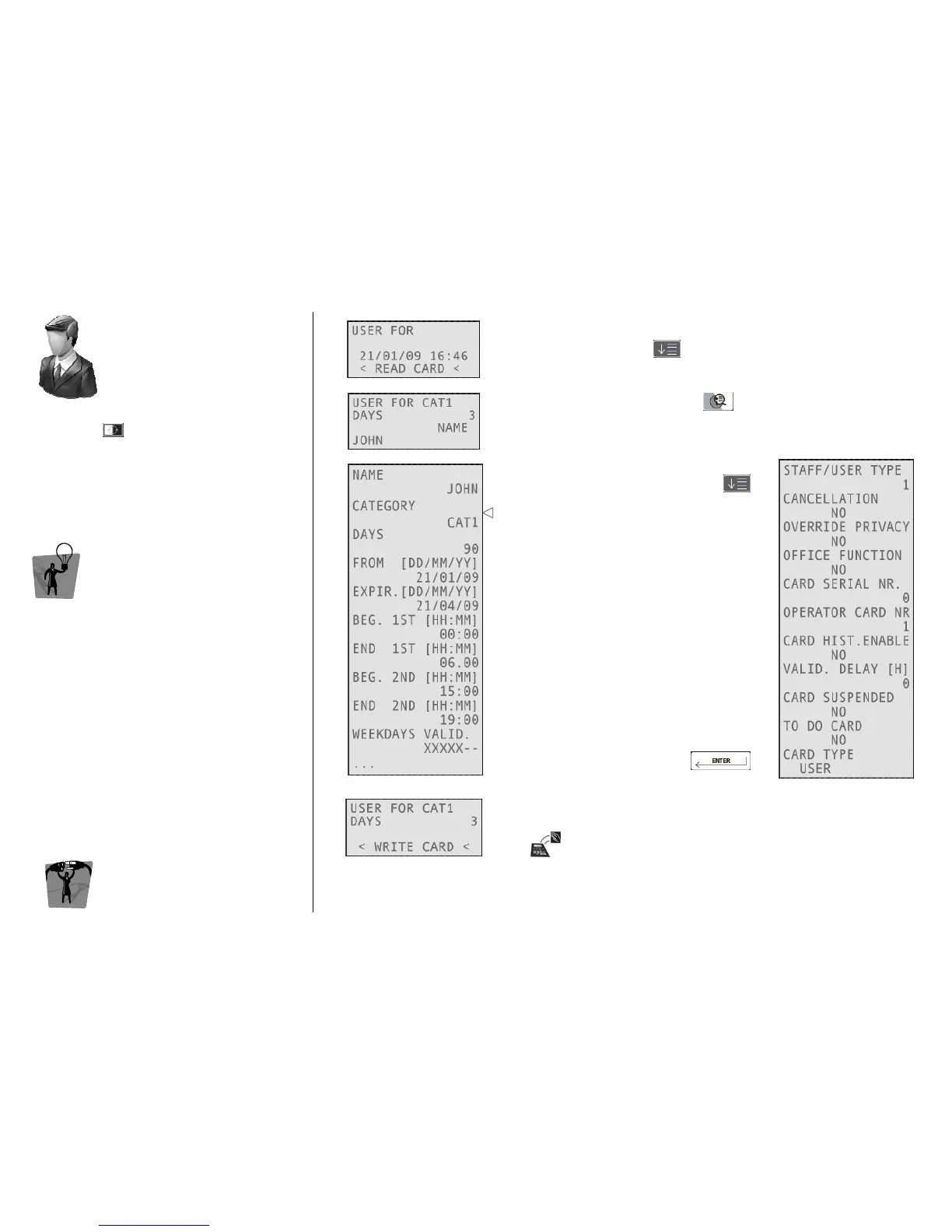
Once logged into the system, to write user
cards, press and select USER FOR.
TIP
TIPTIP
TIP
To create a User card, you have to define the
Categories and the Utility doors that belong to
them.
E
EE
ENCODER
NCODER NCODER
NCODER M
MM
MODE
ODE ODE
ODE
C
CC
CARD
ARD ARD
ARD O
OO
OPERATIONS
PERATIONSPERATIONS
PERATIONS
1
11
1
Type the category the card will be valid for, the days of validity and the
name of the user, pressing after each field.
2
22
2
To change other parameters, press
3
33
3
Navigate through the fields by pressing
This is the previously selected Category.
All the other fields are the same with
respect to Staff cards.
Confirm your choices by pressing
4
44
4
Move the card over the tag reader/writer on the encoder and wait
for the short beep.
Card writing is now completed!



 To Next Page