ESIGNO_SYSTEM_USER_MANUAL_101.DOCX 9/71
E
EE
ENCODER
NCODER NCODER
NCODER /
//
/
HHI
HHIHHI
HHI
L
LL
LOGIN
OGIN OGIN
OGIN
Before doing any operation log on to the
eSIGNO encoder with the operator card.
TIP
TIPTIP
TIP
To change the operator password:
• log on to the encoder;
• read the operator card;
• press ;
• switch to Display/Modify Password with ;
• type the new password, overwriting the old
one.
e
ee
eSIGNO
SIGNOSIGNO
SIGNO
M
MM
MOBILE
OBILE OBILE
OBILE D
DD
DEVICE
EVICEEVICE
EVICE
ENCODER MODE OR HHI MODE
ENCODER MODE OR HHI MODEENCODER MODE OR HHI MODE
ENCODER MODE OR HHI MODE
?
??
?
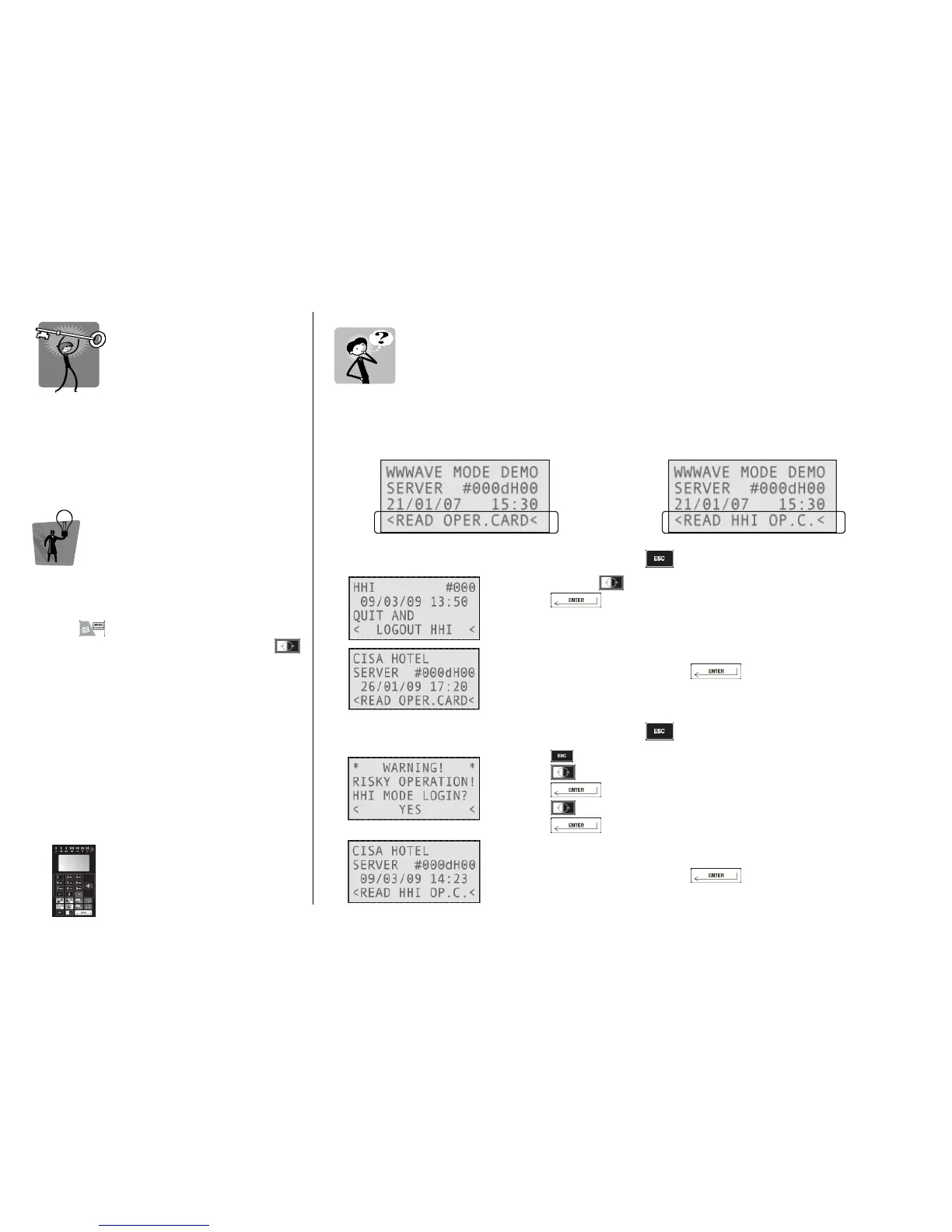
When switching on the ESIGNO Mobile, before doing any operation, check if the device is in Encoder
stand-by mode or in HHI stand-by mode.
ENCODER STAND
ENCODER STANDENCODER STAND
ENCODER STAND-
--
-BY MODE
BY MODEBY MODE
BY MODE
HHI STAND BY MODE
HHI STAND BY MODEHHI STAND BY MODE
HHI STAND BY MODE
To switch from HHI mode to Encoder mode, simply press and follow the steps below:
• navigate with to the Logout HHI option;
• press ;
• select Yes. The ESIGNO Mobile device switches to Encoder mode;
move the operator card above the tag reader of the device;
• type your password and press : you are now logged in
Encoder mode.
To switch from Encoder mode to HHI mode, simply press and follow the steps below:
press once again;
• press to answer Yes to the Are You Sure? question, then
press
• press to answer Yes to the HHI Mode Login? question, then
press
• move the operator card above the tag reader of the device;
• type your password and press : you are now logged in
HHI mode.



 To Next Page