ESIGNO_SYSTEM_USER_MANUAL_101.DOCX 30/71
C
CC
CATEGORIES
ATEGORIESATEGORIES
ATEGORIES
TIP
TIPTIP
TIP
Categories can be created:
• from the Category Manager Menu of the
eSIGNO Mobile in encoder mode;
• from the appropriate form in the Smart
Software.
C
CC
CATEGORIES
ATEGORIESATEGORIES
ATEGORIES
Categories
CategoriesCategories
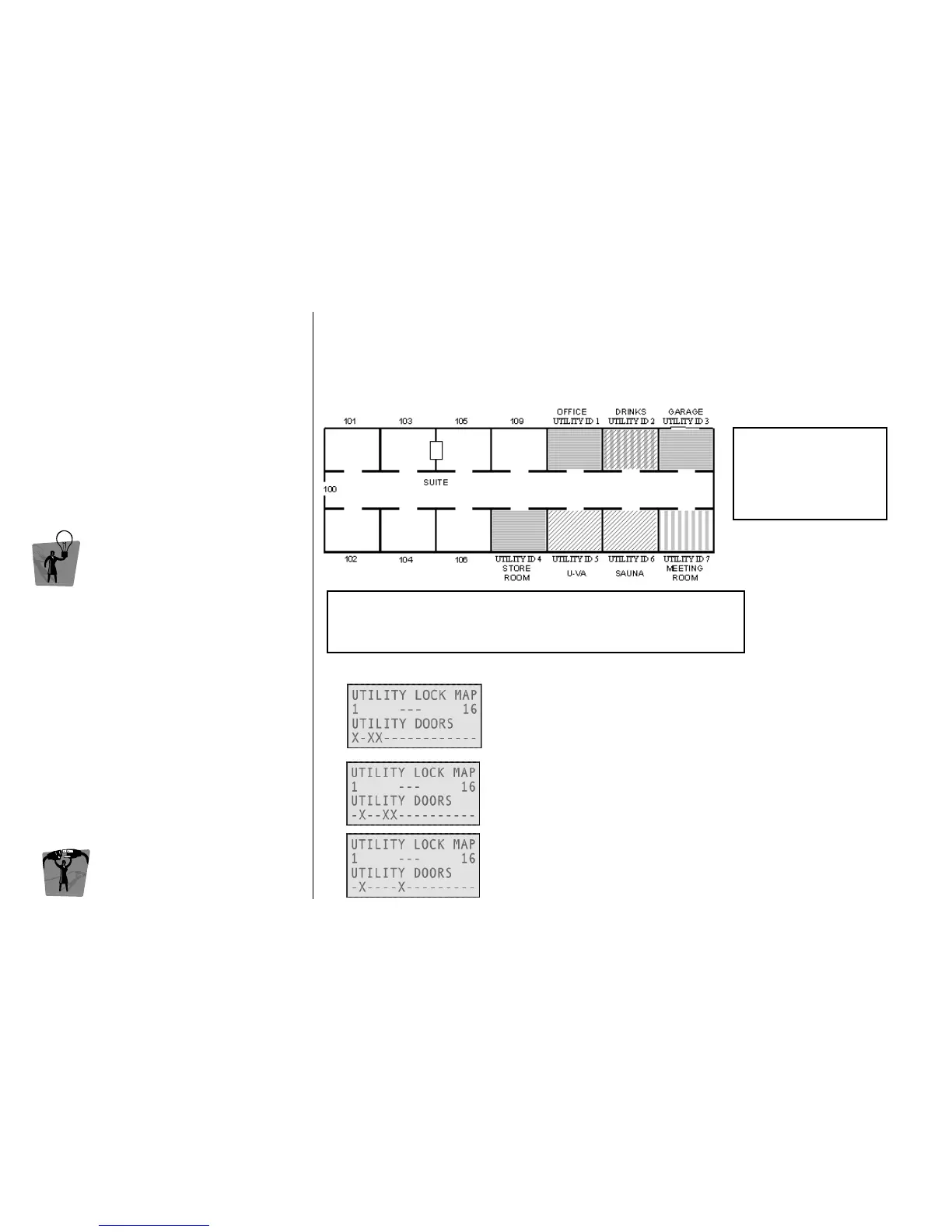
Categories are groups of utility doors: it is possible to create several categories according to hotel
management’s different needs.
After having defined a utility pattern, it is possible to use it more times for different cards; in this way,
the receptionist doesn't need to redefine the utility lock map each time he/she issues a new card.
Example
ExampleExample
Example
HOTEL Category
HOTEL CategoryHOTEL Category
HOTEL Category
Used by hotel staff members, includes Office, Garage and Store Room.
TOUR(ist) Category
TOUR(ist) CategoryTOUR(ist) Category
TOUR(ist) Category
It can be used for all the guests who should have access to the hotel
extra services (in this case Drinks, UVA and Sauna).
BUSIN(ess) Category
BUSIN(ess) CategoryBUSIN(ess) Category
BUSIN(ess) Category
This category allows access to business-related services (in this case
Drinks and Meeting Room).
1 keyplan
3 kinds of card holders:
• Hotel staff member
• Tourist
• Business man
UTILITIES ID MAP
UTILITIES ID MAPUTILITIES ID MAP
UTILITIES ID MAP
1 2 3 4 5 6 7
OFFICE DRINKS GARAGE STORE UVA SAUNA MEETING



 To Next Page