ESIGNO_SYSTEM_USER_MANUAL_101.DOCX 58/71
R
RR
READ
EAD EAD
EAD I
II
INFO
NFO NFO
NFO
H
HH
HARDWARE
ARDWAREARDWARE
ARDWARE
(
((
(2
22
2)
))
)
It will display detailed lock information.
HHI
HHIHHI
HHI
M
MM
MODE
ODE ODE
ODE
M
MM
MENU
ENUENU
ENU
MEMO MESSAGE
MEMO MESSAGEMEMO MESSAGE
MEMO MESSAGE
It reads out a memo message eventually stored on the lock; this message is customizable via the
CS9500 Configurator software.
PROGRAM VERSION
PROGRAM VERSIONPROGRAM VERSION
PROGRAM VERSION
It reads out the program release installed on the lock.
MONITORING
MONITORINGMONITORING
MONITORING
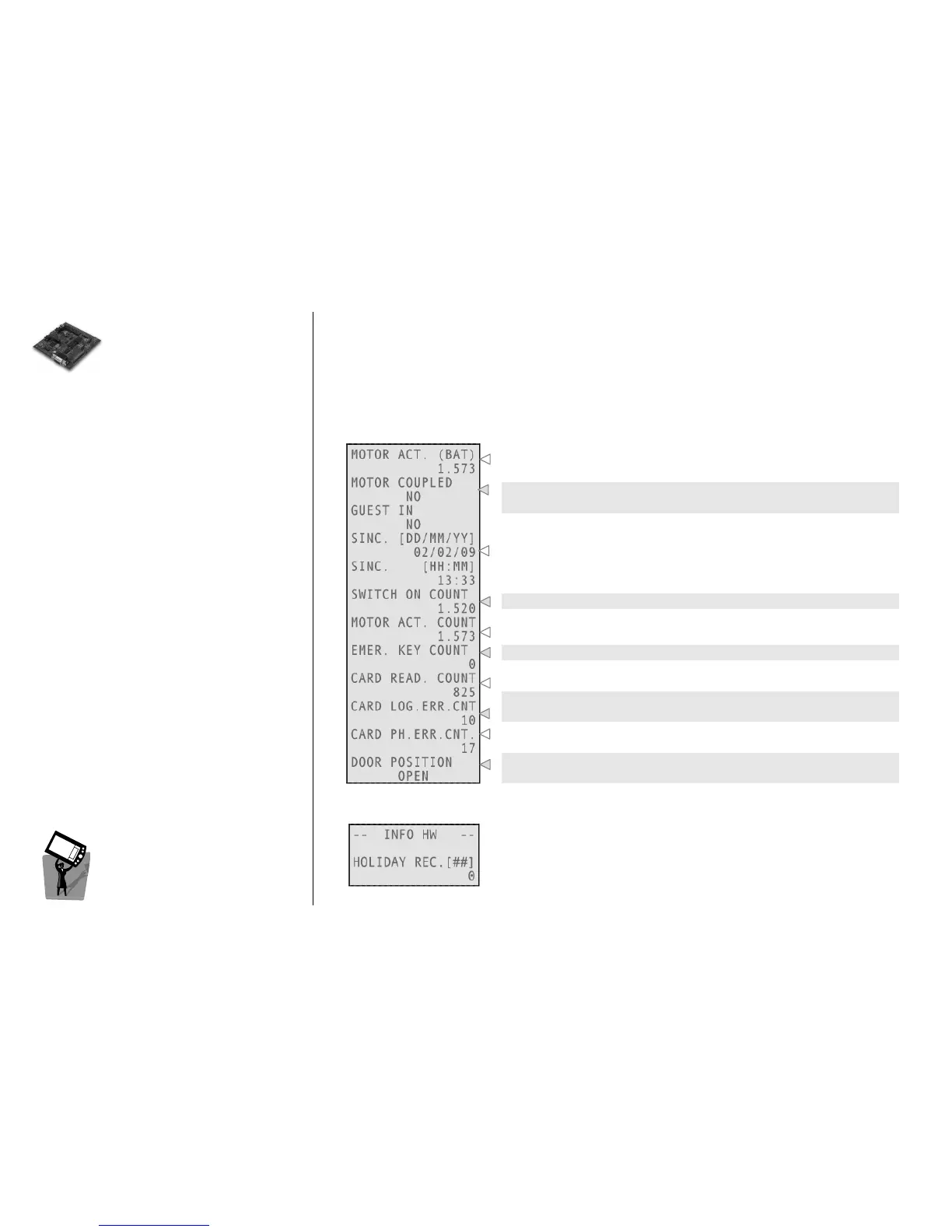
Number of motor actions done with the current batteries.
These fields display if the lock is engaged and if the guest is in the
room.
Date and time of last synchronization.
Count of times the lock has switched on.
Number of motor actions done during lock lifetime.
Number of times that an emergency card has been used on this lock.
Number of Read Card operations completed successfully.
Number of logical errors during Read Card operations due, for
example, to wrong plant code (the lock gives 3 red blinks).
Number of physical errors during Read Card operations, due to card
malfunctions or human error (lock gives 1 red blink).
With Door Position Reporting function enabled, this field says if the
door is Open or Closed.
In this menu, you have to type first the number of record you want to
see. Each record contains an holiday date; these dates can be set only
through Smart Software.



 To Next Page