Service Manual-CA60 24-Electrical System 42
Checking/Replacing Fuses
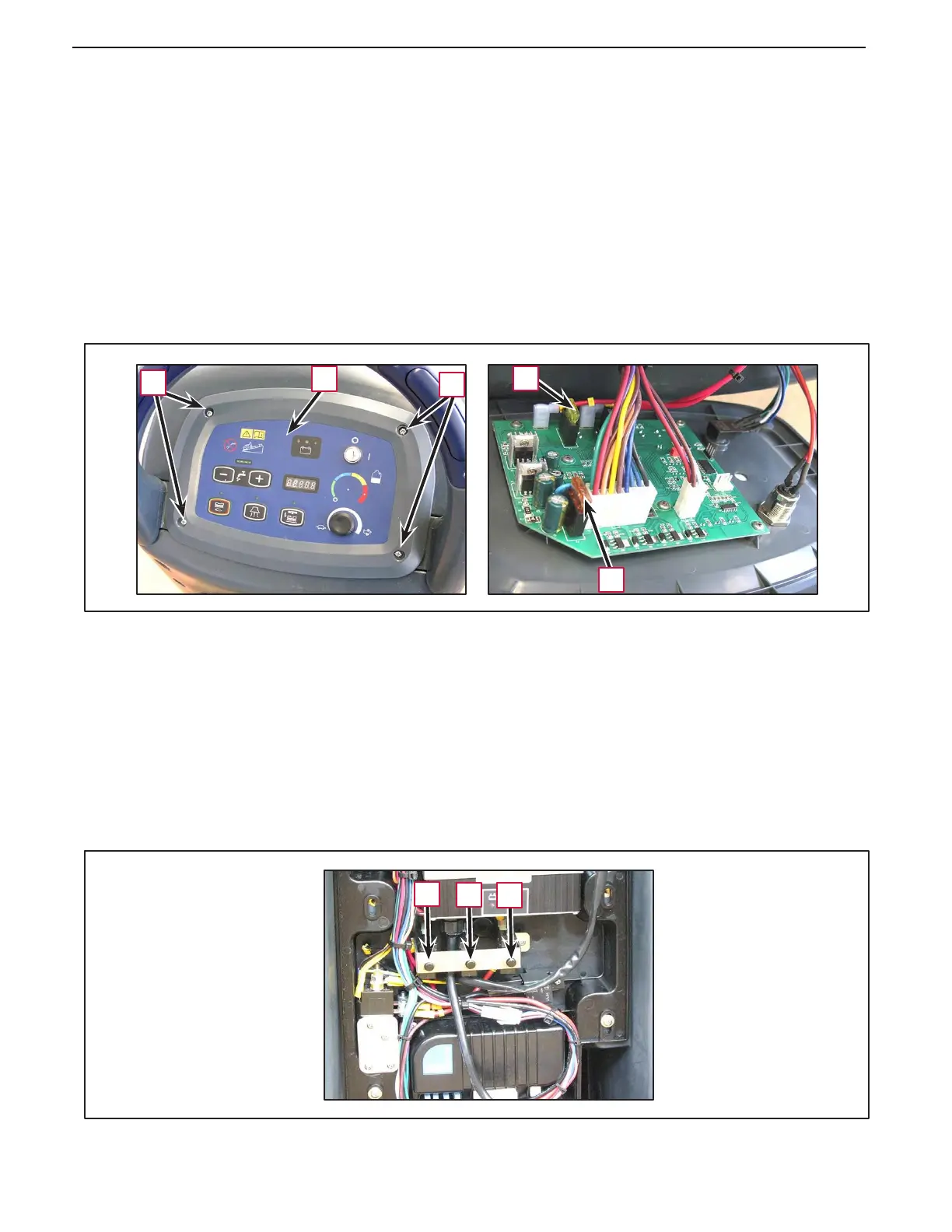
Fuses on control panel (F1), (F3)
1.
Drain the recovery tank.
2.
Turn the ignition key to “0” and remove it.
3.
Make sure that the machine cannot move independently.
4.
Turn the recovery tank sideways, then disconnect the battery connector.
5.
Unscrew the screws (A) and carefully move the control panel (B).
6.
Check/replace the following fuses:
•
(C): fuse (F1), rated 5 A, for protection of the control electronic board
•
(D): fuse (F3), rated 20 A, for protection of the brush motor
7.
Perform steps .4 and .5 in reverse order.
A
B
A
D
C
Fuses on control panel (F2), (F4), (F5)
1.
Remove the rear panel (see the procedure in the relevant paragraph).
2.
Remove the following thermal fuses (resettable):
•
(E): fuse (F5), rated 30 A, for protection of the vacuum motor
•
(F):
fuse (F4), rated 12 A, for protection of the drive motor (*CA60 20D/CA60 20TD)
fuse (F4), rated 17 A, for protection of the drive motor (*CA60 20B/CA60 24B)
•
(G): fuse (F2), rated 30 A, for protection of the brush rotation motor
(*): Only on machines with drive system
E
F G



 To Next Page