Multi-Appliance Touch Pad
PNE2004 Series Control
Page 47
Controls – Installation / Setu
/ Commissionin
Ducted Gas Central Heating
SETTING FAN SPEEDS – HIGH / LOW
There are 2 available fan speed setting options for ducted gas central heating as set out on the Fan Speed
Options Chart. Minimum fan speed should be set so that the heater does not go out on over temperature.
NOTE: fan speed settings should ONLY be set by a qualified installer or service technician
To enter into the installer maintenance to adjust minimum and maximum fans speeds, the following steps
must be followed. When in the speed change mode wait for the heater to be fully functional before
adjusting the fan speeds.
Step 1 Ensure the control is in the OFF mode.
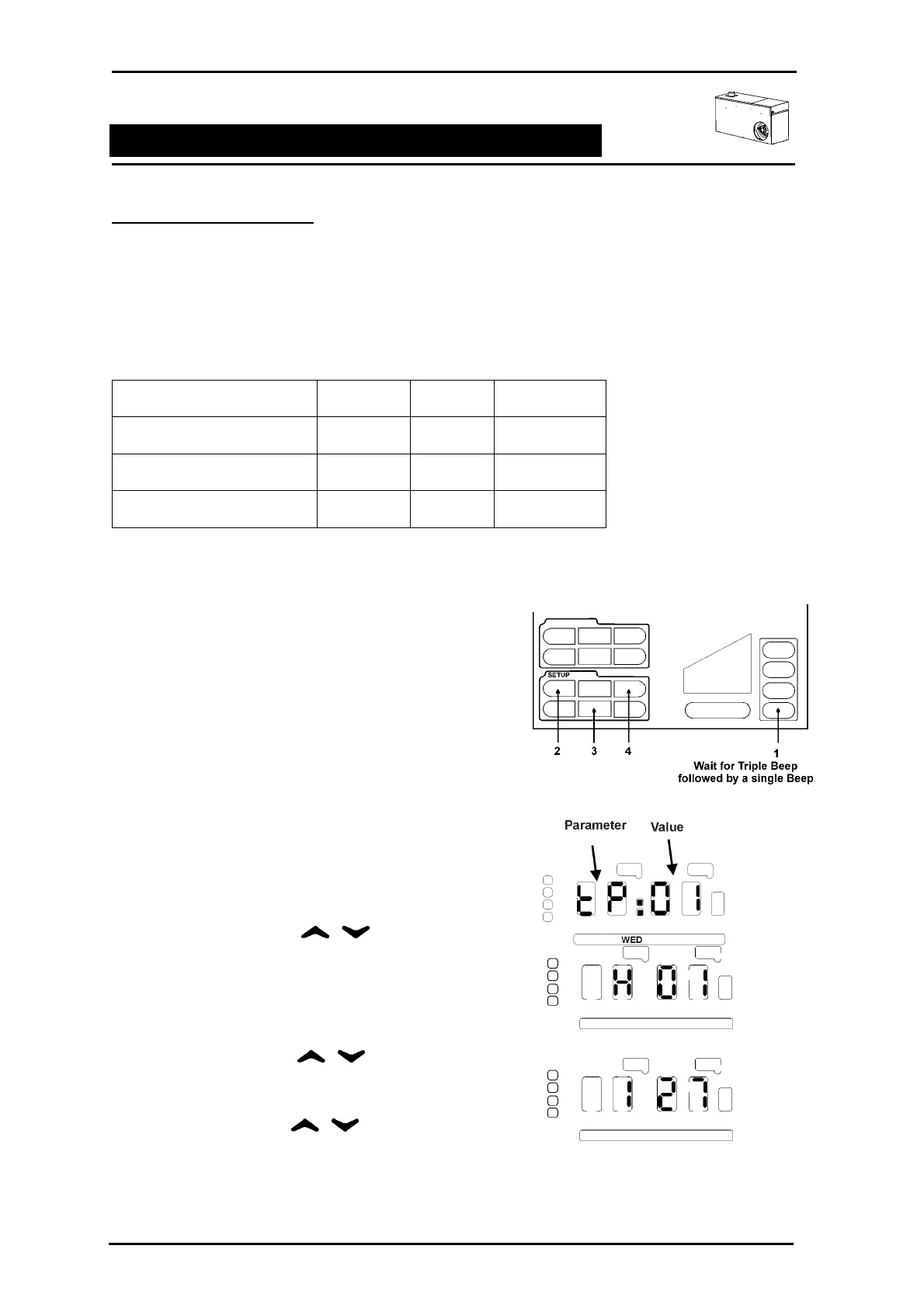
Step 2 A series of unseen icons must be pressed
1. Press and hold the ZONE 4 icon allowing
for a triple BEEP followed by a single
BEEP.
2. In quick succession press the unseen
SETUP icons ENTER, REVIEW &
CLOCK.
If successfully executed the clock LEDs
will display tP:01.
3. If unsuccessful repeat 1 and 2 of STEP 2.
Step 3 Using the select the LED
display H 01 or if addon cooling is fitted HC 01
Step 4 Press ENTER. The display will now change to
1 27 or any other previous setting.
Step 5 Using the select the
parameter to be changed. Press ENTER. The
heater will begin operation.
Step 6 Using the change the value /
fan speed setting. Press ENTER to save the
revised setting.
Step 7 To change the other fan speed parameter repeat Step 5 – 6.
Step 8 Press FINISH to exit.
Fan Speed Options
Installer Maintenance Parameter Default Value Range
Low Fan Speed 1 27 0 – 35
High Fan Speed 2 35 0 – 35
High Fan Speed – Addon AC 3 35 0 – 35



 To Next Page